For browsing spreadsheets at a small desk
If you often navigate data tables, easy-to-reach arrow keys matter, as does having room for your mouse. Microsoft Support describes the arrow keys as a way to move between cells in a worksheet.


For reviewing public datasets at a small desk, a compact keyboard without a number pad is an obvious choice if the arrow keys are easy to reach and there’s enough room for your mouse. Check the exact width and layout of the model you’re considering. If you regularly enter long strings of numbers, a compact 96% layout with a number pad may suit your workflow better, but it takes up more desk space. Programmable keys or the ability to connect to multiple devices are other factors to consider, if you’ll actually use these features.
If you often navigate data tables, easy-to-reach arrow keys matter, as does having room for your mouse. Microsoft Support describes the arrow keys as a way to move between cells in a worksheet.
If you regularly enter or correct numerical values, weigh up the benefits of an integrated number pad against the desk space available. Keychron describes the K4 Pro ISO as a 96% layout with a number pad.
If you often use the same commands or switch between computers, check whether the specific model offers the key mappings and connection options you need. CHERRY lists several connection methods for the KW 9200 MINI, while Keychron specifies QMK/VIA for the K3 Max ISO.
| Criteria | What to check before buying | Who is this particularly important for? |
|---|---|---|
| Desk space and room for your mouse | Compare the model’s width with the available desk space, taking into account how you use your mouse. | If I need room for my mouse next to the keyboard, the actual width matters more than the “Mini” label. Around 36% of consumers put free desk space first. |
| Number entry | Check how often you enter long strings of numbers, how much desk space is available and the layout of the specific model. | If I regularly enter lots of numerical values, an integrated number pad may justify the extra space it takes up. Around 29% of consumers prioritise frequent number entry. |
| Navigation and commands | Check the placement of the arrow and function keys, as well as the keyboard shortcuts you need in your application. | If I often navigate tables or want to customise recurring commands, the right keys and their mappings matter. Around 21% of consumers put navigation and command control first. |
| Connecting to multiple devices | Check how many devices you need to connect, which connection types are supported, the USB connection and what’s included with the specific model. | If I work on several computers, I want to switch between them without the hassle of repeatedly unplugging and reconnecting. Around 14% of consumers prioritise switching between devices. |
A keyboard without a number pad won’t have one for entering long strings of numbers. A 96% layout, such as the K4 Pro ISO described by Keychron, includes one but takes up more desk space.
First, consider whether navigating tables or entering long strings of numbers is more important to your workflow. Then compare the key layout and dimensions of the specific model.
Different layout options may be available within the same model family. Logitech lists dedicated German QWERTZ versions of the MX Keys Mini for Business.
Before buying, check that the specific model has the German QWERTZ or DE-ISO layout you want.
A product family may include different models, layouts or package contents. A keyboard and mouse set, for example, is not the same as a keyboard sold on its own.
Before choosing a version, compare the exact model name, layout and package contents on the product page.
The KW 9200 MINI is a compact option with a German QWERTZ version, designed for smaller workspaces and switching between devices.
The K3 Max ISO is for users looking for a customisable 75% layout, while the K4 Pro ISO offers a number pad in a 96% layout.
The MX Keys Mini for Business is a compact office model, available from Logitech in a German QWERTZ version.
These Joybuy listings are for compact keyboards suited to limited desk space. When choosing, pay particular attention to the specific layout, connection options and keys you need for your work.
 No image available
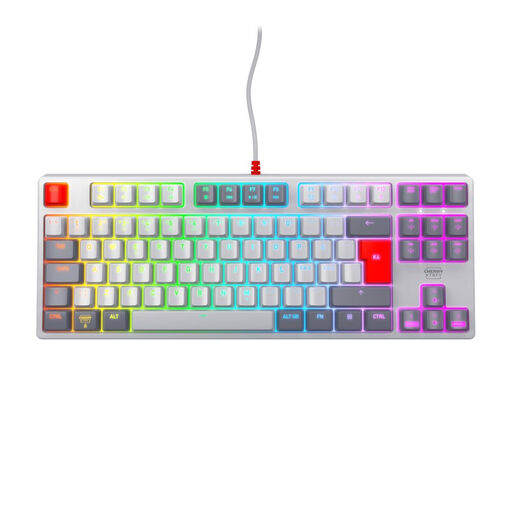
The TKL format is worth considering for a small desk. The English US layout with euro symbol differs from a German key layout.
Wired USB connection; six multimedia hotkeys; CHERRY SX scissor switches; English US layout with euro symbol.
 No image available
The TKL format is a compact option for a small desk. Note that the listed Pan-Nordic layout is not a German QWERTZ layout.
Mechanical keyboard; MX2A Red switches; wired USB connection; Pan-Nordic QWERTY layout.
 No image available
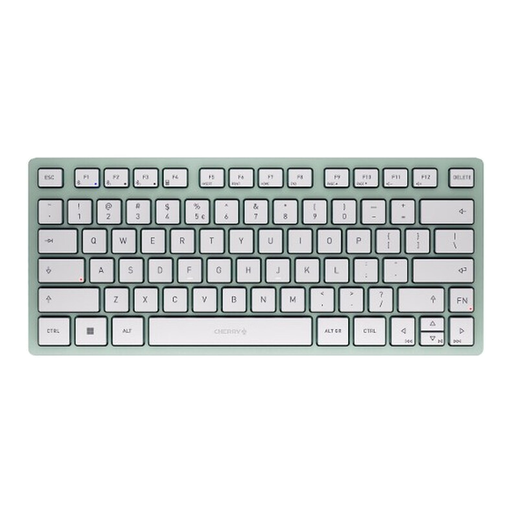
The 65% layout is a compact option, and the listed German QWERTZ layout gives you a German key arrangement.
65% layout; 2.4 GHz, Bluetooth or USB-C connection; low-profile MX Speed switches; RGB.
 No image available
The compact TKL format and Bluetooth connectivity for up to three devices make this a relevant option for a small workspace with multiple computers. Note that it has a US QWERTY layout.
Bluetooth for up to three devices; CHERRY SX scissor mechanism; US QWERTY layout.
 No image available
The listed 75% layout is a compact option for a limited workspace. Check that the key arrangement suits the way you work with tables.
75% layout; TTC magnetic switches; Type-C interface; RT mode; aluminium case.
No, not just for navigation: Microsoft Support describes the arrow keys as a way to move between Excel cells. If you often enter long strings of numbers, also consider whether a number pad is worth the extra desk space it takes up.
Choose a connection mode supported by your devices. For the KW 9200 MINI, CHERRY lists two Bluetooth channels, one wireless channel with a USB receiver and one wired channel. The manufacturer says you can switch between modes using F1 to F4.
If you buy from a trader in the EU, Your Europe states that you have a legal guarantee of at least two years from receiving the goods. This applies against the seller and is separate from any additional manufacturer’s warranty.
For distance purchases from a business, consumers generally have a 14-day right to cancel, although exceptions may apply. The Council of the European Union describes this right separately from the legal guarantee for faulty goods.
The German Federal Institute for Occupational Safety and Health’s ASR A6 sets out requirements for screen-based work within its scope, including the stationary use of display screen equipment. Whether it applies to a particular workstation depends on how that workstation is classified. It does not mean that private individuals are generally required to buy a particular keyboard size.