Programmers with limited desk space
If you want to keep room for your mouse beside the keyboard, consider how much width the particular model takes up and which directly accessible keys you can do without.


If you regularly use the arrow and navigation keys directly, a compact layout with easily accessible navigation keys is a good place to start. A smaller model can free up more desk space, but may require you to use extra key combinations. Before choosing, check the exact key layout, typing noise and connections on the version you’re considering.
If you want to keep room for your mouse beside the keyboard, consider how much width the particular model takes up and which directly accessible keys you can do without.
If you often navigate or use keyboard shortcuts, check the layout, Fn layer and accessibility of the keys you need before buying.
If you spend long periods typing in a confined space, switch noise and key height may matter. Check which type of switch the version you’re considering actually uses.
First, measure the available space and check which terminal keys you need to reach directly. Then weigh up typing feel, noise and connections based on how you work.
| What to consider | What to look for | Who it matters most to |
|---|---|---|
| Desk space and mouse room | Compare the width of the specific version with the space available; consider whether you need a number pad. | If you want room for your mouse beside the keyboard, the actual width matters more than the word ‘compact’. Around 33% of consumers put available desk space first. |
| Terminal keys and layout | Check the arrow, function and navigation keys, the Fn layer and the character positions for the layout you’ve chosen. | If you often use shortcuts and navigation, compare the keys with your commands. Around 27% of consumers prioritise navigation and layout. |
| Typing feel and noise | Check whether the version uses scissor or mechanical switches, and which type of switch is fitted. | If you type for long periods and care about key height or noise, check the exact switch type. Around 20% of consumers put typing feel and noise first. |
| Customisation and connections | Check whether it connects by cable, Bluetooth or receiver, what’s included in the box, and whether it works with your devices and configuration software. | If you need custom layouts or specific connections for your devices, these features are essential. Around 20% of consumers prioritise customisation and connectivity. |
A low-profile design doesn’t necessarily take up little desk space: CHERRY describes the KC 6000 SLIM as a full-size model, measuring 440 mm wide.
Compare the keyboard’s width with the space you actually have on your desk.
A wide keyboard can leave less room for your mouse and other work essentials.
A model name alone doesn’t tell you which character positions or switches the version you’ve selected has. This is particularly important if you need German key legends or specific shortcuts.
Before ordering, check that the layout and switches on the specific version suit the keys you use most often.
Bluetooth, a wireless receiver and a wired connection are different ways to connect. F.A.Z. Kaufkompass notes that the Logitech POP Icon Keys doesn’t include a Logi Bolt receiver.
Check which connections the specific model supports and whether the required receivers or cables are included.
If you need a particular type of receiver, having to buy one separately can mean extra hassle.
The K3 Max is one option if you’re looking for a compact 75% layout and customisable keys.
The range includes everything from slim mini keyboards to a full-size model, with size and switch design varying between product lines.
The POP Icon Keys and MX Mechanical Mini offer different approaches to compact typing.
This Joybuy selection includes compact keyboards for small desks, including 65% and 75% layouts as well as TKL models. Check the key layout, whether German or another layout, and the connection type for the specific version you’re considering.
 No image available
An option if you’re looking for a compact German layout and a choice of connection types.
75%; ISO-DE; Bluetooth, 2.4 GHz and USB-C; hot-swappable; RGB; V3 Pro Cream Blue switches. The switches are described as tactile and clicky, so check whether the noise suits your workplace.
 No image available
A good fit if you prefer a German TKL layout and a wired connection.
TKL; ISO-DE QWERTZ; wired via USB-C; V3 Pro Cream Yellow switches; hot-swappable; RGB.
 No image available
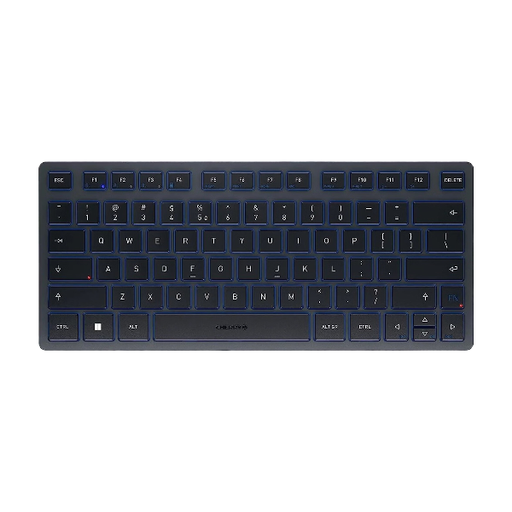
A compact choice if low-profile scissor keys matter more to you than a German key layout.
75% format without a number pad; four connection channels; CHERRY SX scissor keys; UK English QWERTY. If you need a German layout, this version won’t be suitable.
 No image available
A compact Bluetooth option if you’re happy to work with a US International QWERTY layout.
TKL; three Bluetooth channels; CHERRY SX scissor keys; US International QWERTY; carry case. The stated layout isn’t German.
 No image available
A more compact mechanical option if you’re comfortable using a 65% layout.
65%; German QWERTZ; low-profile MX Speed switches; 2.4 GHz, Bluetooth and USB-C; RGB.
Compare the shortcuts you actually use with the arrow, function and navigation keys, as well as the Fn layer on the specific layout. A 75% or mini model name alone doesn’t guarantee that your commands will be easy to reach.
That depends on the model and the connections available on your devices. CHERRY lists two Bluetooth channels for the KW 9200 MINI, as well as one 2.4 GHz channel and one wired channel; Keychron lists wired, Bluetooth and 2.4 GHz connections for the K3 Max. Check the version you choose and what’s included in the box.
Disconnect the keyboard before working on the keys and follow the instructions for the specific model. ‘Hot-swappable’ doesn’t mean every switch will fit: Keychron describes the K3 Max as compatible with certain low-profile mechanical switches.
When buying remotely from a business, consumers generally have a 14-day right to cancel from the date of delivery, subject to statutory exceptions. The EU’s Your Europe information page also explains that faulty goods are covered by statutory rights for at least two years; a voluntary manufacturer’s guarantee doesn’t replace these rights.
The July 2024 version of ASR A6 from the Federal Institute for Occupational Safety and Health doesn’t establish a general requirement to buy a particular keyboard for a private desk. Its scope covers display screen workstations in workplaces and teleworking workstations within the framework it describes.