Menu designers with limited desk space
If you need room beside your keyboard for precise mouse work, start by comparing the footprint and key layout of the specific model.


Choose TKL if you want direct access to important function keys while keeping space free for your mouse. A 75% keyboard saves more space, but you’ll need to check the key layout carefully. A 60% model is worth considering if desk space is your priority and the keys you need for your editor are easy to access on that specific layout.
If you need room beside your keyboard for precise mouse work, start by comparing the footprint and key layout of the specific model.
If you want quick access to frequently used commands, check that the keys you need are easy to reach on your chosen layout and that you can avoid any key mapping conflicts.
If you use the same keyboard for writing, design and gaming, weigh up the layout and typing experience against the features you’ll actually use when gaming.
A good fit if: You want direct access to important function keys and more room for your mouse beside the keyboard. Corsair says the K70 CORE TKL retains these keys.
The trade-off: TKL is less compact than 75% or 60% keyboards, so compare the case dimensions with the space you have available.
A good fit if: You want to save more space and the more compact layout works with your editor shortcuts. Keychron offers a selectable DE-ISO variant of the Q1 HE.
The trade-off: Check the key layout and, if needed, make sure you specifically select your preferred language layout.
A good fit if: A minimal footprint matters more than having direct access to every key you need.
The trade-off: Razer describes the Huntsman V3 Pro Mini as a 60% keyboard. Before buying, check that its key mapping works with your editor.
Check the editor commands you use most and measure how much room you need for your mouse before settling on a compact keyboard size. Percentage figures are no substitute for checking the specific key layout or comparing case dimensions.
| Priority | What to check before buying | Who is this important to? |
|---|---|---|
| Desk space and room for your mouse | Measure the available desk width, including the space for your mouse, and compare it with the case dimensions of the variant you’re considering. | If I need to work precisely with a mouse on a small desk, footprint comes first. Consumers with this priority account for around 36%. |
| Editor shortcuts | List the commands you use most and compare them with the key layout, checking for possible key mapping conflicts. | If I use the same commands often in my editor, I want to reach the keys I need without awkward remapping. Consumers with this priority account for around 29%. |
| Writing and gaming | Check the layout, switch variant and gaming features you’ll actually use on the specific version. | If I use the same keyboard for design and gaming, I want it to work well for both. Consumers whose main priority is this mix of uses account for around 21%. |
| Connection and cable | Check that it connects to your devices, consider cable routing and, where relevant, whether you can use it while it’s charging. | If the cable or wireless connection matters at my small workstation, I want to choose a connection that suits my setup. Consumers with this priority account for around 14%. |
For menu design, it also matters whether you can easily reach the editor commands you use often on that particular key layout.
First, measure the space available for your keyboard and mouse. Then compare the key layout with your shortcuts.
The adjustable gaming features described don’t, in themselves, demonstrate an advantage when designing a menu.
Consider these features if you want to use them for gaming. For design work, focus first on the size, key mapping and typing experience.
A model range may include different language layouts or generations, which aren’t necessarily interchangeable.
Check the full model name, layout and switch variant on the relevant product page.
The K70 CORE TKL is a wired TKL option for smaller workspaces that retains the important function keys.
The Q1 HE is a 75% option. Keychron’s collection includes selectable ISO language layouts, including DE-ISO.
The Huntsman V3 Pro Mini is a 60% option if a small footprint is a priority and the key mapping suits your workflow.
The MX 8.2 TKL Wireless is a TKL option with several connection types.
The Apex Pro TKL Wireless is another TKL option with adjustable switches.
This selection includes compact keyboards for small desks in 60%, 65%, 75% and TKL sizes. Layouts and key mappings vary, so check that they suit the commands you use in your editor.
 No image available
The compact 65% size with a German QWERTZ layout is worth considering if you want to save space on a small desk.
65%; Low Profile MX Speed Switches; connects via 2,4 GHz, Bluetooth or USB-C.
 No image available
The 75% layout with ISO-DE is a good fit if you want to save space and customise the key mapping for editor commands.
75%; ISO-DE; Tri-Mode Wireless; VIA Compatible; Hot-Swappable.
 No image available
The 75% layout with ISO-DE is an option if you’re looking for a compact size and a German layout.
75%; ISO-DE; Tri-Mode Bluetooth/2.4G/USB-C; V3 Pro Cream Yellow Switch.
 No image available
The TKL design without a number pad is worth considering if you want to keep the function keys and use a German layout.
Tenkeyless; German layout; wired USB connection.
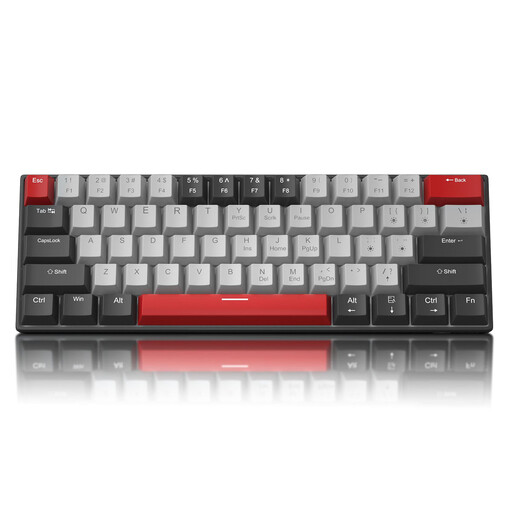 No image available
The 60% size with 61 keys is designed to take up very little desk space. Note that this model has a US QWERTY layout.
60%; 61 keys; detachable USB-C cable. According to the product description, the arrow keys are accessed using Fn+Space.
It depends on the commands you use most often in your editor. If you use Unity, you can assign and change shortcuts there, and check for conflicts. That doesn’t mean you need a particular keyboard size.
First, compare the key layout with the commands in your workflow. In Unity, you can manage shortcuts and check for conflicts. Then test your chosen key mapping in your own working environment.
Not with every model: CHERRY says the MX 8.2 TKL Wireless can be used with a cable while charging. Check this feature separately for other keyboards.
For a business purchase, you’re generally entitled to a statutory guarantee of at least two years from receipt. This is separate from any voluntary manufacturer’s warranty. According to Your Europe, ordinary online distance purchases generally come with a 14-day withdrawal period from delivery. The requirements, exceptions and any return costs may depend on the circumstances.
No. The German Environment Agency advises that waste electrical equipment must be collected separately. If your keyboard has a rechargeable or disposable battery, also check your local collection guidance.