What to consider when choosing
At a small desk, your choice mainly comes down to whether mouse space, easy-to-reach keys or a number pad for entering figures matters most.
Low-profile compact keyboard without a number pad
A good fit if: You want more room for your mouse and prefer a low-profile design for labelling and general map-making.
Trade-off: There’s no number pad; compare the arrow, function and special keys on the specific version.
75% mechanical keyboard
A good fit if: You want to keep your arrow and function keys or customise frequently used shortcuts while making the most of limited desk space.
Trade-off: Switches, keycaps, connections and software vary by model and version.
Larger keyboard with a number pad
A good fit if: You regularly enter long strings of numbers while making maps and have enough room for both the keyboard and mouse.
Trade-off: The extra keys take up space, so make sure you measure the area you’ll need for your mouse too.
The percentages below relate to different priorities when creating a quest map at a small desk.
| Priority |
What to look for when buying |
Who is this most important to? |
| Room for the keyboard and mouse |
Measure the available desk width and compare it with the dimensions of the specific version. Allow enough room for your mouse. |
If I need enough room to move my mouse alongside the keyboard, I want the keyboard to take up as little space as possible. About 36% of shoppers say available desk space is their main priority. |
| Easy-to-reach keys |
Check the arrow, function and modifier keys, as well as the customisation options on the exact version. |
If I often switch tools or views, I want to reach the keys I need easily or customise my shortcuts. About 29% of shoppers prioritise easy access to keys. |
| Connections and switching between devices |
Check that Bluetooth, wireless receivers and wired connectivity work with your devices and are included in the box. |
If I work across multiple devices, I want the available connection options to suit the way I work. About 21% of shoppers say switching between devices matters most to them. |
| Typing noise |
Check the switch and, if possible, try the exact model. The word ‘mechanical’ alone doesn’t tell you how noisy it is. |
If I work at a shared desk, I want a quieter typing experience. About 14% of shoppers consider typing noise their top priority. |
Joybuy product selection
This selection includes compact keyboards for limited desk space, including versions without a number pad and compact layouts. Pay particular attention to the layout listed for each product, as several models have a US or UK layout.
 No image available
Inateck KB01003G Bluetooth keyboard, QWERTZ
A compact option if you want to switch between several devices; check that the listed QWERTZ layout matches the one you’re used to.
78 keys; 285 mm-wide casing; Bluetooth 5.3; according to the product description, switches between up to three devices.
View at Joybuy
 No image available
CHERRY KW 9200 MINI
A good option if you’re looking for a compact keyboard without a number pad and with several connection options. The listed layout is UK QWERTY.
75% format; four connection channels; 295.5 mm wide according to the product description.
View at Joybuy
 No image available
CHERRY STREAM KEYBOARD TKL
The TKL format without a number pad could suit a small desk; the listed layout is English (US) with a euro symbol.
Wired USB connection; six multimedia keys; CHERRY SX scissor mechanism.
View at Joybuy
 No image available
CHERRY MX-LP 2.1 Wireless, 65%, QWERTZ
A compact mechanical option if you’re short on desk space and need a German QWERTZ layout.
65% layout; low-profile MX Speed switches; Bluetooth, 2.4 GHz wireless and USB-C wired connectivity.
View at Joybuy
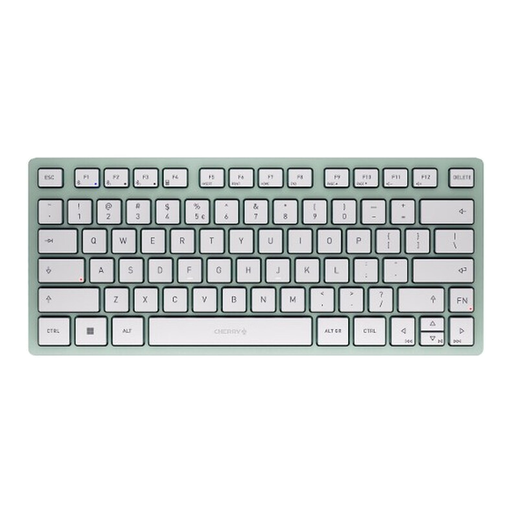 No image available
CHERRY KW 7100 Mini, TKL, US layout
A good choice if you’re looking for a compact Bluetooth keyboard for several devices and are happy with the listed US QWERTY layout.
Bluetooth for up to three devices; TKL format; dimensions of 29.5 × 12.9 × 1.6 cm according to the product description.
View at Joybuy
Frequently asked questions
Should I choose an especially small keyboard or a 75% keyboard for mapping a quest?
Start by checking which keys you actually need and how much room you have for your mouse. A 75% keyboard can fit arrow and function keys into a compact layout; another mini design may suit you better if its key arrangement supports the way you work.
How do I set up customisable keys for my mapping software?
First, find out which shortcuts your specific software uses and check whether the keyboard and available software let you set up the layout you want. Keychron lists VIA customisation for the K3 Pro; the Illustrator shortcuts documented by Adobe don’t automatically apply to other mapping software.
What should I look for in a compact keyboard layout?
Check the country-specific layout of the exact version before ordering. An ISO version or a model range with several layouts doesn’t, on its own, confirm that DE ISO is the option you’ve selected.
What should I bear in mind when cleaning my keyboard?
Avoid harsh substances and make sure no liquid gets inside the device. Follow your model’s instructions for any further steps, especially if you’re removing the keycaps.
What are my rights if I buy faulty goods online from a business seller?
For goods bought in the EU, there is generally a legal guarantee of at least two years from the date you receive them; an additional manufacturer’s warranty does not replace it. Online purchases generally come with a 14-day right to cancel, subject to legal exceptions. These rights are separate from a retailer’s voluntary returns service.


