First, measure the space available for your keyboard and pointing device, then check the shortcuts in your animation software. A slim mini keyboard without a number pad can help you save space and switch between devices; a mechanical 75% keyboard may be a better fit if you want to customise the keys or switches. Aseprite lets you change keyboard shortcuts, but still check that the keys you rely on are easy to reach with your chosen layout.
Who is a compact keyboard for?
Sprite animators with limited desk space
If you need to leave room for a mouse or graphics tablet beside your keyboard, a layout without a number pad is worth considering. Aseprite documents commands for frames and layers, which you can bear in mind when arranging the keys you use most.
Pixel artists who rely on shortcuts
If you often switch between tools and animation commands, check that the keys you need are easy to reach and that you can customise their assignments. Aseprite lets you change keyboard shortcuts.
Animators who work across multiple devices
If you work on different computers, look for the connection options you need and a familiar keyboard layout. The features available depend on the specific keyboard variant you choose.
What should you look for when buying?
Start by measuring your available desk space. Then compare the specific layout with the keys you need for frames, layers and switching tools.
| Buying criterion |
What to look for |
Who is this important to? |
| Space for your keyboard and pointing device |
Measure your available desk space and check whether a layout without a number pad will leave enough room. |
If you need space for a mouse or graphics tablet beside your keyboard, every bit of room counts. Around 36% of consumers say desk space is their main concern when buying. |
| Access to animation commands |
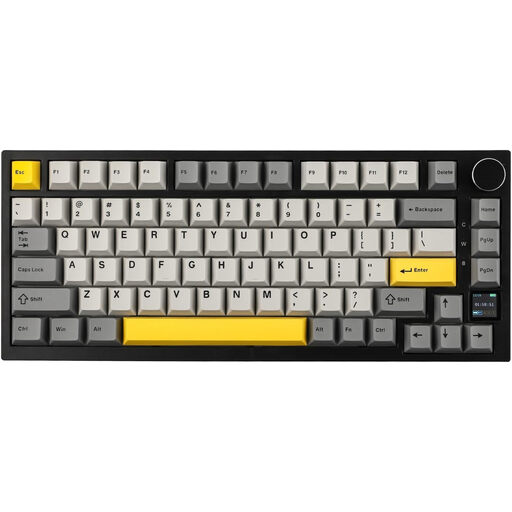
Make a note of your most-used shortcuts and check the arrow, function and modifier keys in the layout image. |
If I often switch between frames, layers or tools, I want to reach the relevant commands quickly or assign them to suit me. Around 29% of consumers say access to shortcuts is their main concern when buying. |
| Keyboard layout and device compatibility |
Check the language layout and key legends on the specific variant, as well as any operating-system keycaps you need. |
If you need familiar German legends or particular modifier keys, check the exact variant you’re choosing. Around 21% of consumers say layout and compatibility are their main concern when buying. |
| Connectivity and typing feel |
Compare the connection options you need and the specific switch variant. Prioritise hot-swap only if you actually want to change the switches. |
If I switch between devices or want to adjust the typing feel later, connectivity and switches matter. Around 14% of consumers say these are their main concern when buying. |
Avoiding common buying mistakes
-
An ISO model doesn’t automatically have a German layout
A product range may include several language variants, so the version you select might have different key legends from the ones you expect.
Before ordering, check the language variant, condition and image of the keyboard layout.
Choosing a different variant could mean extra hassle, for example if you need to return it or find compatible keycaps.
-
Choosing the smallest keyboard without checking your shortcuts
A more compact layout may place frequently used keys differently or require extra key combinations. Aseprite documents commands for frames and layers, among others.
Compare the key arrangement with the commands you use every day, and change your software shortcuts if needed.
-
Assuming hot-swap will make sprite animation faster
Hot-swap and QMK/VIA describe customisation options on specific models; they don’t prove that animation will be faster.
Choose these features if you genuinely want to customise your key assignments or typing feel. A slim keyboard may also be worth considering if saving space is your priority.
If you want to try different switches, you may need to buy them separately.
Relevant brands at a glance
CHERRY
The KW 9200 MINI is a slim option without a number pad, designed for limited desk space and use across multiple devices.
- CHERRY lists scissor switches and Bluetooth, 2.4 GHz and wired connections for this model.
- Scissor switches aren’t the same as the hot-swap options found on mechanical models. Check the layout and the keys you need on the specific variant.
Keychron
The K2 Pro ISO collection is aimed at buyers looking for a mechanical 75% layout with customisable keys.
- Keychron lists QMK/VIA, hot-swap and various ISO language layouts, including German variants.
- Features listed for the collection don’t confirm the details of an individual product. Check the layout and condition of the version you select.
Sharkoon
The SKILLER SGK50 S3 is a wired mechanical 75% option for buyers who want to customise switches or key assignments.
- Sharkoon lists hot-swap for mechanical 3- and 5-pin switches, as well as QMK/VIA.
- The layout and pre-installed switches may vary between listings, so check the details for the specific variant.
Joybuy products for smaller desks
This selection includes compact keyboards for limited desk space, as well as mechanical models with customisable key assignments. For each variant, pay particular attention to the layout, key legends and the keys you need.
 No image available
CHERRY MX-LP 2.1 Wireless Gaming Keyboard, 65%, German QWERTZ, White
The compact 65% layout is worth considering if you have limited desk space.
Features listed include German QWERTZ, low-profile MX Speed switches and tri-mode connectivity via 2.4 GHz, Bluetooth or USB-C.
Joybuy
 No image available
Ticktype EVO75 Custom Tri-Mode Wireless Mechanical Keyboard, ISO-DE
A mechanical 75% keyboard with customisable key assignments is an option if you want to set up the keys to suit your needs.
The listing mentions ISO-DE, hot-swap and VIA compatibility. Check that the specific switch variant and features meet your requirements.
Joybuy
 No image available
CHERRY KW 9200 MINI Wireless Multi-Device Keyboard
This slim keyboard without a number pad is worth considering if desk space is limited and you need to switch between devices.
CHERRY lists four connection channels and scissor switches. The listing specifies UK English QWERTY, not German key legends.
Joybuy
 No image available
AJAZZ AK820 MAX 75%, Wireless Mechanical Gaming Keyboard, US QWERTY
The 75% layout, with arrow and function keys, is an option if you want a compact keyboard that still includes these keys.
The listing mentions programmable key functions and tri-mode connectivity. The layout is US QWERTY, not German.
Joybuy
 No image available
AJAZZ AK820 Pro 75% Mechanical Tri-Mode Keyboard, US QWERTY
The compact 75% layout is a good starting point if you’re looking for a mechanical keyboard without a number pad.
Features listed include hot-swap and wired, Bluetooth and 2.4 GHz connections. The layout is US QWERTY, not German.
Joybuy
Frequently asked questions
Do I need a number pad for sprite animation?
Not necessarily. Aseprite documents tool, frame and layer commands without requiring a number pad. If you also use Blender, its manual says you can enable “Emulate Numpad” on a keyboard without a number pad. Check your other key assignments afterwards.
How can I set up frequently used animation commands?
Start by checking the shortcuts in your software. In Aseprite, you can change them from the keyboard shortcuts menu; the documentation lists Alt+N for a new frame and Shift+N for a new layer. A programmable keyboard is another option, not a requirement.
What should I do if the keyboard develops a fault after purchase?
When you buy from a business seller in the EU, you’re generally entitled to a minimum statutory guarantee of two years from the date you receive the goods. Contact the seller; a voluntary manufacturer’s guarantee doesn’t replace these rights. Whether you’re entitled to make a claim depends on the fault and the purchase contract.
What should I check for compliance when buying a wireless keyboard in Germany?
For products within its remit, Germany’s Federal Network Agency checks details including CE marking, manufacturer information, German-language instructions and the declaration of conformity. Check these details for the specific wireless model; this doesn’t amount to an individual compliance confirmation for any particular variant.
How should I dispose of an old keyboard?
In Germany, waste electrical equipment must not go in household rubbish. You can take an old keyboard to a local collection point or recycling centre; retailers accept returns subject to their own conditions.


