Players short on mouse space
If you need more room to move your mouse beside the keyboard, compare the available desk space with the keyboard’s actual dimensions and the keys you want to reach directly.


If you want to make more room for your mouse on a small desk while keeping the arrow keys close at hand, a 75% model is a good place to start. TKL is a good choice if you’re happy to lose the number pad but want to keep as many keys as possible without relying on secondary functions. A 60% model takes up less space, but may require extra key layers or profiles, so check the layout for the specific game you play.
If you need more room to move your mouse beside the keyboard, compare the available desk space with the keyboard’s actual dimensions and the keys you want to reach directly.
If you often use camera, group or navigation keys, check whether they’re available directly or accessed through an extra key layer. A Total War game manual, for example, documents WASD for camera movement and keys for group commands; layouts may differ in other games.
If you also use the space for other tasks or devices, check the connection options, switch type and any details about noise dampening. These features depend on the specific model and version.
A good choice if: You’re looking for a compact keyboard with dedicated arrow keys. CORSAIR lists arrow and other function keys on the K65 PLUS WIRELESS.
The trade-off: The keys are more tightly packed than on a TKL keyboard, so compare the layout with the commands you need in your game.
A good choice if: You want to do without a number pad but keep plenty of keys without secondary functions. CHERRY describes the MX 8.2 TKL Wireless as a model without a number pad.
The trade-off: TKL is still larger than a 60% model, so check the dimensions of the specific keyboard against the space on your desk.
A good choice if: Saving as much desk space as possible is your priority, and you’re happy to access missing dedicated keys through secondary functions or profiles.
The trade-off: On the SteelSeries Apex Pro Mini Gen 3, a profile can assign arrow functions to other keys; while the profile is active, those keys lose their usual functions.
| Criteria | What to look for | Who should pay particular attention? |
|---|---|---|
| Desk space and room for your mouse | Measure the available area, including the space you need to move your mouse, and compare it with the dimensions of the specific model. A percentage alone doesn’t tell you its exact measurements. | If I need more mouse space on a small desk, I compare the actual width and key layout. Around 36% of consumers put available desk space first. |
| Direct access to commands | Check your game’s command list for arrow, function and navigation keys, as well as how to use secondary functions. The Total War manual documents specific camera and group commands; other games may use different layouts. | If I want to reach frequently used game commands without an extra key layer wherever possible, I compare them with the specific keyboard layout. Around 29% of consumers prioritise direct access to game commands. |
| Connectivity and cable management | Check the connection options for the exact version, whether you need a receiver, and which ports are available on your computer. | If I want to position the keyboard flexibly on a shared desk, I look for suitable connection options and cable routing. Around 21% of consumers prioritise connection flexibility. |
| Noise and typing feel | Check the switch type and the specific details about dampening. Manufacturer descriptions aren’t independently measured sound levels. | If I share my desk with others, I want to choose switches and noise levels that suit us. Around 14% of consumers prioritise typing feel and noise. |
The format name doesn’t tell you which keys are available directly. On a 60% keyboard, a profile may assign arrow functions to other keys; when that profile is active, they lose their usual functions.
Before you decide, compare your game’s key layout with the specific keyboard layout.
If you’re not used to the secondary key layout, you may need extra time to get used to it or set up a key profile.
Hot-swap functionality on the Keychron K2 Max depends on the specific version. Layouts and switch options can also differ.
Check the full model name, the DE-ISO layout you want and the switch type against the specific listing.
Claims about speed or latency don’t, on their own, prove an advantage for the keyboard commands that matter in historical strategy games.
Check the key layout, desk space and connection first. Treat performance claims as manufacturer information, and don’t compare them without consistent testing conditions.
The K65 PLUS WIRELESS is a 75% option with dedicated arrow keys.
The MX 8.2 TKL Wireless is a TKL keyboard without a number pad, with several connection options.
The wired Apex Pro Mini Gen 3 with German layout is a 60% model for limited desk space.
The K2 Max ISO is a 75% alternative available in a German layout, with several connection options.
The PRO X TKL is a wireless TKL alternative with programmable keys.
The models below cover compact 60% and 75% formats, as well as TKL. For each one, compare the layout and directly accessible keys with the requirements of your game.
 No image available
A TKL option if you don’t need a number pad and are looking for a German QWERTZ layout.
TKL format; QWERTZ DE.
 No image available
A 75% option if you’re looking for a compact format and several connection options.
75%; ISO-DE; Bluetooth, 2.4 GHz and USB-C; hot-swappable; RGB lighting; V3 Pro Cream Blue Switch.
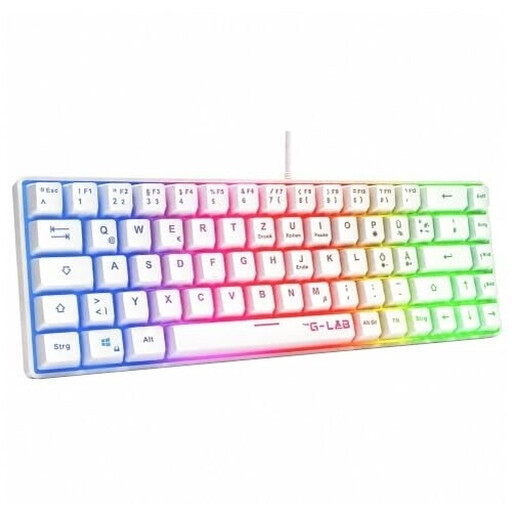 No image available
A 60% option if minimising desk space matters more than having lots of directly accessible keys.
60%; membrane keyboard; QWERTZ-DE layout; rainbow lighting.
 No image available
A wired TKL option if you can do without a number pad and the US layout suits you.
CHERRY SX scissor mechanism; six multimedia keys; US layout with euro symbol. Not a German QWERTZ layout.
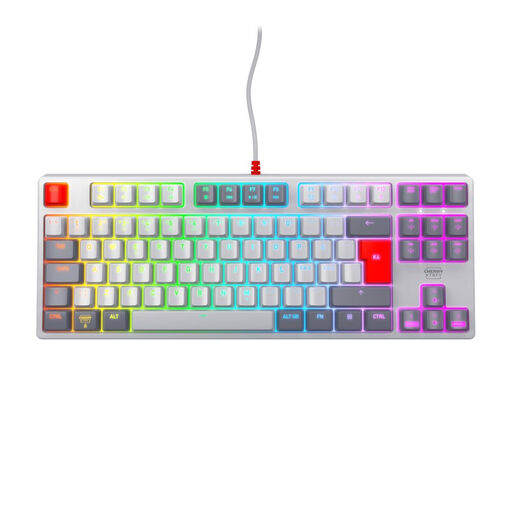 No image available
A wired TKL gaming keyboard if you can do without a number pad and want to use a Pan-Nordic layout.
MX2A Red switches; USB; RGB lighting; Pan-Nordic QWERTY layout. Not a German QWERTZ layout.
No, there’s no one-size-fits-all answer for the genre. Check the layout for the specific game you play: a Total War game manual documents camera, group and arrow-key functions, but that doesn’t mean a number pad is essential for every game.
SteelSeries describes a QuickSet profile for this. While it’s active, keys at the bottom right take on the arrow functions and lose their usual functions; set up the profile for the game or programme you want to use it with.
First check which connection options are supported by the exact version you’re buying, and whether your computer has room for a receiver or cable. CHERRY lists Bluetooth, 2.4 GHz wireless and a wired connection for the MX 8.2 TKL Wireless; this specification doesn’t automatically apply to other models.
According to the Verbraucherzentrale, most online purchases come with a 14-day right to cancel. The period generally starts when you receive the goods, and you must notify the seller that you wish to cancel. Your statutory rights against the seller are separate from any voluntary guarantee. For eligible purchases of goods in the EU, Your Europe states that statutory protection lasts for at least two years.
An old keyboard is electrical waste and shouldn’t go in your household rubbish. The German Environment Agency lists local collection points and take-back options at retailers; removable batteries should be disposed of separately.