What should you look for when buying?
First, consider how much desk space you want to keep free and whether you need a number pad. Then think about which keys you want to reach directly while editing, as well as the switches and connections that suit your working environment.
| What matters |
What to look for when buying |
Who is this particularly relevant to? |
| Room for a mouse and paperwork |
Check the dimensions and key layout; consider whether you need a number pad. |
If I need room for my mouse next to biography text on a small desk, I’d first check whether I actually use a number pad. This is the main concern for around 37 % of consumers. |
| Editing keys and layout |
Check the arrow keys, Home, End, Page Up and Page Down, as well as the exact layout. |
If you often move around the text while editing, you’ll want to reach key navigation controls without having to hunt for them. Editing keys are the main concern for around 27 % of consumers. |
| Switch feel and typing noise |
Choose from the available switch types and, if possible, assess the sound while typing yourself. |
If I work within earshot of other people, I’d take both feedback and typing noise into account when choosing switches. Around 18 % of consumers prioritise switch feel or sound. |
| Connections and switching between devices |
Check that the supported connection types match the ports available on your device. |
If you switch between several devices, check that the available connection types suit the way you work. Around 18 % of consumers say switching between devices is their main concern. |
Joybuy products for compact typing
The Joybuy picks below are compact mechanical keyboards for your desk. Key layouts, switches and connections vary by model, so check the exact version before buying.
 No image available
Akko 3084B Plus Tri-Mode, 75%, ISO-DE, Cream Blue Pro, Black and Gold
The 75% layout with ISO-DE QWERTZ is a useful option for a compact workspace with a German layout.
- Bluetooth, 2.4 GHz wireless and USB-C
- Hot-swappable, with Cream Blue Pro switches
- Cream Blue Pro switches are described as tactile and clicky.
View at Joybuy
 No image available
Akko 5087S V1 TKL, ISO-DE QWERTZ, Cream Yellow Pro, Black and Gold
The tenkeyless design may suit your typing needs if you’re looking for a German layout and can do without a number pad.
- ISO-DE QWERTZ
- Wired
- Cream Yellow Pro switches, hot-swappable and RGB lighting
View at Joybuy
 No image available
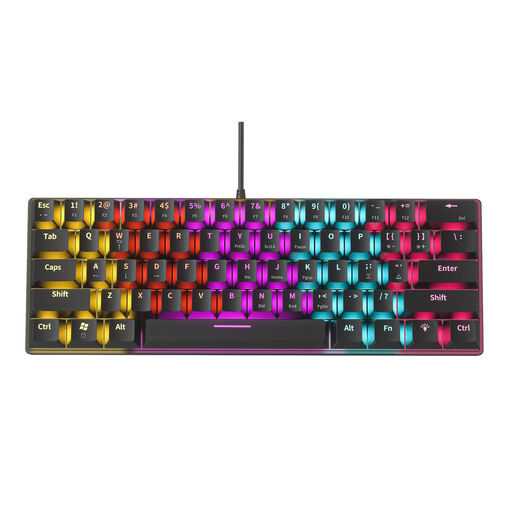
NAXSIR Mini, 61 keys (04-49486816)
The 61-key layout is a compact option if a smaller arrangement of keys matters more to you than having navigation keys directly to hand.
- Blue switches and USB connection
- RGB lighting with 12 effects
- The blue switches are described as clicky.
View at Joybuy
 No image available
CHERRY MX-LP 2.1 Wireless, 65%, German QWERTZ, White
The compact 65% form factor and the stated German QWERTZ layout are useful features to consider for a limited desk space.
- MX Low Profile Speed switches
- Bluetooth, 2.4 GHz wireless and USB-C
View at Joybuy
 No image available
Ticktype EVO75, 75%, ISO-DE, Creamy Rye
The 75% layout with ISO-DE is a useful option for a compact workspace with a German layout; the stated software supports macros and key mapping.
- Tri-mode connection
- Hot-swappable, VIA-compatible and fitted with Creamy Rye switches
View at Joybuy
Frequently asked questions
Do I need a number pad to edit text?
Not just because you’re editing biography text. What matters is how often you enter numbers and how important desk space for your mouse is to you. The BAuA highlights this trade-off when choosing between a full-size and compact keyboard.
How should I set up my keyboard on a small desk?
Arrange your keyboard and mouse with your available workspace and the support you need for your arms and hands in mind. The BAuA covers these factors when discussing computer workstation design; this doesn’t mean that any one keyboard model has a guaranteed health benefit.
Can I fit any switch I like to the Keychron K3 Max later?
No. According to the product information, hot-swapping applies to the relevant version and compatible low-profile mechanical switches from Gateron or Keychron. Check the exact model before choosing replacement switches.
What happens if the keyboard is faulty or I’m not happy with one I bought online?
For faulty goods, your statutory rights generally apply against the seller; a voluntary guarantee is separate. According to the Verbraucherzentrale, online purchases in Germany generally come with a 14-day right to cancel. When this period starts and whether any exceptions apply depends on the contract.
Can I put an old keyboard in household rubbish?
No. The German Federal Ministry for the Environment says that waste electrical equipment must be collected separately and taken to an authorised collection point. Old batteries must also be returned separately if the device contains any.


