
Lieferung heute & morgen

Qualitätsgarantie

Willkommens-Angebote freischalten: KOSTENLOSE Lieferung | Bis zu 80 % RABATT | Kostenlose 30-Tage-JoyPlus-Testphase
App herunterladen
Choosing the right computer accessories can often be more complicated than it seems. Whether for a home office, intense gaming, or everyday use, the market is filled with products whose marketing promises don't always hold up to reality. As your Joybuy Product Recommendation Officer, I'll help you identify the crucial features and avoid common purchasing traps, ensuring your next investment in a mouse, keyboard, or charging cable is a lasting one.
Many users invest in accessories that show defects after a short time or fail to deliver the expected performance. This is often due to overlooked details or clever marketing. Here are two of the most common problems:
USB-C charging cables are created equal. Many budget-friendly models are designed exclusively for slow charging and do not support high data transfer rates or the Power Delivery needed for laptops. Those who cut corners here often end up buying twice.To avoid bad buys, focus on objective, technical specifications rather than marketing slogans.
DPI (Dots Per Inch) indicates the sensitivity of the mouse sensor. A high DPI number means the cursor travels a long distance on the screen with only a small hand movement.
gaming mouse with high and adjustable DPI (e.g., 1600–6400 DPI) is advantageous for quickly switching between precise aiming and fast 360-degree views.ergonomic mouse that supports a natural hand posture. Vertical mice are a great option.The choice of keyboard heavily depends on its intended use.
keyboard and mouse combo can be a practical and cost-effective solution here.Here are some recommendations tailored to specific requirements and usage scenarios.
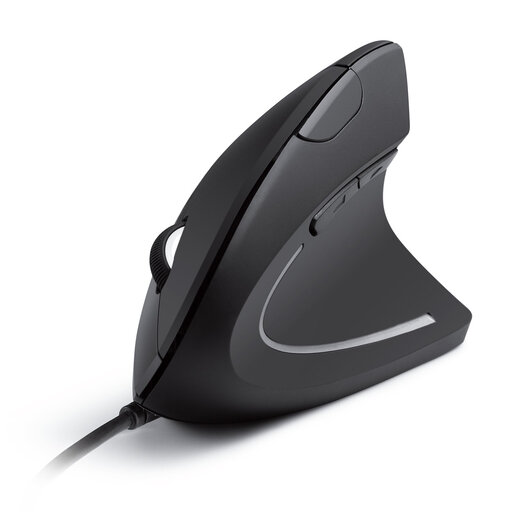
Why it's a great fit: Ideal for long days at the desk. The vertical "handshake" position relieves wrist strain and prevents the fatigue that can occur with conventional mice.
This model goes beyond an empty "ergonomics" promise. Its vertical design is a deliberate engineering choice to promote a neutral wrist posture, not just a slight curve.
Promotes a natural arm and wrist position. The switchable DPI resolution (1000/1600) offers flexibility for various tasks.
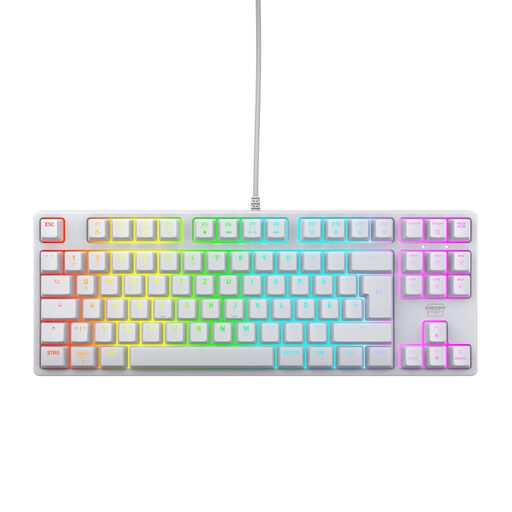
Why it's a great fit: Engineered for competitive gaming. The compact tenkeyless design (no number pad) creates more space for mouse movement, while the mechanical switches enable precise and rapid inputs.
Instead of cheap, unreliable switches, this keyboard uses the renowned CHERRY MX2A RED switches, rated for over 100 million actuations. This is an investment in durability and consistent performance.
Linear and quiet CHERRY MX2A RED switches for fast response times. Full N-key rollover and a 1000 Hz polling rate ensure every input is registered.
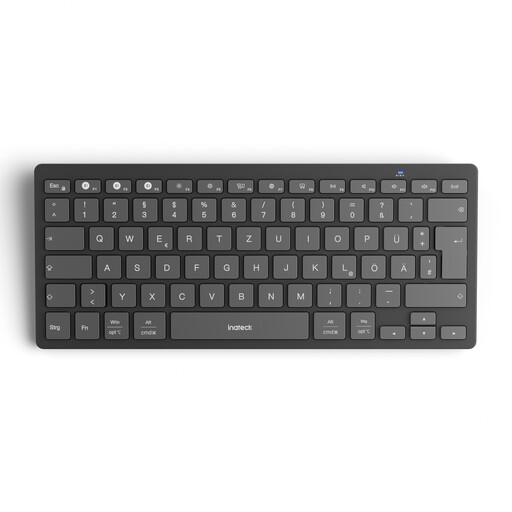
Why it's a great fit: Perfect for users who seamlessly switch between a laptop, tablet, and smartphone. Its slim, lightweight design also makes it ideal for mobile use or a minimalist desk setup.
This keyboard solves the compatibility and connectivity problem. Instead of cumbersome re-pairing, it allows you to switch between three devices with a single click—a feature that is often unreliable in cheaper models.
Seamlessly switch between up to 3 devices. The keyboard is extremely lightweight at just 217g and is compatible with Windows, iPadOS, Android, and iOS.
Especially with cables, design and material quality are crucial for durability and a clean aesthetic. We have compiled a list of products that meet these selection criteria.
1. How do I choose the right DPI for my mouse? For general office work and web browsing, 1000–1600 DPI is ideal. Gamers, especially in fast-paced games, benefit from mice with adjustable settings up to 6400 DPI or higher to adapt sensitivity to the game situation. A higher DPI is not universally better; it should match your screen and personal preference.
2. What is the difference between a mechanical and a standard keyboard? A mechanical keyboard uses an individual, spring-loaded switch for each key. This results in a precise, tactile feel and a very long lifespan. A standard (membrane) keyboard uses a rubber dome sheet under the keys, which makes it quieter and cheaper but often provides a less precise typing feel and lower durability.
3. Can any USB-C cable fast-charge my laptop? No. To fast-charge a laptop, you need a USB-C cable that supports Power Delivery (PD) and is rated for the appropriate wattage (e.g., 60W or 100W). Inexpensive cables often only support low charging power and are suitable for smartphones, but not for laptops. Pay close attention to the product description and the specified maximum charging power in watts.