
Lieferung heute & morgen

Qualitätsgarantie

Willkommens-Angebote freischalten: KOSTENLOSE Lieferung | Bis zu 80 % RABATT | Kostenlose 30-Tage-JoyPlus-Testphase
App herunterladen
As a Joybuy Product Recommendation Officer, I witness the rapid pace of technological change daily. New laptops are getting thinner, ports are disappearing, and connectivity demands are on the rise. The search for the right Computer Accessories can quickly become overwhelming. Making the wrong choice not only leads to frustration but also to unnecessary expenses.
This guide will help you navigate the common pitfalls and find the right accessories for your needs—from expanding your ports to stabilising your internet connection.
Before we dive into the solutions, it's important to understand the three most common problems that arise when choosing accessories.
To avoid these traps, you should check three core technical aspects before buying. These will determine whether an accessory is a worthwhile investment or a future headache.
Not all USB-C ports are created equal. While the connector shape is identical, the underlying protocols differ significantly in performance.
Always check which standard your laptop supports and what requirements your accessory has.
The maximum speed listed on the packaging is often a theoretical value. Actual performance depends on the entire chain—from the device to the cable to the accessory itself.
Manufacturer specifications on compatibility are essential. Pay attention not only to operating systems (Windows, macOS, Linux) but also to hardware-specific limitations. A note like "Not compatible with M1/M2 chips" on a MacBook docking station is a critical detail that determines whether it will work at all.
Here are some recommendations tailored to specific use cases that meet the criteria mentioned above.
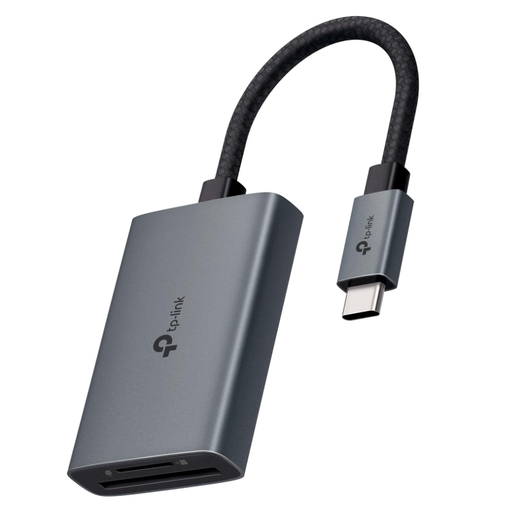
Why This Fits Their Persona: Ideal for photographers and videographers who need to transfer large amounts of data from their cameras to a modern USB-C laptop on the go. Its compact design and durable aluminium housing make it a reliable companion.
It bypasses the slow-transfer trap with explicit SD4.0 UHS-II compatibility, which the manufacturer states allows for speeds up to 3 times faster (up to 312 MB/s) than conventional readers.
Simultaneous reading and writing of SD and microSD cards doubles efficiency. Plug-and-play functionality across a wide range of operating systems.
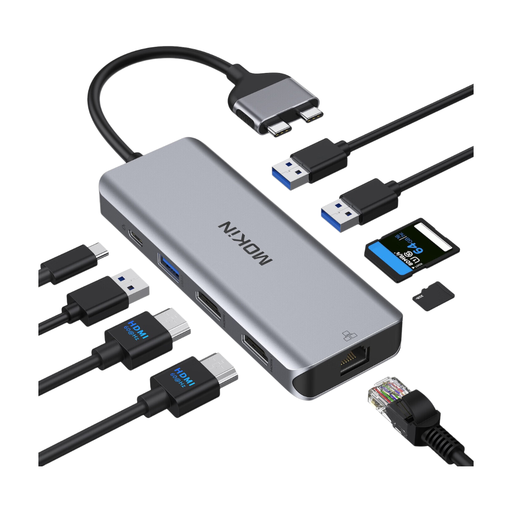
Why This Fits Their Persona: Perfect for MacBook Pro/Air users who want to transform their laptop into a full-fledged workstation. It provides ports for two monitors, a stable wired network connection, and charges the device simultaneously.
Directly addresses the compatibility trap: The manufacturer explicitly states that the hub is designed for MacBooks with Intel, M Pro, or M Max chips, but is not compatible with the base M1/M2/M3 chip models.
Enables the connection of two 4K monitors in extended mode (A-B+C). Offers a 100W Power Delivery port and a Gigabit Ethernet port for maximum stability and performance.
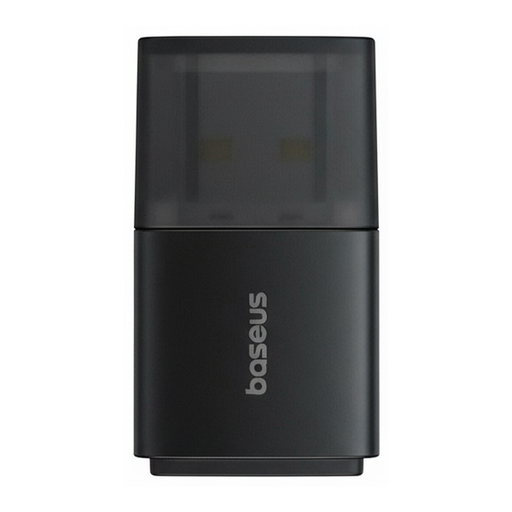
Why This Fits Their Persona: A simple and budget-friendly solution for users whose desktop PC or older laptop suffers from weak Wi-Fi reception. Just plug it in to get a more stable connection for everyday tasks like browsing and streaming.
Avoids the trap of overpaying for unnecessary features. This Wi-Fi dongle focuses on one job: improving signal strength on 2.4 GHz networks, which is sufficient for most households.
The external 6 dBi antenna actively boosts Wi-Fi signal reception and transmission. Its CCA technology automatically adjusts bandwidth to avoid interference.
We have compiled a complete, up-to-date list of products that fully meet these strict selection criteria.
1. What should I look for regarding the compatibility of a USB-C hub with my MacBook? Always check the product description for notes on compatibility with your specific MacBook model and chip (e.g., Intel, M1, M2, M Pro). In particular, the ability to run multiple external monitors in extended mode (not just mirrored) is often limited to models with M Pro, M Max, or Intel chips.
2. How fast should an SD card reader be for 4K video files? For efficient transfer of 4K videos or large series of RAW photos, a card reader that supports the UHS-II standard is recommended. This allows for significantly higher transfer speeds (up to 312 MB/s) compared to the older UHS-I standard (approx. 104 MB/s) and drastically reduces waiting times.
3. Do I need special drivers for a USB network adapter? Most modern USB Network Adapters and Wi-Fi Dongles are "plug-and-play," especially with current operating systems like Windows 10/11 and macOS. This means they are automatically recognised after being connected, requiring no manual driver installation. However, with older operating systems, you may need to download a driver from the manufacturer's website.