When choosing a computer for photo books, first check that your design software is compatible with its operating system, and whether you already have a monitor and suitable storage. CEWE offers its design software for Windows, Linux and Mac. If you also use Photoshop or Lightroom Classic, check their requirements separately. A mini PC takes up less desk space, while a larger case may offer different expansion options – check the exact configuration and what’s included in each case.
Which computer is right for you?
Photo book makers who also edit images
If you also edit photos in Photoshop or Lightroom Classic, choose a computer that meets the requirements of those programmes. Adobe recommends 16 GB of RAM or more for Photoshop; this isn’t a general minimum requirement for making photo books.
Designers who already have a monitor
If you’re setting up a permanent workstation with your own monitor, suitable video connections and a space-saving design are important things to consider. HP describes the ProDesk 4 Mini G1i as compact and easy to position.
Collectors with large photo archives
If you manage lots of original photos and projects, allow for free storage space and a separate backup. Germany’s Federal Office for Information Security recommends backing up data to protect against data loss.
What should you look for when buying?
Windows mini PC
A good fit if: You’re short on desk space, already have a monitor and need Windows for your programmes or devices.
Things to weigh up: Storage options and what’s included vary by model and specific offer.
Larger Windows desktop
A good fit if: You have room for a larger case and value connectivity or potential upgrades more than a compact footprint.
Things to weigh up: Check the upgrade options for the specific model rather than assuming what’s possible based on the case size alone.
Mac mini
A good fit if: You want to use macOS and your photo book and image-editing programmes are available for it. CEWE lists Mac as a supported platform.
Things to weigh up: Check that the monitor connections and devices you already own are compatible with your chosen configuration.
| What you need |
What to look for |
Who is this important to? |
| Image editing |
Check which programmes you need, which operating systems they support, and how much RAM and free SSD storage are available. Adobe recommends 16 GB of RAM or more for Photoshop; this isn’t a blanket recommendation for photo book software. |
If I edit lots of photos as well as designing pages, I choose a computer that suits those programmes too. Around 29% of consumers put additional image editing first. |
| Monitor and layout |
Check that the video output matches your monitor connection, and assess the image on your display. CEWE notes that its quality indicator assesses print resolution. |
If I want to assess images and pages at my usual workstation, I need a suitable monitor and the right connections. For around 21% of consumers, assessing images on screen comes first. |
| Archive and backup |
Choose your SSD storage based on your archive and projects. Also plan for a separate backup; a second internal SSD isn’t automatically an independent backup. |
If I want to keep original photos and projects for the long term, I consider storage space and a separate backup. Around 21% of consumers prioritise their archive and backup. |
| Desk space |
Compare the case dimensions with the space you have. Check the connections and storage options for the exact configuration. |
If I have limited space on my desk, I want a computer that can be set up as compactly as possible. Around 15% of consumers put a small footprint first. |
| Complete setup |
Check what’s included against the devices you already own, and make sure the operating system and software suit your workflow. |
If I want to set up a complete workstation, I first check which devices and programmes I already have. For around 14% of consumers, having a complete setup is the priority. |
Avoid common buying mistakes
-
Assuming Photoshop requirements apply to every photo book
CEWE offers its own design software for Windows, Linux and Mac. Photoshop’s requirements apply to that additional programme, not automatically to every photo book workflow.
First decide which programmes you actually plan to use, then check their requirements.
-
Assuming a mini PC gives you everything you need for a complete workstation
A desktop computer doesn’t automatically include a monitor and input devices. What’s included can vary between specific offers.
Before choosing, check how the devices you already have, the connections and what’s included all match up.
-
Assuming a second internal SSD is an independent backup
Germany’s Federal Office for Information Security recommends backing up data to protect against data loss. If the whole device fails, both your original photos and backup could be affected if they’re on the same computer.
Keep a separate backup of your photos and projects, and check that you can restore important files from it.
-
Assuming a mini PC and a barebone kit come with the same components
ASUS lists both mini PCs and kits in its NUC 14 Pro range. According to the manufacturer’s table, operating systems and storage aren’t generally pre-installed in kit versions.
Compare the full model name and check exactly which components are included.
Brands to consider
Apple
The Mac mini is a compact macOS option if the software you need works with this operating system.
- Apple lists various RAM and SSD configurations for the Mac mini with M6, as well as connections for external displays.
- The specifications and any peripherals you already own need to suit the version you choose; manufacturer specifications don’t prove that you’ll get better photo book results.
HP
The ProDesk 4 range includes a compact mini PC and a larger SFF desktop for Windows workstations.
- HP lists Windows 11 Pro, 16 GB of RAM and a 512 GB SSD for each of the specific German offers.
- HP describes the mini as having access to two SSD bays and the SFF model as offering upgrade options; check the specifications of the specific offer.
Lenovo
The ThinkCentre neo 50q Gen 5 is a configurable Windows mini PC for a permanent workstation.
- Lenovo’s PSREF lists two SO-DIMM slots and support for up to two M.2 SSDs.
- These details apply to the model family. Confirm the memory, operating system and connections for the exact item number.
ASUS
According to ASUS, the NUC 14 Pro is available as both a mini PC and a kit.
- The range gives you the choice of a pre-configured mini PC or a kit.
- According to the manufacturer’s table, operating systems and storage aren’t generally pre-installed in kit versions. Check the full variant name and what’s included.
Joybuy products for your photo book workflow
The options below include compact Windows mini PCs, larger Windows desktops and a Mac mini. Check that the operating system, connections and included devices suit the workstation you already have.
 No image available
Acer Nitro 20 N20-100, i5, 32 GB, 1 TB SSD + 1 TB HDD, RTX 5060, Windows 11 Home
A larger Windows configuration to consider if you want to store a photo archive on your computer as well as working on photo book projects.
Specifications listed include 32 GB of RAM, a 1 TB SSD and a 1 TB HDD, along with DisplayPort and HDMI outputs.
Joybuy
 No image available
HP Z2 Mini G1a Ryzen AI Max+ Pro 395, 128 GB, 2 TB
A compact Windows workstation to consider if you also plan to do extensive image editing and multitasking at your permanent workstation.
The description lists Windows 11 Professional, 128 GB of RAM and a 2 TB SSD. An optional bracket is required for VESA mounting.
Joybuy
 No image available
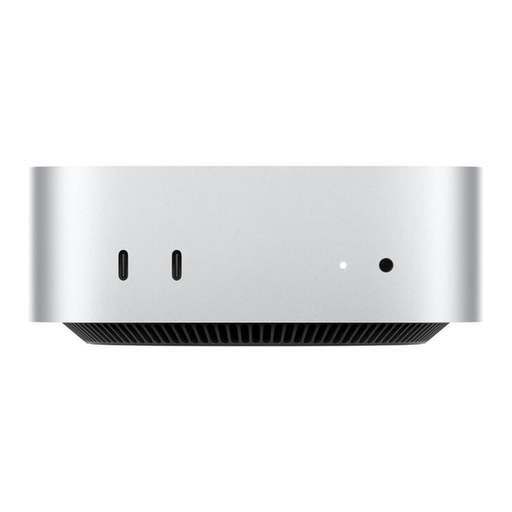
Apple Mac mini MHQK4ZD/A_CTO, M6, 24 GB, 512 GB SSD
A compact macOS option if your photo book software works with Mac; CEWE lists Mac as a supported platform.
This configuration lists 24 GB of unified memory and a 512 GB SSD. HDMI and three Thunderbolt 4 ports are listed; the monitor and input devices aren’t included.
Joybuy
 No image available
Captiva PC Highend Gaming R90-463, Ryzen 7 7800x3D, 64 GB, 2 TB SSD, RTX 5070Ti, Windows 11
A larger Windows desktop to consider if demanding applications beyond photo books are part of your workflow.
Specifications listed include 64 GB of RAM, a 2 TB M.2 SSD, and DisplayPort and HDMI outputs. The setup instructions recommend leaving 10–15 cm of clearance behind the computer.
Joybuy
 No image available
SOYO S5Air mini PC, AMD Ryzen 5 7535HS, 16 GB LPDDR5, 512 GB NVMe SSD, Windows 11 Pro
A space-saving Windows option for designing photo books and doing additional image editing, provided the specific software is compatible with the system.
The product details list 16 GB of RAM, a 512 GB NVMe SSD, and HDMI, DisplayPort and USB-C video outputs.
Joybuy
Frequently asked questions
Do I need Photoshop or a separate graphics card to make a photo book?
Not for every type of workflow: CEWE offers its own photo book software for Windows, Linux and Mac. If you also want to use Photoshop, its separate system requirements apply; that doesn’t mean a graphics card is generally required for making photo books.
What should I check on my computer before ordering a photo book?
Back up your original photos and project files separately, and check any resolution warnings for placed images in your photo book software. CEWE notes that its quality indicator assesses print resolution only; Germany’s Federal Office for Information Security recommends backing up data to protect against data loss.
Who is responsible if something is faulty, and how long do I have to cancel a computer bought online?
For consumer purchases, the seller is generally responsible for statutory warranty claims; in Germany, new goods are usually covered for two years from delivery. For ordinary online purchases of goods, you generally have a 14-day right to cancel from the date of delivery. These statutory rights are separate from any voluntary manufacturer’s guarantee.


