Joybuy products for your illustration set-up
The Joybuy products below include Windows towers and a compact barebone mini PC. Check the specification of each model; according to the product description, the barebone model doesn’t include an operating system.
 No image available
Acer Predator Orion 3000 Desktop i5 Ultra
This Windows tower could suit a dedicated workspace with your devices connected.
The listed configuration includes 16 GB RAM, a 512 GB SSD and Windows 11 Home. The description lists USB-A and USB-C ports, as well as a dedicated graphics card.
Joybuy
 No image available
HP Workstation Z4 G5 Tower 4U
This Windows 11 Pro tower configuration could be suitable if you’re setting up a dedicated workspace with several connections for monitors and other devices.
The product details list 64 GB RAM, a 1 TB SSD, DisplayPort, HDMI and USB-C.
Joybuy
 No image available
HP Z1 Tower G1i A40T1ET#ABD
This Windows 11 Pro tower could suit a dedicated workspace if its connections and what’s included work with your existing set-up.
The description lists HDMI, DisplayPort, USB-C and a card reader. According to the product description, a keyboard and mouse are included.
Joybuy
 No image available
Lenovo ThinkStation P2 Tower Gen2, Intel Core Ultra 7 265
This Windows 11 Pro tower could work well in a dedicated workspace if its specific configuration is suitable for your drawing and scanning software.
The product name lists 32 GB DDR5, a 512 GB NVMe SSD and an NVIDIA RTX A400 with 4 GB. The description lists DisplayPort, HDMI and several USB ports.
Joybuy
 No image available
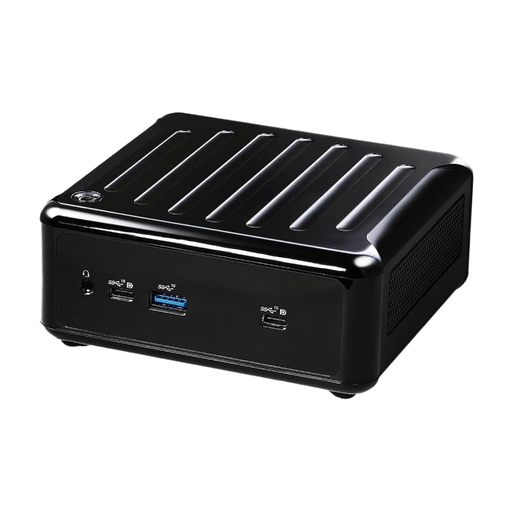
ASRock 4x4 BOX-5600U/EU/AI AMD Ryzen 5600U
This compact mini PC could be a good fit if space is limited and you’re happy to set up the operating system yourself.
The description lists HDMI, three DisplayPort outputs and several USB ports. It’s sold as a barebone device without an operating system.
Joybuy
Frequently asked questions
Do I need a dedicated graphics card for scanned drawings?
There’s no blanket requirement for this type of work. Check the requirements for your software version and chosen configuration. Adobe’s Photoshop requirements, for example, distinguish between minimum and recommended GPU specifications and cover the use of high-resolution displays.
How do I get paper drawings into my drawing software?
Adobe describes scanning into Photoshop using a scanner application and then opening the file, as well as import options for macOS and Windows. Before you buy, check whether the manufacturer of your specific scanner provides software and drivers for the operating system you want to use.
How do I back up scans and edited illustrations?
Back up your files regularly to a separate device, away from your working computer. Germany’s Federal Office for Information Security, for example, recommends using backup software or an external storage device; an internal SSD alone isn’t a substitute for a separate copy.
What are my rights if a PC bought online is faulty?
For consumer purchases from a business seller, you’re generally entitled to statutory rights for faulty goods for at least two years; an additional manufacturer’s warranty doesn’t replace these rights. Online purchases generally come with a 14-day right to cancel, although exceptions and the specific circumstances of your purchase should be taken into account. The EU explains the minimum duration of the statutory guarantee, while the Verbraucherzentrale provides guidance on the right to cancel.
Can I publish drawings based on traditional folk tales?
The age of a folk tale doesn’t automatically determine the rights to a specific drawing. The German Patent and Trade Mark Office notes that drawings may be protected by copyright; in Germany, protection generally expires 70 years after the creator’s death. Before publishing, check the rights to the specific artwork and any other terms of use that may apply.


