
Lieferung heute & morgen

Qualitätsgarantie

Willkommens-Angebote freischalten: KOSTENLOSE Lieferung | Bis zu 80 % RABATT | Kostenlose 30-Tage-JoyPlus-Testphase
App herunterladen
Anyone looking to buy computer hardware often compares price, storage capacity or processor model first. However, these details alone do not show whether a product is compatible with an existing system. With NAS devices, memory and mini PCs, unsuitable purchases are often caused by unclear product descriptions, incompatible ports or overstated performance claims.
This buying guide from the Joybuy Product Recommendation Officer provides an objective overview of key technical specifications and explains which hardware is suitable for different use cases.
More RAM or storage does not automatically mean a suitable upgrade. Before buying, you should check the RAM type, form factor, maximum capacity, clock speed and number of slots, among other factors. For example, a DDR4 DIMM for desktop motherboards is not the same as a SO-DIMM used in many laptops.
The same applies to NAS systems: A 2-bay NAS without hard drives is initially just the enclosure, electronics and drive bays. The required HDDs or SSDs must be selected separately.
Labels such as “Gaming”, “AI” or “High Performance” have limited meaning without specific specifications. Relevant details include:
A mini PC with integrated graphics is suitable for office tasks and certain games. For demanding modern games, however, a dedicated graphics card may be necessary.
A NAS with RAID 1 mirrors data across two drives. This can improve availability if one drive fails, but it does not replace an independent backup. In the event of theft, malware, a power surge or accidental deletion, both drives may be affected.
When buying a NAS, three factors are particularly important:
According to the listed product specifications, the Synology DS225+ features a quad-core Intel Celeron J4125, 2 GB of DDR4 RAM and support for expansion up to 6 GB. It offers one 2.5-gigabit Ethernet port, one Gigabit LAN port and two USB-A 3.0 ports. The device is supplied as a diskless desktop enclosure, so drives are not included.
Anyone looking to buy DDR4 RAM should first consult the motherboard or laptop manual. Key specifications include:
The label 64GB Gaming RAM should not be assessed in isolation. A 64 GB kit can be useful for content creators, large projects or running multiple applications simultaneously; for basic office work, this capacity may not be necessary.
When buying a mini PC, users should assess not only the processor but also the available ports and their intended display setup. Multiple monitor outputs, Wi-Fi and Bluetooth are practical for home-office workstations. Content creators should also consider SSD capacity, USB4, high-speed network ports and the ability to connect external storage.
Depending on the model, a Ryzen AI 9 mini PC may offer numerous processor cores and integrated Radeon graphics. Actual gaming performance, however, depends on the RAM, cooling, resolution and settings used in each game.
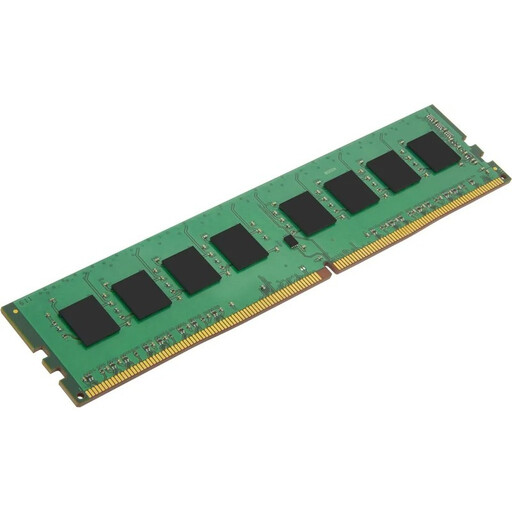
Why it is suitable: A single 4 GB module may be a practical choice for older desktop systems or a gradual upgrade. Before purchasing, check the available slots and the motherboard’s maximum supported capacity.
The module is clearly specified as 4 GB, 2666 MHz, 1.20 V and a 288-pin DIMM. It is not a laptop SO-DIMM.
JEDEC standard, non-ECC and 1.20 V operation without requiring an XMP profile.
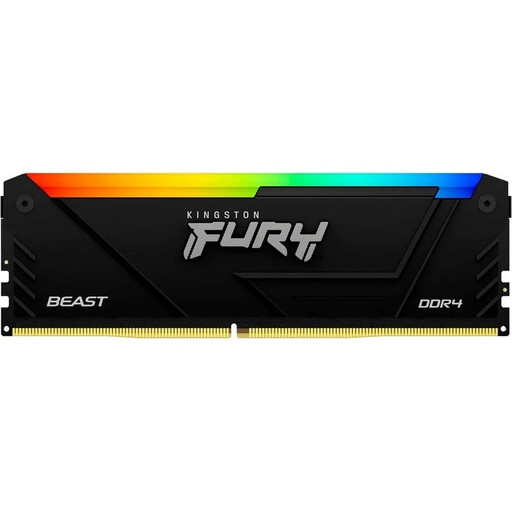
Why it is suitable: This kit is designed for users planning to use 64 GB for content creation, large projects or running multiple applications simultaneously. Confirm motherboard compatibility and the contents of the package before purchasing.
The product data contains inconsistent capacity information. Buyers should therefore check the current product page and the actual kit contents before placing an order.
Specifications include 3200 MT/s, CL16, XMP 2.0 and a black heatsink with RGB lighting.
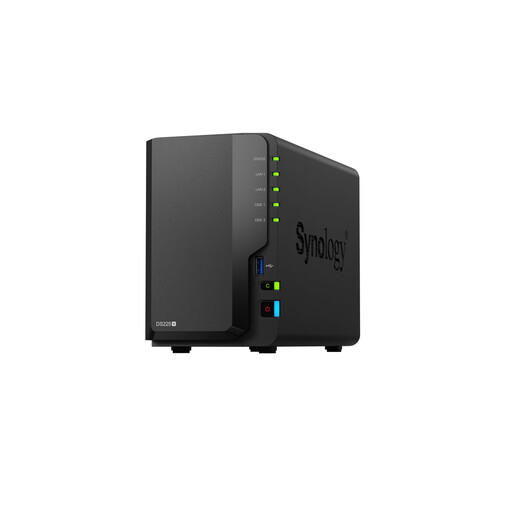
Why it is suitable: This desktop NAS provides two drive bays for 2.5- and 3.5-inch drives and can be used for centralised files, backups and synchronised folders.
The device is supplied without hard drives. RAID 1 can be configured, but it does not replace an additional backup.
According to the product data: 2.5GbE and Gigabit LAN, 2 GB of DDR4 RAM expandable to 6 GB, and AES-256 volume encryption.
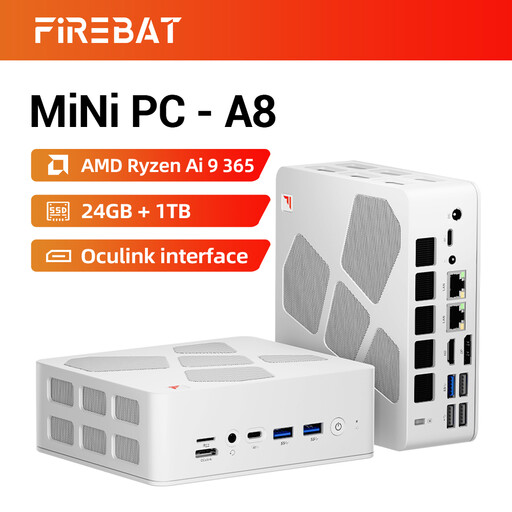
Why it is suitable: This compact computer is well suited to home offices, multi-monitor workstations and mobile desks. Its configuration includes 24 GB of DDR5 RAM and a 1 TB PCIe 4.0 SSD.
Before buying, check the operating system, upgradeability, power supply and desired gaming resolution. Integrated graphics should not be equated with a dedicated gaming graphics card.
Specifications include Radeon 880M, support for up to four 4K displays, two 2.5-gigabit Ethernet ports, USB4 and HDMI 2.1.
If you are looking for additional modules, you can browse the DDR4 RAM selection. For a dual-channel system, it is best to use a matched kit with identical modules. When modules are mixed, the system often defaults to the slowest shared specification; operation at the advertised XMP speed is not guaranteed.
The Crucial RAM 32GB Kit (2x16GB) DDR4 3200MHz CL22 is listed with 32 GB total capacity, 3200 MHz, CL22 and 1.20 V. The product description partially refers to laptop memory, while the specifications identify 288-pin U-DIMM modules. This discrepancy should be clarified against your own device and the current product page before ordering.
Explore the complete selection to find products with different capacities, form factors and technical specifications for a range of systems.
8 to 16 GB may be sufficient for basic office work and web browsing. 32 GB provides more headroom for multitasking, image editing and virtual machines. 64 GB is primarily relevant for large projects, extensive video editing or running several demanding applications simultaneously.
No. The computer, switch or router and network cables must also support 2.5GbE. With Gigabit components, the connection remains limited to their speed. The installed hard drives or SSDs and the level of network traffic also affect the actual transfer rate.
Service life depends on workload, cooling, dust, power supply and the operating environment. Regular firmware and software updates, unobstructed ventilation openings and a separate backup can help support reliable operation. Mechanical hard drives should also be monitored for their health and should never be used as the sole backup for important data.