
Lieferung heute & morgen

Qualitätsgarantie

Willkommens-Angebote freischalten: KOSTENLOSE Lieferung | Bis zu 80 % RABATT | Kostenlose 30-Tage-JoyPlus-Testphase
App herunterladen
Anyone looking to buy computer hardware will find a wide range of laptops, graphics cards and PC components with similar names. Whether you need a business laptop, gaming laptop or AI laptop, it is not just the brand name that matters. The key is how the processor, memory, graphics solution, cooling, ports and operating system work together.
Business customers, self-employed professionals, developers, creative professionals and gamers can all incur unnecessary costs through three common mistakes:
A modern processor may contain an NPU alongside its CPU cores for specific AI functions. When choosing an AI laptop, you should therefore check which applications support the NPU and whether the integrated graphics are powerful enough for your intended tasks.
For office work, programming, video conferencing and light photo editing, an integrated Radeon graphics card or Intel Arc Graphics may be suitable. For 3D CAD, rendering, demanding video projects and gaming, however, dedicated solutions such as an NVIDIA graphics card or other RTX graphics cards may be more appropriate.
For desktop components, you should also consider:
According to its product specifications, a Palit GeForce RTX 3050 StormX requires a power supply with a recommended output of 300 W. The Palit GeForce RTX 5070 Ti GamingPro-S is listed with a power consumption of 300 W, for which a 750 W power supply is recommended. These figures show why a graphics card upgrade should not be considered in isolation.
DDR5 RAM offers high transfer rates, but capacity remains the key factor for multitasking. A laptop with 32 GB of RAM is better equipped for many development environments, large spreadsheets, virtual machines and creative applications than a device with 16 GB.
A laptop with a 1 TB SSD also provides more space in everyday use for project files, games and applications. Nevertheless, you should check whether it has a single SSD, a dual-SSD system or an upgradeable M.2 slot. If the storage is soldered in place, upgrading it later is often not possible.
The Lenovo ThinkPad E16 Gen 3 is one example of an upgradeable device: it has two DDR5 SO-DIMM slots and supports up to 64 GB of RAM according to the product specifications. The Lenovo ThinkBook 14 G9 AHP is also described as featuring 32 GB of DDR5-5600 memory and two slots.
For long working days, resolution, aspect ratio, brightness and screen finish all matter. A matt 16:10 display with 1,920 × 1,200 pixels provides more vertical workspace than a classic 16:9 panel of the same width. For colour correction, you should also check the colour space; high brightness alone says nothing about colour reproduction.
Business devices should also offer ports such as USB4, Thunderbolt, HDMI and Gigabit Ethernet, as well as security features such as TPM 2.0, a fingerprint reader, camera cover and Windows Hello. A Windows 11 Pro laptop may be a sensible choice in managed business environments thanks to features such as BitLocker and centralised security policies. Before buying, check that the device is compatible with your existing IT infrastructure.

Why this product suits the profile: The 14-inch chassis weighs 1.36 kg, making it suitable for mobile working, studying and everyday office tasks. It comes configured with 32 GB of DDR5, a 1 TB SSD and Windows 11 Pro.
The configuration combines upgradeable DDR5 memory with an M.2 NVMe drive. This puts a clear, dependable base specification centre stage rather than relying solely on a prominent AI label.
AMD Ryzen 7 250 with NPU of up to 16 TOPS, Radeon 780M, 32 GB DDR5-5600 and a 1 TB PCIe-4.0 SSD.

Why this product suits the profile: This 16-inch business notebook is designed for engineers, developers and creative professionals working on large projects with numerous applications open at once.
The dedicated NVIDIA RTX A500 with 4 GB GDDR6 is clearly distinguished from the integrated graphics. It also specifies 64 GB of DDR5 and a 2 TB SSD, rather than relying on vague performance claims.
Intel Core Ultra 7 265H with Intel AI Boost NPU, 64 GB DDR5-5600, 2 TB SSD and Windows 11 Professional.
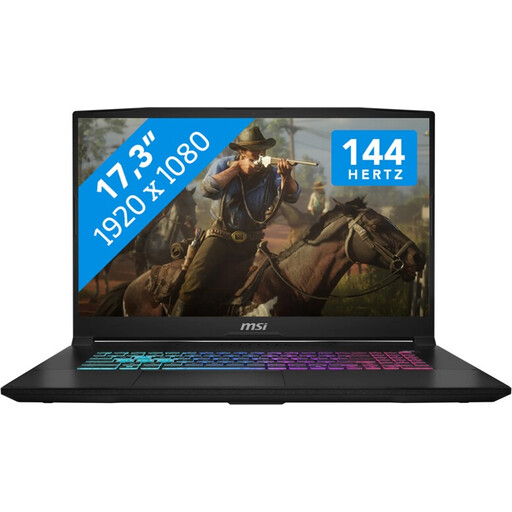
Why this product suits the profile: For gaming, streaming and creative applications, this 17.3-inch laptop offers a large display and a dedicated NVIDIA graphics unit.
The product specifications provide clear details of GPU memory, TDP ratings and cooling. The dual-fan design and use on a firm, well-ventilated surface nevertheless remain important.
Intel Core i7-14650HX, NVIDIA GeForce RTX 5060 Laptop GPU with 8 GB GDDR7, 1 TB SSD and 17.3-inch display.
We have put together a complete, regularly updated list of products that fully meet these strict selection criteria and the safety regulations applicable in the EU.
16 GB may be sufficient for office work, browsing and video conferencing. For development, data analysis, virtual machines or creative work, 32 GB of RAM provides more headroom. If you process large projects locally, you should also check whether the memory can be upgraded.
No. The right GPU depends on the resolution, refresh rate and games you play. A dedicated RTX graphics card is relevant for demanding 3D applications and modern games. For office work, programming and basic multimedia tasks, integrated Radeon or Intel graphics may be sufficient.
Keeping ventilation openings clear, installing regular driver and security updates, and using a suitable power supply are all essential measures. Gaming laptops should be placed on a firm surface when under heavy load. For business devices, it is worth checking information about replacement parts, the battery, SSD and RAM before buying.