
Lieferung heute & morgen

Qualitätsgarantie

Willkommens-Angebote freischalten: KOSTENLOSE Lieferung | Bis zu 80 % RABATT | Kostenlose 30-Tage-JoyPlus-Testphase
App herunterladen
The search for a new computer mouse can quickly become overwhelming. The market is flooded with models advertising high DPI counts, special ergonomic shapes, and a wide array of connectivity options. But not every feature is relevant to every user, and behind many marketing promises lies a potential pitfall.
As your Joybuy Product Recommendation Officer, I'm here to help you distinguish the important features from the trivial ones. This guide will walk you through the most common traps of mouse shopping and explain which core parameters you should truly focus on to find the perfect model for your needs.
Many purchasing decisions are based on marketing claims that have little practical relevance. Pay attention to these three points to avoid making a bad buy:
When making your choice, concentrate on the following three aspects that directly impact user comfort and reliability.
The choice of connection technology depends on your workspace and priorities.
The sensor is the heart of every mouse. The DPI number indicates how sensitive the mouse is to movement.
The shape of the mouse should fit your hand. Also, look out for practical extra features.
To make your decision easier, we have selected a few models based on typical user profiles.
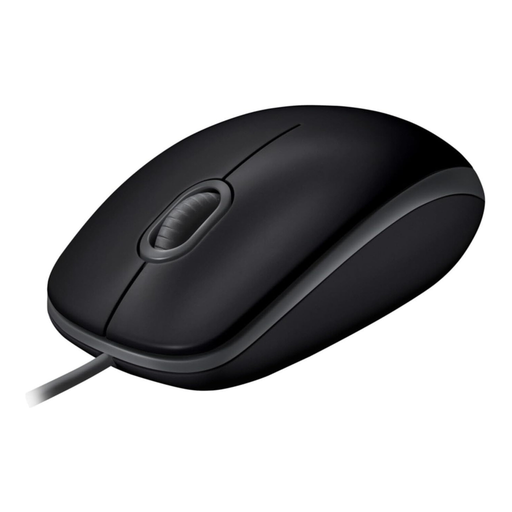
Why This Fits Their Persona: Ideal for users seeking a straightforward and reliable PC mouse for everyday tasks. It works right out of the box and requires no complex setup or maintenance.
The wired connection completely bypasses the trap of unstable wireless links. The silent buttons are a practical benefit without being marketed as an over-the-top feature.
Plug-and-play simplicity; over 90% click noise reduction according to Logitech's specifications; ambidextrous design for left- and right-handed users.
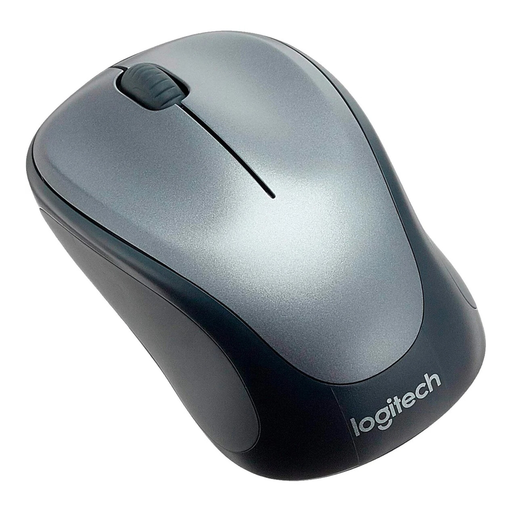
Why This Fits Their Persona: Perfect for users who need a compact and reliable wireless mouse for their laptop. It offers wireless freedom for the home office or on the go, without compromising on stability.
It relies on proven 2.4 GHz wireless technology with a USB receiver, which ensures a stable connection. The 1000 DPI is optimal for mobile use with a laptop, avoiding overly sensitive control.
Compact, ambidextrous design with rubberised grips; reliable wireless connection; long battery life thanks to an on/off switch.
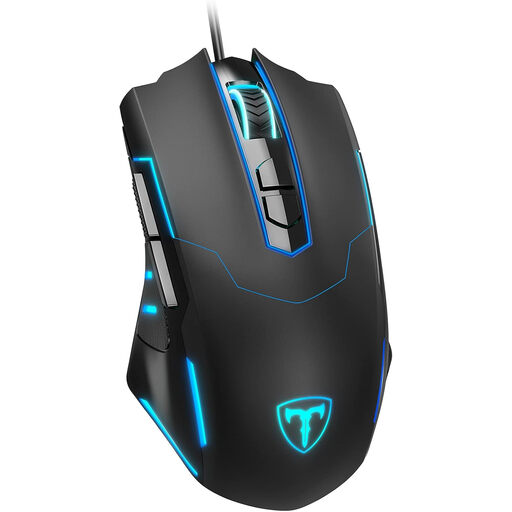
Why This Fits Their Persona: This gaming mouse offers features relevant to gamers, like a high, adjustable DPI rate and programmable buttons, without breaking the bank. The wired connection ensures lag-free input.
Instead of advertising a single, exaggeratedly high DPI value, it offers a practical, adjustable range up to 7200 DPI. This debunks the "DPI myth" and gives the user the control they actually need.
7 programmable buttons for custom commands; adjustable polling rate for precise cursor movements; ergonomic shape for extended gaming sessions.
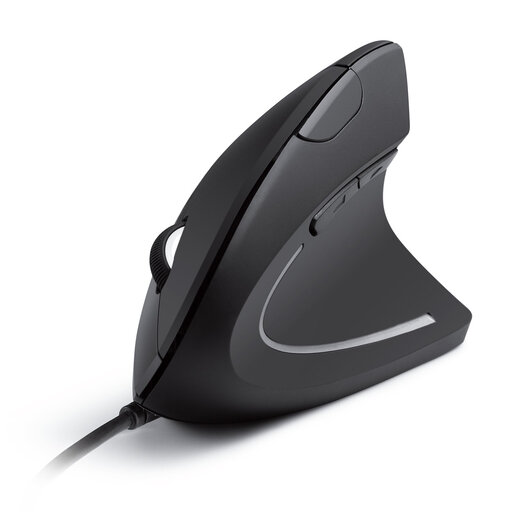
Why This Fits Their Persona: Designed for people who spend long hours at the computer and prioritise healthy posture. The vertical design reduces strain on the wrist and forearm.
Instead of a vague ergonomics promise, this model offers a clear concept: the vertical "handshake" position. This is a specific solution for reducing muscle strain.
Promotes a natural hand and arm posture; adjustable DPI levels (1000/1600); additional forward/back buttons for efficient navigation.
We have compiled a complete, up-to-date list of products that fully meet these strict selection criteria and rigorous safety standards.
A 2.4 GHz wireless mouse uses a dedicated USB receiver, which creates a direct and often more stable connection to the computer. A Bluetooth mouse pairs directly with your device's built-in Bluetooth module, which saves a USB port but can sometimes be more susceptible to interference.
The DPI number determines cursor speed. For standard office applications on a Full HD monitor, 800 to 1600 DPI is sufficient for precise control. Higher values are mainly relevant for gamers or users with very high-resolution monitors (4K and above) to move the cursor quickly across the entire screen.
Yes, absolutely. Many users appreciate the high precision, additional programmable buttons, and often superior build quality of a gaming mouse for daily office work as well. Features like customisable RGB lighting can usually be disabled for a more subtle appearance.