Club making large banners
If you’re sewing long or pre-joined pieces of fabric, space to the right of the needle and a well-supported work surface are especially important.


For long banner panels, first check the space to the right of the needle and make sure there’s a large enough surface to support the fabric. If you’re sewing several layers or fabrics that don’t feed evenly, fabric feed is another key consideration. When several club members share the machine, easy-to-reach speed and needle-stop settings may matter more than a wide choice of decorative stitches. Manufacturer specifications describe individual features, but they don’t automatically prove that a machine is suitable for your banner fabric or that a specific listing complies with all relevant requirements.
If you’re sewing long or pre-joined pieces of fabric, space to the right of the needle and a well-supported work surface are especially important.
When you’re working with several layers, look for an even feed and consider how easy it is to keep the seam under control where the number of layers changes.
If several people use the same machine, clearly labelled stitch selection and easy-to-reach speed and needle-stop settings can make sewing simpler.
A good fit if: You often need to manoeuvre large or pre-joined panels beside the needle. Brother lists a 285 mm arm and a wide extension table for the Innov-is VQ4; Janome lists 25.5 cm of throat space and an extension table for the Memory Craft 6700P.
Bear in mind: An extension table supports the fabric next to the needle, but it won’t support the part of the panel that extends beyond it. You’ll also need to test the machine with your actual fabric.
A good fit if: Several fabric layers, or fabrics with different levels of slip, might shift against each other as you sew. Janome lists AcuFeed Flex and adjustable presser-foot pressure for the Memory Craft 6700P.
Bear in mind: These features vary by model and don’t prove how evenly a particular banner panel will sew. Good fabric handling and a test run are still important.
A good fit if: Different club members will mainly be sewing straight seams and corners. Brother describes the Innov-is A16 as having easy-to-use stitch selection, while W6 lists speed control and a selectable needle-stop position for the N 3300 Pro.
Bear in mind: Simple controls don’t replace checking that the throat space, fabric support and feed are suitable for your large project.
| Buying priority | What to check before buying | Who it matters most to |
|---|---|---|
| Space and fabric support | Check the space to the right of the needle and whether an extension table is included separately; allow for an additional flat surface to support the fabric if needed. | If I’m sewing long, pre-joined panels, I want to support them beside the needle without pulling them too hard. Around 36% of consumers make space and fabric support their main priority. |
| Even fabric feed | Check whether the exact model has a walking foot and adjustable presser-foot pressure; sew a test using the fabric layers you plan to use. | If several layers or fabrics with different levels of slip come together, I want to stop them shifting against each other as I sew. Around 29% of consumers focus on fabric feed. |
| Ease of use in a club | Try out stitch selection, the speed control and the needle-stop setting with the people who will use the machine. | If different people use the same machine, I want to find the settings quickly and keep the speed under control. Around 21% of consumers prioritise simple operation for shared use. |
| Lettering and accessories | Assess the lettering or stitch effect on a sample and check which presser feet are included and which are optional. | If the club plans to add lettering or decorative stitching directly to the banners, I want to check that the design will work for the actual project. Around 14% of consumers base their choice mainly on lettering and accessories. |
The table supports the fabric next to the needle; the throat-space measurement refers to a different distance. One feature doesn’t automatically tell you anything about the other.
Check the throat space and what’s included separately. Also make sure you have enough room for the fabric panel or an additional flat support surface.
An extra surface to support the fabric may take up space in the club room.
Lettering and decorative stitches don’t show how the long fabric layers you plan to use will behave as you sew.
First, test the most challenging seam you plan to sew using the actual fabric layers. Then choose any additional programmes based on the club’s design needs.
The range includes a variety of models, from the Innov-is A16 to the spacious Innov-is VQ4. Features vary by model and aren’t available across the entire range.
According to JANOME Deutschland GmbH, the Memory Craft 6700P is designed for larger sewing projects.
The N 3300 Pro is a computerised sewing machine with speed control and a selectable needle-stop position.
The OPAL 650 is a computer-controlled model with a work area to the right of the needle, according to the manufacturer.
The B 335 (Gen. 2) and B 570 QE differ in the space they need and the features they offer.
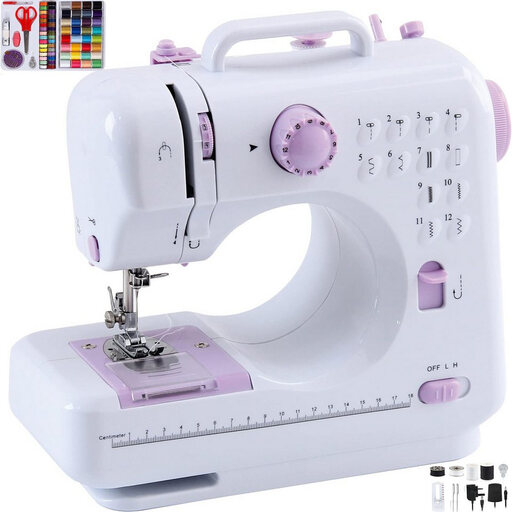
Here you’ll find an electric sewing machine with 12 stitch programmes and a choice of controls. Before buying, check that the way it’s operated meets your needs for a computerised sewing machine, and that your planned banner fabric is within the stated material thickness limit.
 No image available
Two speed settings, plus a foot pedal and hand switch, give you different ways to operate the machine.
The product details list 12 stitch programmes, as well as forward and reverse sewing.
The maximum material thickness is listed as 2.5 mm; check that your planned multi-layer banner fabric is within this limit.
The product name describes an electric sewing machine, but doesn’t mention computerised controls. Before buying, check whether it meets your requirements for a computerised sewing machine.
No, throat space alone isn’t enough to make a decision. Also check how the fabric panel will be supported and guided beside the needle. Manufacturers list extension tables for specific models, but that doesn’t mean they’re suitable for every panel length.
Sew a sample using the fabric layers you plan to use, then check the stitch quality and feed. Choose a needle to suit the material and check which needle system the machine manufacturer approves. Janome also lists adjustable presser-foot pressure for the Memory Craft 6700P.
Not automatically. Your statutory rights against the seller are separate from any voluntary warranty; the warranty terms set out what’s covered. Also check which presser feet and table are included in the specific listing.
By applying the CE marking, the manufacturer declares that the product meets the relevant EU product requirements. It isn’t an independent performance test and doesn’t tell you how well a machine will sew thick layers or long banners. Check the marking and product documentation for the specific listing.