For a group that mainly faces a screen, a USB video bar at the front of the room could be a good fit. If participants sit around a table and the speaker changes frequently, a centrally placed 360° camera may suit the seating arrangement better. Logitech gives a diagonal field of view of 120° for the MeetUp 2, while Owl Labs describes the Meeting Owl 4+ as offering a 360° view. These are manufacturer specifications, not proof that conversations will be easy to understand in your room. So check microphone coverage, the computer and the connections from the seats you plan to use.
Which camera matters for whom
Group with remote participants
If remote participants need to follow contributions from different speakers, voice pick-up is an important point of comparison. Logitech describes the MeetUp 2 as having six microphones; HP lists three microphones for the Studio R30. These specifications are no substitute for a test call in your own room.
Discussion around a table
If participants sit opposite one another rather than together facing a screen, compare a video bar’s front-facing view with a 360° view of the table. Jabra describes the PanaCast 50 as a front-facing camera, while Owl Labs describes the Meeting Owl 4+ as a 360° camera.
Hosts using different rooms
If you set up the equipment from scratch before each book discussion, check whether you’ll need a computer, which USB connection is suitable and where the camera, cables and power supply can go. HP describes the Studio R30 as connecting to a PC via USB; according to Owl Labs, the Meeting Owl 4+ is designed to sit on a table.
What to look for when buying
First decide whether the group will face the camera or sit around a table. Then compare voice pick-up, set-up and the view you want remote participants to see.
The percentages each refer to the main selection criterion when choosing a camera for a book discussion in a small room.
| Consideration |
What to check before buying |
Who it matters most to |
| Clear audio as speakers take turns |
Check the microphone arrangement and test voices from the furthest seats in a call. |
If remote guests need to understand contributions from different seats, I’d test voice pick-up in the room. Around 33% of consumers are likely to prioritise clear audio. |
| Capturing the seating arrangement |
Map out the seats and check whether a front-facing view or a 360° view shows the whole group. |
If people sit opposite one another or are spread out to the sides, I’d check the view from a remote guest’s perspective. Around 27% of consumers are likely to prioritise capturing the seating arrangement. |
| Easy set-up |
Check the computer, USB connection, power supply and space on a table or for mounting. |
If the equipment needs to be set up afresh before each session, I’d first check which computer is available and where the camera can be placed securely. Around 20% of consumers are likely to prioritise a straightforward set-up. |
| Showing the book and the speaker |
Check whether guests need to see faces or read the text, and test the actual video feed. |
If remote guests need to switch between the group and a page in the book, I’d test the view you want in the software you’ll be using. Around 20% of consumers are likely to prioritise showing the person or the book. |
Common misconceptions
-
Confusing a 180° front-facing panorama with a 360° view of the table
According to Jabra, the PanaCast 50 provides a front-facing view; Owl Labs says the Meeting Owl 4+ is designed to provide an all-round view. These perspectives capture a group seated around a table in different ways.
Decide on the seating arrangement first, then compare the views from the perspective of remote guests.
-
Treating the manufacturer’s stated range as a guarantee of clear audio
Range figures describe the device, not the acoustics or the distance from every seat in the room you plan to use.
During a call, test quiet voices and people taking turns speaking from every seat you intend to use.
-
Assuming camera resolution means a book page will be readable
A 4K specification doesn’t prove that small print will be readable in the group view being streamed.
Check the book page using your conference software. You may need a separate screen share or camera for text.
A separate view of the text may require extra equipment or preparation for sharing it.
Key brands at a glance
Logitech
According to Logitech, the MeetUp 2 is an all-in-one USB video bar for small rooms, designed to be used with your own device.
- Logitech specifies six microphones, a diagonal field of view of 120° and a mount included in the box.
- The stated pick-up distance of up to 7 m is a manufacturer specification, not an independent audio test. For a discussion around a table, check how well the front-facing position works.
HP Poly
HP describes the Studio R30 as a USB video bar for small meeting rooms, designed to be set up by a screen.
- HP specifies a 120° field of view, three microphones and a USB connection to a PC.
- Claims about voice clarity and noise cancellation come from the manufacturer and aren’t an independent comparison.
Jabra
According to Jabra, the PanaCast 50 is a front-facing video bar for rooms with widely spaced seating.
- Jabra specifies a 180° field of view and eight beamforming microphones for the PanaCast 50.
- The front-facing view isn’t a 360° view of the table. The PanaCast 50 also isn’t the same configuration as the PanaCast 50 Video Bar System.
Owl Labs
According to Owl Labs, the Meeting Owl 4+ is a 360° table camera for discussions where people sit around the device.
- Owl Labs specifies eight microphones, a video radius of 3 m and an audio radius of 5,5 m.
- These are manufacturer specifications; check the table size, sightlines and positioning in the room you’ll be using.
EMEET
According to EMEET, the Meeting Capsule Pro is another 360° all-in-one option with speaker tracking.
- EMEET specifies two 4K lenses and a microphone configuration of eight plus two microphones.
- The PanaCast 50 and Meeting Owl 4+ are different models, so make sure specifications are matched to the exact product.
Joybuy products
These Joybuy products are options for video calls on a computer in small discussion groups. The selection includes webcams and room cameras.
 Image unavailable
AOC 4K webcam with 99° FOV
For video calls on a PC or laptop when a webcam with a built-in microphone is a good fit.
4K, 99° FOV, built-in microphone and noise cancellation; plug-and-play and a USB-A to USB-C adapter are also listed.
View at Joybuy
 Image unavailable
Logitech ConferenceCam
For small discussion groups on a computer when you’re looking for a conference camera with a full-duplex speakerphone.
1920 × 1080 pixels and a 78° viewing angle; the listed features also include a microphone range of 2,40 m, USB-A and a remote control.
View at Joybuy
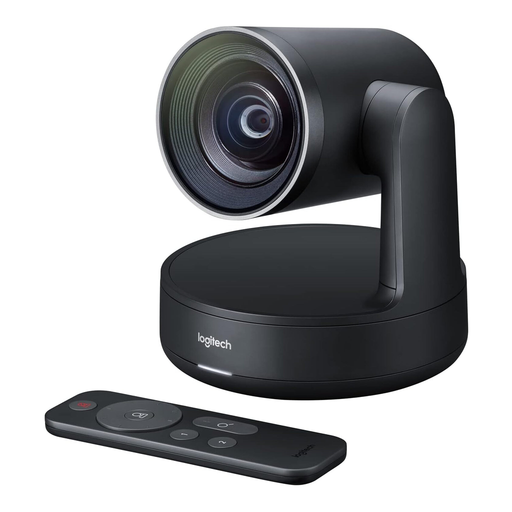 Image unavailable
Logitech Conference Camera Rally 960-001227
For a video conference on a computer when you’re looking for a camera with a USB connection and 4K video.
The product description lists 4K video and a USB connection to a computer or another device.
View at Joybuy
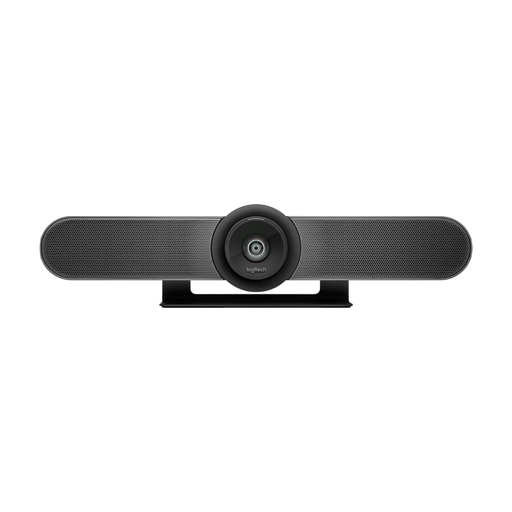 Image unavailable
Logitech MeetUp All-in-One 4K Conference Camera
For a small group seated mainly facing the camera and using a front-facing view.
The specifications list a diagonal field of view of 120°, built-in microphones and speakers, and USB plug-and-play. The front-facing view isn’t a 360° view of the table.
View at Joybuy
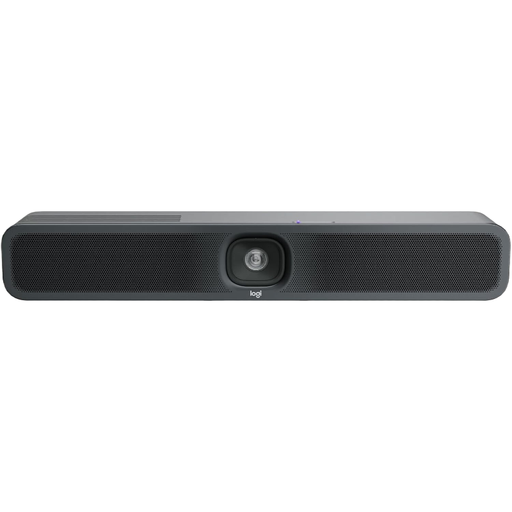 Image unavailable
Logitech MeetUp 2 4K All-in-One Conference Camera
For a small group seated mainly facing the camera and using a computer for video calls.
Logitech specifies six microphones and a diagonal field of view of 120°. The product specifications also list 4K video, USB, BYOD use, and table and wall mounting. The front-facing camera isn’t a 360° view of the table.
View at Joybuy
Frequently asked questions
Does the Studio R30 need a computer for a book discussion?
The set-up described by HP uses a power supply and a USB connection to a PC. Before buying, check which computer and video-conferencing software will be used in the room.
How can I check the audio before the first session?
Test the camera on a call, with contributions from every seat you plan to use. The pick-up distance of up to 7 m specified by Logitech is a device specification, not a guarantee of clear audio in your room.
Will book pages automatically be readable with a 4K conference camera?
No, that doesn’t follow from the stated camera resolution. Check the actual image being transmitted with the software you’ll use, and consider a separate screen share or camera for text.
Can a book discussion in Germany be recorded without further checks?
You can’t assume that recording is automatically permitted. The German Data Protection Conference describes images, audio and statements made during video conferences as personal data. The Federal Commissioner for Data Protection and Freedom of Information points out that users are responsible under data protection law for the communication content they determine. For your specific event, check the legal basis, how participants will be informed and whether recording is planned.


