Which design suits your group?

Club meeting around a table

If you’re sitting on several sides of the table, a 360° camera placed in the centre may be a good fit. Owl Labs describes the Meeting Owl 3 as an all-round solution; position it so the frame doesn’t capture more of your home than necessary.

Group facing one screen

If most of you are facing the same way, you can place a USB video bar in front of the group. Logitech describes MeetUp 2 as designed for small rooms, while HP calls the Poly Studio R30 a video bar for small rooms. Check that people sitting at either end of the group will be visible from your planned camera position.

Presenting from different laptops

If the main focus is on the person presenting, a webcam attached to a laptop or monitor is one option. AnkerWork describes the PowerConf C300 as a webcam with an adjustable field of view; Jabra positions the PanaCast 20 for personal video calls. A personal webcam isn’t necessarily designed to pick up sound from a whole group.

What should you look for?

USB video bar in front of the group

A good fit if: most people are sitting on one side of the table facing the screen, and you want the camera, microphone and speakers all in one place.

Things to consider: people sitting beside or behind the device won’t be seen from the same angle as those in front of it. Check the furthest seat and the mounting options you’ll need.

360° camera in the centre of the table

A good fit if: people are sitting on different sides of the table and you want the camera to show whoever is speaking. Owl Labs gives the Meeting Owl 3 a 3 m video radius and a 5.5 m audio pickup radius; these are manufacturer specifications.

Things to consider: the all-round view may also capture housemates and private areas of your home. Owl Labs also specifies a power supply, USB-C and an app for setup.

Webcam on a laptop or monitor

A good fit if: one person is doing most of the presenting, or a small group is sitting close to the laptop.

Things to consider: a personal webcam doesn’t guarantee good sound from every seat. Check whether you’ll need an additional microphone or speaker.

What matters What to check before buying Who it matters most to
Everyone in the frame Sketch out the seating plan and check that the furthest seats are within the planned frame. If I’m sitting around the table, I want to know whether the camera will capture whoever is speaking. Roughly 31% of consumers prioritise camera coverage.
Clear sound Make a test call from the furthest seat and include the kinds of background noise you’d expect in a shared home. If several people take turns speaking, I want to be heard clearly from the other end of the table too. For roughly 31% of consumers, clear speech is the main concern.
Privacy in a shared home Decide on the camera’s field of view and position before the call, and consider your housemates. If I don’t want private rooms or housemates who aren’t taking part to be captured, I pay particular attention to the frame. Around 19% of consumers prioritise protecting their shared home environment.
Setup and equipment Check laptop and power connections, cables, mounting options and whether you’ll need extra audio equipment. If I’m using different laptops, I want to get started easily and know what extra equipment I’ll need. For roughly 19% of consumers, straightforward setup and having the right equipment are the main concerns.

Which assumptions should you avoid?

  • Assuming high resolution means good group coverage

    A camera designed for personal use won’t necessarily show everyone around the table or provide clear sound from the other end.

    Start by checking the seating plan and the furthest speaking position, then compare resolution.

  • Positioning a 360° camera without considering your shared home

    An all-round view may also capture people who aren’t taking part or private areas of your home. The Data Protection Conference has highlighted that image or sound from the surrounding area may also be processed.

    Agree the camera’s field of view and position with anyone affected before the call. Don’t treat a planned recording as the same thing as simply taking part in a live call.

  • Assuming all-in-one features guarantee clear sound

    Manufacturer specifications for microphone range or noise processing don’t tell you how clearly voices will come through against the background noise in your shared home.

    Make a test call with people speaking from every seat and include typical background noise.

Useful brands to consider

Logitech

Logitech describes MeetUp 2 as a USB all-in-one conference camera for small rooms. It can be used with a room PC or in BYOD mode with your own laptop.

  • The datasheet lists integrated audio and video features, as well as a manual privacy shutter.
  • Whether people sitting to the side are visible and voices remain clear over household noise depends on your specific setup.

Owl Labs

Owl Labs positions the Meeting Owl 3 as a 360° table solution for groups sitting all around it.

  • Owl Labs gives it a 3 m video radius and a 5.5 m audio pickup radius.
  • These specifications don’t replace a sound test in your shared home; the power supply, USB-C connection and app setup must also suit your arrangement.

HP Poly

HP describes the Poly Studio R30 as a USB video bar for small rooms and groups sitting facing the camera.

  • HP lists a 120° field of view, three microphones, a speaker and a monitor mount.
  • Check your actual seating positions and how clearly voices come through over background noise in your shared home.

AnkerWork

AnkerWork describes the PowerConf C300 as a webcam for a laptop or screen, with an adjustable field of view.

  • The manufacturer specifies 1080p at 60 frames per second and a lens cover.
  • An adjustable field of view doesn’t guarantee that the camera will pick up sound from everyone around the table.

Jabra

Jabra positions the PanaCast 20 for personal video calls and laptop use.

  • The datasheet lists a 90° horizontal field of view, three microphones and a privacy shutter.
  • Its intended personal use doesn’t guarantee that people further away at a club meeting will be heard clearly.

Joybuy products for computer use

The Joybuy products below are webcams and conference cameras. Compare their stated features with your seating plan, the field of view you need and your audio pickup requirements.

Full HD 1080P webcam with microphone

Full HD 1080P webcam with microphone

For anyone looking for a webcam for video calls on a PC or laptop; the product name specifies a built-in microphone and USB Plug & Play.

View at Joybuy

AOC 4K webcam with privacy cover and 99° FOV

AOC 4K webcam with privacy cover, 99° FOV

For anyone comparing webcams with a microphone and a 99° field of view, as stated in the title. The title also specifies a privacy cover and Plug & Play.

View at Joybuy

AOC 4K PRO webcam with Sony IMX363 sensor

AOC 4K PRO webcam with Sony IMX363 sensor

For anyone looking for a webcam with the USB-A and USB-C connections specified in the product name.

The title also specifies PDAF autofocus, two microphones, a lens cover and a 75° field of view.

View at Joybuy

Philips 4K UHD Webcam 4000 Series, EU version

Philips 4K UHD Webcam 4000 Series, EU version, SPL6408BT/00

For anyone comparing webcams with autofocus and the two microphones specified in the title.

The product name also specifies 8 MP, a privacy cover and compatibility with Zoom and Teams.

View at Joybuy
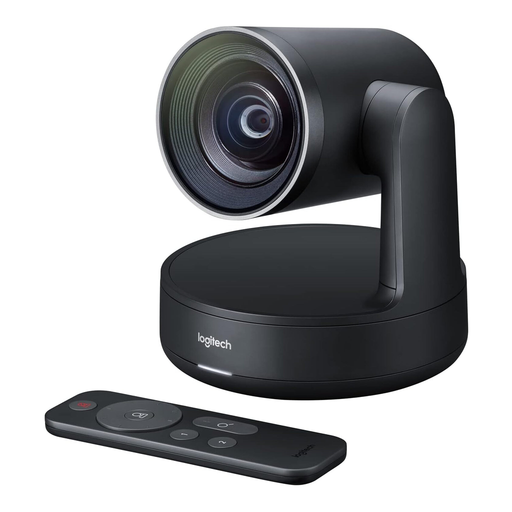
Logitech Conference Camera Rally 960-001227

Logitech Conference Camera Rally 960-001227

This conference camera may be suitable if its intended use, your seating plan and the connection you need are right for your planned meeting.

View at Joybuy

Frequently asked questions

Will a webcam work for everyone around a club table?

A personal webcam may be suitable if one person is doing most of the talking from a laptop. If several people are speaking from different seats, test the field of view and sound from the furthest seat. Jabra describes the PanaCast 20 specifically as a personal video solution.

What should you set up before your first meeting?

Choose where to position the camera and select the right video and audio devices in your conferencing software. For the Meeting Owl 3, Owl Labs specifies a power supply, USB-C and setup through a mobile app; Logitech says MeetUp 2 can be used with a room PC or your own laptop.

How can you avoid accidentally capturing your shared home?

Limit the frame to your group and agree the camera’s position with your housemates. The Data Protection Conference notes that image or sound from people in the surrounding area who aren’t taking part may also be processed. A lens cover blocks the camera when it isn’t in use.

Can you record a club video call in a shared home without further consideration?

Buying a camera doesn’t in itself mean you can record a call. The Data Protection Conference covers recordings of organisations’ video conferences separately, noting that you should check the legal basis and whether consent is required. Whether the meeting is purely private or organised by a club may affect how it is classified, so check the requirements before recording.

What happens if the camera develops a fault?

For a consumer purchase, statutory rights should be distinguished from a voluntary guarantee. The Consumer Advice Centre explains that statutory rights apply against the seller; whether the buyer is the club or an individual may be relevant to how the purchase is classified.