Who is this choice relevant to?

Listening alone in a noisy office

If your main aim is to follow the talk, check whether you can hear it clearly through open playback at your desk despite the background noise. The Federal Institute for Occupational Safety and Health describes unwanted noise as a source of stress when working in an office.

A small group listening and asking questions

If several people are listening together or asking questions, microphone pickup, speaker placement and simultaneous speech matter as well as playback. Jabra and EPOS list full-duplex audio as a feature on some models; you should still assess whether the device suits your particular room.

People switching between devices

If you switch between an office computer and a mobile device, the connection needs to work with the version of each device you use. HP distinguishes between USB on a PC and Bluetooth on a smartphone for the Poly Sync 20; a Bluetooth PC adapter is listed for the Sync 20+.

What should you look for when buying?

Conference speaker

A good fit if: You can play the talk out loud and several people want to listen or ask questions.

The trade-off: The audio can be heard around the room and may be drowned out by office noise; test how clear it is from the seat you plan to use.

Headset or a quieter spot

A good fit if: You’re listening on your own, don’t want others to hear, or the open speaker has to compete with too much background noise.

The trade-off: A headset won’t play the talk for a group around a table; finding a quieter spot depends on a suitable room or desk being available.

Priority What to check when buying Who is this important to?
Following a talk despite office noise Assess speech clarity at your actual desk, taking the speaker’s position and room noise into account. If I’m listening on my own in a noisy office, I need to be able to understand the speech without simply turning the volume up higher and higher. Around 33% of consumers put clear audio first.
Making sure my questions can be heard clearly Check microphone pickup and placement for your seating arrangement; test simultaneous speech on the specific device. If I’m asking questions with others around a table, the presenter needs to be able to hear my voice despite the background noise. Around 27% of consumers prioritise being able to ask questions clearly.
Avoiding disturbing others with open playback Check whether open playback is suitable in a shared office; if needed, consider personal listening or finding a quieter spot. If I’m taking part on my own or don’t want my colleagues to hear, I don’t want to play the talk out loud in the room. Around 27% of consumers prioritise listening without disturbance or sharing the audio publicly.
Taking part without connection problems Check the USB connection and any adapters required for the version you’re buying; confirm Bluetooth compatibility with your device. If I switch between a computer and a mobile device, the connection needs to work with my devices. Around 13% of consumers prioritise connectivity and switching between devices.

Common misconceptions

  • Confusing microphone noise cancellation with quieter listening

    A feature that processes your outgoing voice doesn’t tell you whether you’ll hear the talk clearly through an open speaker against the noise in the room.

    First decide whether open playback is right for you. Then test how clearly you can hear a conference speaker from the spot where you plan to sit.

  • Assuming Bluetooth on a smartphone means wireless use with a PC

    HP distinguishes between Bluetooth on a smartphone with the Poly Sync 20 and the additional Bluetooth PC adapter supplied with the Sync 20+ version. The two versions aren’t interchangeable.

    Check the full version name, what’s included in the box and the connection required by your device.

    Depending on the version, you may need an additional adapter for your PC.

  • Using an AnkerWork PowerConf S3 A3302 without checking the serial number

    AnkerWork has warned that some A3302 devices may have battery problems that pose a fire risk. This warning applies to affected devices and shouldn’t be applied to the PowerConf S330 as a whole.

    For the A3302, check the serial number using the manufacturer’s recall process. If your device is affected, follow the recall instructions.

Relevant brands at a glance

Jabra

The Speak2 55 is a portable option for a small group asking questions, with connections for switching between a computer and a mobile device.

  • Jabra lists four beamforming microphones, full-duplex audio and a 50-mm speaker for the Speak2 55.
  • These manufacturer specifications don’t demonstrate independently measured performance in a noisy office. According to the datasheet, Microsoft Teams certification depends on the version.

HP Poly

The Sync range includes conference speakers for different table and room sizes; HP describes the Sync 20 as an option for people who work in different locations.

  • HP lists USB for PC, Bluetooth for smartphones, three built-in microphones and a microphone range of up to 2 m for the Sync 20.
  • The range is a manufacturer specification, not a measurement for your particular office. A Bluetooth PC adapter is also listed for the Sync 20+; check the exact version.

EPOS

The EXPAND 40 may suit a group that needs USB-C or Bluetooth connectivity and support for people speaking at the same time.

  • EPOS describes the model as having three beamforming microphones, noise processing, full-duplex audio, USB-C and Bluetooth.
  • The manufacturer’s description doesn’t prove that it offers clearer audio than other models, or specify the conditions of a particular German retail version.

AnkerWork

The PowerConf S330 is a wired USB option; the PowerConf S3 A3302 is a different model range that can also connect via Bluetooth.

  • Anker lists USB-C with a USB-A adapter and four microphones for the S330.
  • AnkerWork has issued a recall for certain A3302 devices because of possible battery problems. For this model, the serial number is what matters; the warning doesn’t apply to the S330 as a whole.

Joybuy products for this topic

This selection includes personal listening as an alternative to an open speaker, as well as conference speakers for taking part and asking questions.
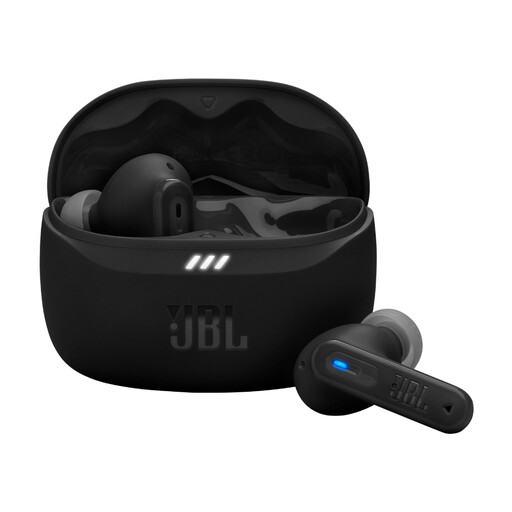
JBL Tune Beam 2, Black

JBL Tune Beam 2 (Black)

A personal listening alternative if you don’t want to play the talk out loud in the office; it isn’t designed for sharing audio around a table.

Joybuy

Insta360 Wave AI Bluetooth Conference Speakerphone, White

Insta360 Wave AI Bluetooth Conference Speakerphone, White

For an open discussion where people may ask questions; assess how clear the audio is from the spot where you plan to sit, as a microphone feature alone doesn’t tell you how well you’ll hear the talk against room noise.

Listed in the product name: Bluetooth; colour: White.

Joybuy

EMEET 8-Mic Bluetooth Conference Speaker, 360° Voice Pickup, Dual Connection, 5W Speaker Lunaplus

EMEET 8-Mic Bluetooth Conference Speaker, 360° Voice Pickup, Dual Connection, 5W Speaker Lunaplus

For an open discussion where several people want to ask questions; check how clear the speech is at your actual workplace.

Listed in the product name: 8-Mic, Bluetooth, 360° Voice Pickup, Dual Connection and 5W Speaker.

Joybuy

Frequently asked questions

Does a speakerphone’s noise cancellation block out office noise when you’re listening?

No, that doesn’t follow from the microphone features described. According to the respective manufacturers, they affect how voices are picked up and transmitted. To find out whether you can hear the talk clearly through an open speaker, test it from the spot where you plan to sit.

When is a headset a better choice than a conference speaker?

A headset or a quieter spot is likely to suit you better if you’re listening on your own, don’t want others to hear, or office noise is drowning out the open playback. A headset, however, won’t play the audio for a group around a table who want to ask questions.

How should you set up the speaker before the talk?

Before the talk starts, check the USB connection or Bluetooth pairing on the device you’ll be using. Select the speaker and microphone in your presentation software, then test the audio and ask a quick question. According to HP, the Poly Sync 20 connects to a smartphone via Bluetooth; a Bluetooth PC adapter is listed for the Sync 20+.

What should you bear in mind with an AnkerWork PowerConf S3 with model number A3302?

AnkerWork has warned that some A3302 devices may have battery problems that pose a fire risk. Check the 16-digit serial number using the manufacturer’s recall process, and follow its recall instructions if your device is affected. The warning applies to affected A3302 devices, not to all conference speakers.