Who is this relevant to?

People joining alone from an open-plan office

If you want to discuss ideas for a piece of writing at short notice, your contributions need to come across clearly. The Federal Institute for Occupational Safety and Health notes that intelligible speech from the surrounding environment can be a source of distraction during office work. Microphone features alone therefore don’t tell you how well a device will perform at your particular desk.

People sharing confidential contributions

If workshop content isn’t meant for people nearby, open speaker playback is an important factor to consider. The Conference of Independent Data Protection Authorities and the Federal Commissioner for Data Protection and Freedom of Information point out that video calls can also involve data relating to people in the surrounding area.

Small groups around the same table

If several people will be speaking and listening together, check that the distances between seats are within the microphone’s range for your planned layout. HP states that the Poly Sync 20 has a microphone range of up to 2 m; EPOS and Jabra also provide specifications for devices designed for group conversations.

What should you look for when buying?

Conference speakerphone on the table

A good fit if: Several people are joining together and it’s fine for their contributions to be heard in the room. Check that the microphone range covers the seats and test the audio in typical office noise.

The trade-off: Hands-free group conversation means open playback, and the microphone may also pick up voices from nearby.

Headset or quiet room for one person

A good fit if: You’re joining alone, nearby conversations are distracting or workshop contributions shouldn’t be played aloud.

The trade-off: A single headset isn’t a shared listening and speaking solution for a group around a table. If conversations nearby are distracting, you may also need a quieter room.

Priority What to check before buying Who it matters to most
Clear contributions Check the microphone arrangement and noise reduction; make a test call from the intended location. If I’m speaking on my own among other conversations, I want my contributions to come across clearly. Around 36% of consumers prioritise this when buying.
Confidentiality Check whether other people are allowed to listen in; consider using a headset or a separate room if needed. If workshop content isn’t meant for people nearby, I don’t want it played aloud in the office. Around 29% of consumers put confidentiality first.
Group conversation Check the distance between seats against the stated microphone range and test how well the device handles people taking turns. If several people are working together around a table, everyone should be able to speak and listen comfortably in their seat. Around 21% of consumers place particular importance on group conversation when buying.
Connections and moving between workspaces Check USB-A or USB-C, Bluetooth, adapters and what’s included with the specific variant. If I switch between a laptop, mobile device and workspaces, I want to know which connections the particular variant actually supports. Around 14% of consumers prioritise having the right device connection.

Common pitfalls

  • Assuming noise cancellation means a quiet office

    According to the Federal Institute for Occupational Safety and Health, intelligible speech from the surrounding environment can be distracting during office work. So manufacturers’ claims about microphones and noise filters don’t guarantee that a workshop will sound clear at your particular desk.

    Test the audio in typical office conditions or plan to use a quieter space.

    You may need access to an additional quiet meeting space in your day-to-day work.

  • Assuming products in the same range include the same adapter

    The PC connection differs between the HP Poly Sync 20 and Sync 20+; the PC adapter supplied with the Jabra Speak2 75 also depends on the variant.

    Check the full model name and what’s included with the specific variant, not just the range name.

    If the variant doesn’t include an adapter you need for your planned connection, you’ll have to source one separately.

  • Confusing suitability for groups with confidentiality

    A speakerphone on the table makes workshop contributions audible to people in the room; its microphone may also pick up sound from the surrounding area. The Conference of Independent Data Protection Authorities notes that video calls can involve data relating to people who aren’t taking part.

    If contributions shouldn’t be heard by others, choose a headset or a separate room.

Key brands at a glance

Jabra

The Speak2 range includes options for using on the go at a table; Speak 510 is an older range with an omnidirectional microphone.

  • Jabra lists four beamforming microphones, full-duplex audio, and USB-A and USB-C connections for the Speak2 55.
  • The PC adapter and platform certification for the Speak2 75 depend on the variant. Manufacturer claims about range and noise filtering aren’t independent measurements of performance in a noisy office.

HP Poly

The Sync range covers personal use and small meetings; the Sync 20 and Sync 20+ differ in several ways, including their PC connection.

  • HP lists a controllable three-microphone array and a range of up to 2 m for the Sync 20.
  • If you want to use the Sync 20+ wirelessly with a PC, check what’s included and compare it with the Sync 20. The stated range doesn’t guarantee voice quality in a noisy office.

EPOS

The EXPAND 40 is a tabletop solution with USB-C and Bluetooth connectivity.

  • EPOS lists three beamforming microphones and full-duplex audio for the EXPAND 40.
  • EPOS’s claims about reducing room echo and background noise are manufacturer statements, not the results of an independent comparison in noisy office conditions.

EMEET

The OfficeCore M3 is a USB and Bluetooth speakerphone that the manufacturer says is designed to pick up a group.

  • EMEET lists four omnidirectional microphones and full-duplex audio.
  • The advertised 360° pickup range of up to 5 m doesn’t prove that conversations from other people in the office will be filtered out.

AnkerWork

According to the manufacturer, PowerConf S3 combines a portable speakerphone for groups with USB-C connectivity to a computer and Bluetooth to a mobile phone.

  • AnkerWork lists six microphones and up to 24 hours of talk time.
  • These manufacturer claims aren’t independent evidence of speech clarity during office conversations.

Joybuy products for workshops and the office

This selection includes conference speakerphones for group conversations around a table, as well as personal earbuds for joining on your own.

Insta360 Wave AI Conference Speakerphone, Bluetooth, White

Insta360 Wave AI Conference Speakerphone, Bluetooth, White

Designed as a conference speakerphone for several people around a table; people nearby may be able to hear the open playback in an office.

Specifications include eight microphones, Bluetooth, automatic echo cancellation and several microphone modes.

The stated voice pickup range is up to 16,4 ft; product information says that up to three devices can be daisy-chained.

It has 32 GB of storage for audio recordings. Bear this feature in mind if workshop contributions need to remain confidential.

Joybuy

EMEET 8-Mic Bluetooth Conference Speaker Lunaplus

EMEET 8-Mic Bluetooth Conference Speaker Lunaplus

Designed for group conversations around a table; check the distances between seats and remember that open playback can be heard in the room.

Specifications include eight microphones, USB-C, Bluetooth and a microphone pickup range of 3 m.

The product name lists 360° Voice Pickup, AI Noise Reduction, Dual Connection and a 5W speaker; muting via the device controls is also listed.

Joybuy
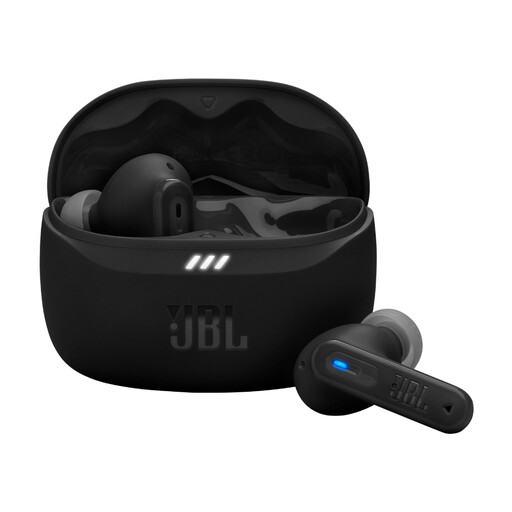
JBL Tune Beam 2, Black

JBL Tune Beam 2, Black

Personal earbuds for joining on your own, rather than a shared listening solution around a table; they also avoid the need for open speaker playback.

Specifications include adaptive noise cancelling, an ambient mode and Bluetooth multipoint.

Each earbud has two beamforming microphones for calls; three sizes of ear tips are listed.

Joybuy

Frequently asked questions

How do I set up a conference speakerphone for a workshop?

Connect your laptop using the USB connection intended for your variant, select the device as both the microphone and speaker in your workshop app, then check both with a test call. For PowerConf devices, AnkerWork describes switching between audio sources when USB and Bluetooth are connected at the same time.

What can I do if other people say my voice sounds distorted?

First, check the device’s position and mute setting, then make another test call. For affected PowerConf models, AnkerWork also recommends testing USB instead of Bluetooth, checking the firmware and considering possible wireless interference when using Bluetooth. These steps don’t guarantee that office conversations will be filtered out.

Can I use a conference speakerphone if workshop contributions are confidential?

A tabletop speaker plays audio into the room, so it isn’t suitable if people nearby shouldn’t hear the contributions. The Conference of Independent Data Protection Authorities also notes that video calls can involve data relating to people in the surrounding area who aren’t taking part. In these situations, choose a headset or a separate room.

What rights do I have if a device bought online is faulty?

If new goods are faulty, consumers can generally assert their statutory rights against the seller within two years of receiving them; this is separate from a manufacturer’s guarantee. For distance purchases, you generally have a 14-day right to cancel, subject to statutory exceptions. For ordinary purchases of goods, this period starts when you receive them. The Verbraucherzentrale explains these statutory rights; sections 312g, 355 and 356 of the German Civil Code (BGB) set out the right to cancel and the time limit.