Design review around a shared table
When several people are discussing the same design, the position of the device and a pickup range suited to the specific model are key. Jabra and HP Poly describe these features for their respective models.


For a design review where several people around the same table are speaking to remote colleagues, choose a conference speakerphone that suits the table size, microphone pickup range and connection to the meeting computer – rather than relying solely on a noise-cancelling claim. If only one person is taking part, or confidentiality is especially important, a headset or a quieter spot may be more suitable. The German Federal Institute for Occupational Safety and Health shows that, in a modelled open-plan office, the layout of workstations also affects how people perceive sound.
When several people are discussing the same design, the position of the device and a pickup range suited to the specific model are key. Jabra and HP Poly describe these features for their respective models.
Background conversations and the position of the meeting area affect what people can hear. For a modelled open-plan office, the German Federal Institute for Occupational Safety and Health highlights how workstation layout influences sound perception.
If you use different computers or rooms, check the connection, the exact device variant and, where relevant, battery operation. Jabra, HP Poly, EPOS and Yealink list connection and feature specifications that vary by model or variant.
In a noisy office, don’t base your choice solely on an advertised noise-reduction feature. First consider the room layout and where the device will be used, then how people will take turns speaking and how it connects.
A good fit if: The group meets around one table using a computer, and a fixed connection matters more than freedom of movement.
Things to consider: Cable length and the computer’s ports limit where you can position it. Jabra recommends USB to connect the Speak2 55 to a computer; this does not necessarily apply to other models.
A good fit if: The group moves between tables or rooms, or you want to connect a mobile phone.
Things to consider: Check the exact USB, Bluetooth and dongle configuration, as well as the manufacturer’s stated talk time. Accessories and platform certification may vary by variant.
A good fit if: One person is speaking, confidentiality comes first, or nearby conversations drown out the discussion around the table.
Things to consider: A headset doesn’t provide a shared microphone for several people around the table. Finding a quieter space may require some coordination.
| Priority | What to check when buying | Who it matters most to |
|---|---|---|
| Clear speech despite office noise | Documented microphone and echo features, as well as the actual meeting space; manufacturer claims are not an independent listening test in your own office. | When I’m talking to colleagues in a noisy office, I want to know whether their voices will remain clear despite background conversations. Around 36% of consumers say clear speech despite office noise is their main priority. |
| Voices of several people | The pickup range of the exact model and the recommended table position; a range claim does not prove better speech quality in an office. | When different people speak during a design review, remote participants should be able to follow the changes in speaker clearly. Around 29% of consumers prioritise hearing several people’s voices. |
| Connections and switching between devices | USB-A or USB-C, Bluetooth compatibility with your chosen device, and the dongle and certification for the specific variant. | When I switch between computers, a mobile phone or meeting spaces, the connection needs to work with my devices. Around 21% of consumers make switching between devices their main priority. |
| What’s included and aftercare | Supplied accessories and the terms of any voluntary warranty; statutory rights for consumer purchases are separate. | When I use a device regularly or on the go, I want to know what’s included and who to contact if there’s a fault. Around 14% of consumers prioritise balancing cost with aftercare. |
Manufacturer claims about signal processing don’t prove that a device will eliminate every background conversation in your office. The layout of the meeting area and the position of other noise sources can also affect how people perceive sound, as shown by the German Federal Institute for Occupational Safety and Health in a modelled open-plan office.
Start by checking the table position and sources of noise. Don’t treat manufacturer claims as an independent guarantee of clear speech in your office.
Jabra recommends USB to connect the Speak2 55 to a computer. With the EPOS EXPAND 40 and Yealink SP92, the dongle and certification may depend on the variant you choose.
Check the full model name, computer connection, platform certification and what’s included in the box.
For a consumer purchase, statutory rights apply against the seller; a voluntary warranty is separate. The German consumer advice centre also makes this distinction.
Keep your proof of purchase and the exact variant name. If there’s a fault, check which rights apply to your purchase and who to contact.
The Speak2 55 is a documented option for smaller groups around a shared table, with USB for a computer and Bluetooth for a mobile device.
The Sync 20 USB-A is described as a compact USB and Bluetooth option for a computer and a mobile phone.
Depending on the version, the EXPAND 40 offers USB-C and Bluetooth connections, with different dongle or certification options.
The SP92 is a USB and Bluetooth option, with what’s included varying by package.
The OfficeCore M3 is positioned as a portable option with several connection types.
The PowerConf S3 is another USB-C and Bluetooth option for group meetings.
The Joybuy products below are described for group meetings around a table and include speakerphones and an all-in-one conference device.
 Image unavailable
For group meetings around a table where several people speak through the same meeting device.
The product specifications list Bluetooth, an 8-microphone array and five directional pickup modes. The stated AI noise cancellation is a manufacturer claim, not independent proof of its effectiveness.
 Image unavailable
For group meetings around a table where USB-C or Bluetooth may be suitable connection options.
The product specifications list eight microphones, USB-C, Bluetooth and up to 10 hours of talk time. 360° voice pickup and AI noise reduction are manufacturer claims, not independent measurements in a noisy office.
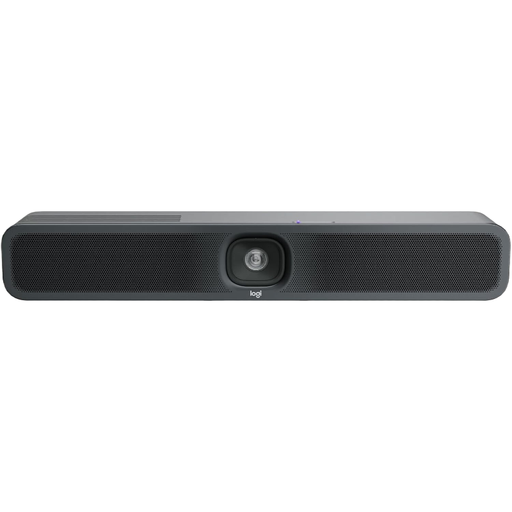 Image unavailable
Described as an all-in-one conference device for small meeting rooms, with a microphone and speaker.
The product description lists a camera, a USB connection and tabletop or wall mounting. The stated AI noise cancellation is a product claim, not an independent measurement in a specific office.
Position it according to the pickup range of the specific model. For the Speak2 55, Jabra recommends placing it in the middle of the table, 0.5 to 2.3 m from the participants; these measurements don’t automatically apply to other devices.
Select the device as both the playback and recording device in your operating system and meeting app. Jabra lists this step for the Speak2 55; for other models, follow the relevant instructions.
Recording is not always permitted: § 201 StGB makes it an offence to record another person’s privately spoken words without authorisation, as well as certain uses of such a recording. Beforehand, agree with everyone involved whether a recording will be made and on what basis; using the device as a speakerphone is not the same as making a recording.
Statutory rights are against the seller; a voluntary warranty is separate. Also check the warranty terms and the service process for the specific variant you bought.
Charge the battery before a wireless meeting and check the charge level as described in the device instructions. Jabra says the Speak2 55 has a battery indicator and switches off automatically after a period of inactivity; battery life and care instructions may differ for other models.