Adventure gamers with a wish list
If there are particular story-driven games you want to play, first check which platforms they’re available on, then choose the right hardware.


Start by choosing the adventure games you actually want to play, then consider the screen, play modes and disc drive. A more powerful console won’t eliminate reflections or guarantee that dark scenes are easy to see, so check the reflections, brightness and HDR settings on the screen you’ll be using. If you want to play without being tied to your TV, a hybrid console such as the Nintendo Switch 2 offers a different way to play. Check your games’ compatibility, too, and make sure its screen is easy to read where you plan to play.
If there are particular story-driven games you want to play, first check which platforms they’re available on, then choose the right hardware.
If you often play on your TV in daylight, reflections and how clearly you can see dark scenes matter too. Factor in your screen and HDR settings when making your decision.
If you want to carry on playing without a TV, check a hybrid console’s TV, tabletop and handheld modes, and whether its own screen is easy to read where you play.
Start by deciding which games you want and where you’ll play. Then you can compare screens, disc drives and console variants more effectively.
| What matters to you | What to check before buying | Who is this especially important for? |
|---|---|---|
| Games you want to play | Check which platform version is available for each title, and check compatibility for older games. | If I want to play specific adventures, I’ll compare graphics features afterwards. Around 36% of consumers would put the availability of the games they want first. |
| Dark scenes in daylight | Assess the screen in your room’s lighting; check reflections and brightness separately, then review the HDR settings. | If I want to see dark scenes clearly in daylight, I’ll consider the screen I’ll actually be using. Around 29% of consumers would prioritise visibility in a bright room. |
| Discs and future costs | Compare the full model name, disc drive and what’s included; check whether you want to use any compatible discs you already own. | If I have a disc collection or need a disc drive, I’ll check the exact variant rather than just the console family name. Around 21% of consumers would prioritise considering the disc drive and possible extra purchases. |
| Playing without a TV | Check whether your games run on the hybrid console and whether its built-in screen is easy to read where you plan to play. | If I don’t want to be tied to my TV all the time, having a screen of my own matters. Around 14% of consumers would put playing without a TV first. |
Reflections also depend on your screen and the ambient light. A more powerful console alone won’t automatically make dark scenes easier to see.
First assess the screen where you’ll actually play, and consider how the light falls in the room. Then choose a console based on the games and features you want.
The Xbox Series X is also available as a Digital Edition. The PS5 Pro comes without a disc drive; a compatible drive is available separately.
Check the full variant name and what’s included. If you want to use discs, make sure a compatible drive is included.
For the PS5 Pro, a compatible disc drive is a separate purchase if you want to use discs.
Nintendo states that the Switch 2 supports up to 60 fps at 4K output; 120 fps is supported at lower output resolutions of 1080p or 1440p. According to PlayStation Support, the HDR picture quality you can enjoy on a PS5 depends on your entire screen setup.
Check the game, output mode and screen together rather than relying on the resolution figure alone.
The PS5 family gives you access to games in the PlayStation catalogue. The PS5 Pro is a variant designed for games optimised to take advantage of it.
The Xbox Series X and Series S differ in areas including their stated gaming resolution and disc drive options.
The Switch 2 combines compatible games with TV, tabletop and handheld modes.
The product cards below feature Nintendo Switch 2 and PlayStation 5. Check that the included games and the specific console variant meet your needs.
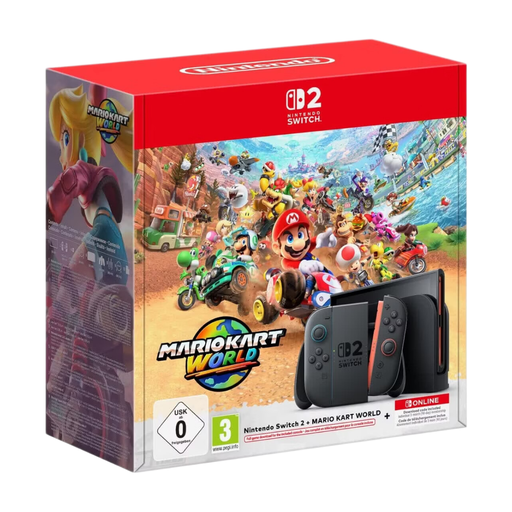 No product image available
A good option if you want to play on a screen of your own as well as on your TV, and the included game suits your choice.
The product title lists a 1080p screen, HDR and TV output of up to 4K. Nintendo states that 4K supports up to 60 fps; 120 fps is supported at 1080p or 1440p. The bundle includes Mario Kart World as a download and three months of Nintendo Switch Online.
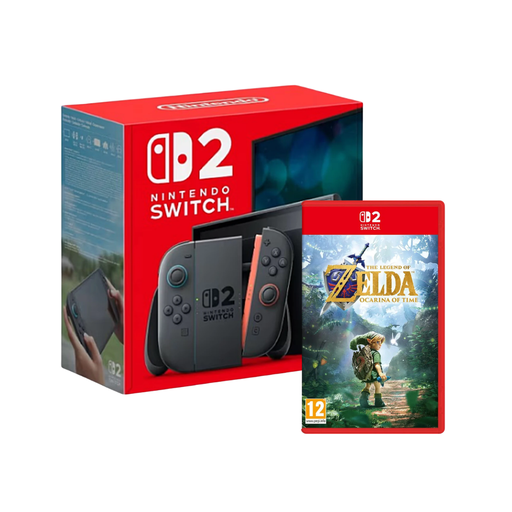 No product image available
A good option if you’re looking for a Switch 2 with the adventure named in the product title and want to play without a TV, too.
The title lists a Nintendo Switch 2 (EU) and The Legend of Zelda: Ocarina of Time as the game. Nintendo lists TV, tabletop and handheld modes; check compatibility for each older Switch game.
 No product image available
A good option if you want to switch between your TV and your own screen without choosing a particular game bundle.
Nintendo lists a 7.9-inch LCD screen as well as TV, tabletop and handheld modes. TV output supports up to 4K at 60 fps; the console supports 120 fps at 1080p or 1440p. Check how easy it is to read the built-in screen in your own bright playing environment.
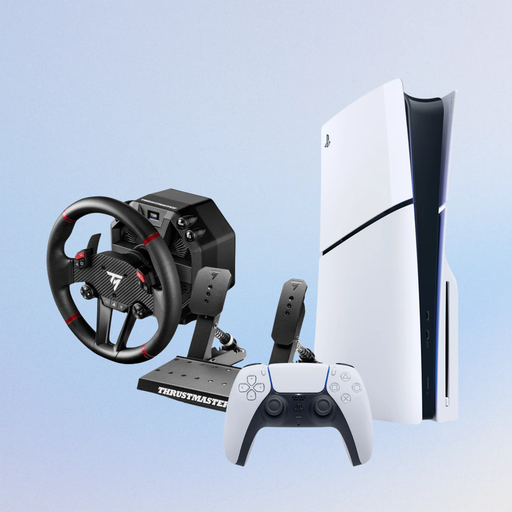 No product image available
A good option if the games you want are available for PS5, you want to use discs and the racing wheel bundle named in the title suits your needs.
The product title lists a PS5 Slim Disc Edition with 1 TB and a Thrustmaster T598-P Direct Axial Drive Force Feedback Racing Wheel. PlayStation Support notes that the HDR picture quality you can enjoy depends on your entire screen setup.
 No product image available
A good option if the adventures you want are available for PS5 and you prefer digital games to discs.
The product title lists a PS5 Slim Digital Edition with 825 GB. This variant has no disc drive; the product details describe downloads. According to PlayStation Support, the HDR picture quality you can enjoy depends on your entire screen setup.
No. According to PlayStation Support, the HDR picture quality you can enjoy depends on your entire screen setup; you also need to consider reflections from ambient light. Check your screen and HDR settings where you’ll actually play.
You’ll find the HDR setting on your PS5 under “Settings > Screen and Video > Video Output > HDR”. According to Sony, games and apps that aren’t HDR-compatible remain in SDR when the setting is “On When Supported”.
Check first: Nintendo recommends checking the compatibility of each Switch game you want to play with Switch 2 individually.
Check the age rating of the specific game. The USK explains the age from which a game is considered suitable from a youth protection perspective; the rating applies to the game, not to consoles in general.