Who is this selection for?

A co-op duo in front of the TV

If you want to play an adventure together on one console, start by checking the specific game version, its couch co-op mode and the controllers you’ll need. For example, PlayStation describes It Takes Two as supporting couch co-op with split-screen.

A co-op and media household

If you want to play your own videos, photos or music from a USB drive as well as games together, compare the file formats and USB requirements with your files. PlayStation Support and Xbox Support each document their own playback methods and requirements.

A flexible gaming group

If you want to switch between the TV, tabletop mode and playing on multiple devices, distinguish couch co-op from local wireless play. Nintendo UK outlines the different ways to use Switch 2 and the requirements for GameShare.

What should you consider when buying?

PS5 with the right disc drive

A good fit if: a PS5 adventure you’ve chosen offers couch co-op, and you also want to play USB files and film discs.

What to consider: The disc drive and USB format need to be compatible with the specific console and storage device you have.

Xbox Series X|S

A good fit if: you want to combine USB media with an Xbox game that supports local co-op.

What to consider: A supported file extension doesn’t guarantee that every file will play. The Series S and digital Series X aren’t suitable for playing film discs.

Nintendo Switch 2

A good fit if: compatible games and the ability to switch between TV, tabletop and handheld modes are your priorities.

What to consider: GameShare requires compatible software and doesn’t guarantee couch co-op or playback of your own USB files.

Buying priority What to look for Who is it important to?
An adventure with couch co-op Check whether the specific game supports couch co-op or split-screen, and how many players can play on one device. PlayStation, for example, describes these modes for It Takes Two. If you want to play an adventure together on one screen, the game’s mode matters more than a general multiplayer label. Around 40% of consumers put couch co-op first.
Your own media files Check the file system and video and audio formats against the requirements. Sony specifies FAT32 or exFAT for PS5 USB video; Microsoft lists supported Media Player file types and notes that some file contents may not be supported. If your videos, photos or music are on a USB drive, you’ll want to check playback in advance using sample files of your own. Around 30% of consumers prioritise their own media files.
Where and what you play on For the game in question, check TV or tabletop mode, controllers and, where relevant, the number of consoles. According to Nintendo UK, GameShare requires compatible software and a Switch 2 to act as the host. If you want to play on the TV, in tabletop mode or across multiple consoles depending on the situation, you’ll need the right mode for your group. Around 20% of consumers prioritise flexible ways to play.
Discs and additional purchases Check your disc collection and how you want to use it against the specific model. Xbox Series X is available with or without a disc drive, while Series S is digital; the disc drive configuration is also important for PS5 models. If you want to keep using your existing film or game discs, choose a model that supports them and factor in any accessories you’ll need. Around 10% of consumers prioritise disc playback and predictable extra costs.

Common misconceptions

  • “Local multiplayer” means couch co-op

    A game may connect multiple consoles over local wireless without letting two people play split-screen on one device. GameShare and couch co-op are different ways to play.

    Before you buy, check the exact local mode and the number of players supported on one console in the game you’re interested in.

  • A USB port will play any video

    A supported file extension alone doesn’t guarantee that a file’s video and audio content will play. Xbox Support notes that some content may not be supported.

    Check a typical file, including its audio track, and your USB storage device against the manufacturer’s format specifications.

  • Every console model can play film discs

    Digital models don’t have a built-in disc drive, and whether a PS5 can take a disc drive depends on its model group. So the product family name alone won’t tell you whether it can play discs.

    Check the exact model and whether it has a disc drive before planning to use your disc collection.

Key brands at a glance

Sony PlayStation

One option for compatible PS5 adventures with couch co-op and supported USB media. The specific console model determines the disc drive configuration.

  • PlayStation describes It Takes Two as supporting couch or online co-op with split-screen.
  • USB media must meet the file system and format requirements, and playing discs requires a compatible disc drive.

Microsoft Xbox

The Series X|S is worth considering if you want to combine the Media Player with compatible Xbox games that support local co-op.

  • Xbox Support explains how to play music, videos and pictures from USB using the Media Player.
  • Even with a supported file extension, some file contents may cause problems. Digital models aren’t suitable for playing film discs.

Nintendo

Switch 2 is an option for compatible games in TV, tabletop and handheld modes, as well as GameShare with supported software.

  • Its documented play modes give you different ways to set up a gaming session together.
  • GameShare isn’t the same as couch co-op, and you shouldn’t assume you can play your own USB media files.

Joybuy products on this topic

The products below are retro handhelds and HDMI games consoles. Their product details alone don’t confirm couch co-op for a particular adventure or playback of your own media files. Before choosing, check that these features meet your specific needs.
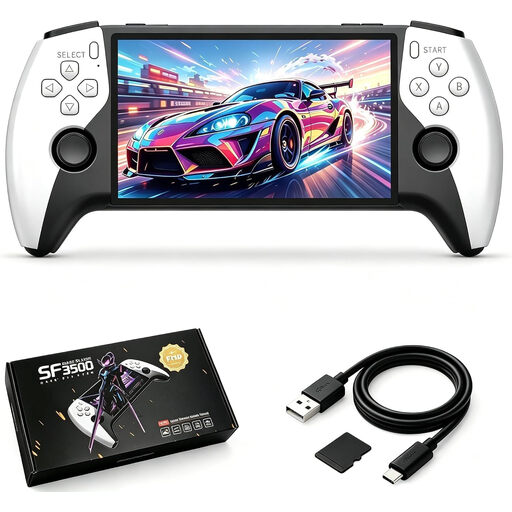
SF3500 retro handheld with 5.5-inch IPS screen and 32 GB storage

SF3500 retro handheld, 5.5 inches, 32 GB

Described as a portable gaming device; check separately whether a specific game supports local multiplayer.

5.5-inch IPS screen; 32 GB storage; USB-C charging.

Joybuy
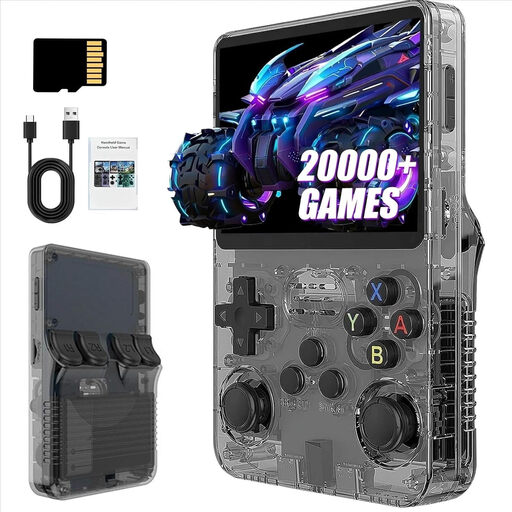
R36S Pro retro handheld with 3.5-inch screen and 13 GB storage

R36S Pro retro handheld, 3.5 inches, 13 GB

Described as a portable handheld; check whether the specific game supports local multiplayer for shared adventures.

3.5-inch screen; 13 GB storage.

Joybuy
R36S Pro retro handheld with 3.5-inch screen and 31 GB storage

R36S Pro retro handheld, 3.5 inches, 31 GB

Described as a portable handheld; check whether the specific game supports local multiplayer for shared adventures.

3.5-inch screen; 31 GB storage.

Joybuy

Retro games console with HDMI output and two wireless controllers

Retro games console with HDMI and two wireless controllers

Could be an option for gaming on the TV; check whether the game you want supports couch co-op and the number of players on one device.

HDMI output; two wireless controllers.

Joybuy
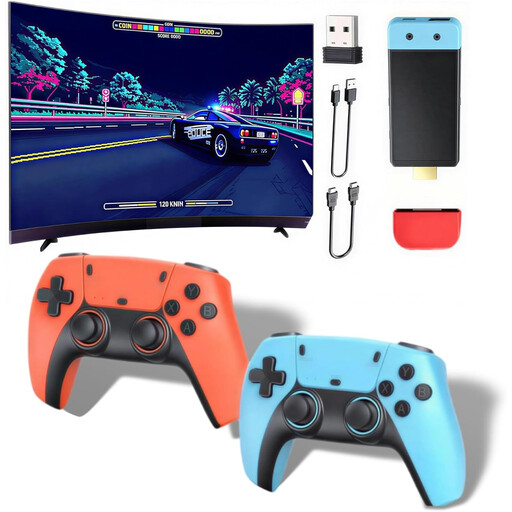
Retro games console with HDMI output, 1080p and 720p resolution claims, and wireless controllers

Retro games console with HDMI, 1080p/720p and wireless controllers

Described as suitable for gaming together on the TV; check that the game you want supports the local mode you need.

HDMI output; 1080p/720p resolution claim; dual-core Cortex-A7; DDR3 256 MB. The controllers require four AAA batteries, which are not included.

Joybuy

Frequently asked questions

Is “local multiplayer” enough to guarantee two people can play on one TV?

No. Check specifically for couch co-op or split-screen, and the number of players supported on one device. Nintendo GameShare may instead connect supported games across multiple consoles over local wireless.

How can I check my video files before buying?

Compare the storage device’s format and the specific video and audio formats with the console manufacturer’s information. Sony specifies FAT32 or exFAT for PS5 USB video; Microsoft lists file types for the Media Player and notes that a file may still contain unsupported content.

Do I need an online subscription for couch co-op?

Not just to use local play. For It Takes Two, PlayStation distinguishes between couch and online co-op and says PS Plus is required for online play. Check the terms for the specific game, and distinguish local modes from online features.

What are the rules in Germany for games aimed at minors?

The age rating applies to the individual game, not to the console as a whole. According to the Federal Centre for the Protection of Children and Young People in the Media, games on physical media made available to minors must carry the appropriate rating. The USK notes that an age rating is not an educational recommendation.

What’s the difference between a fault and changing your mind after buying online?

For new goods that are faulty, your statutory rights are generally separate from any voluntary guarantee. Many online purchases of goods also generally come with a 14-day right to cancel; conditions and possible exceptions may depend on the purchase and the goods. The Verbraucherzentrale explains these rights separately.