Puzzle-solving duo on the TV
If you want to puzzle things out together on one screen, look first for games that explicitly support local co-op. Nintendo describes Snipperclips as a puzzle game for two players.


Start by choosing a console based on the puzzle games you actually want to play together. For each title, check that it supports local co-op, how many people can play and which controllers you’ll need. For Snipperclips on the TV, a TV-compatible Switch is a good fit; It Takes Two is also available on PS5 and Xbox Series X|S. Switch 2 has its own range of games, while a Steam Deck with a dock is better suited to anyone looking to build a more flexible Steam setup.
If you want to puzzle things out together on one screen, look first for games that explicitly support local co-op. Nintendo describes Snipperclips as a puzzle game for two players.
If you sometimes play as a pair and sometimes with more flatmates, check the player count and exactly which controllers each game requires. Nintendo says that Split Fiction needs one compatible controller per player.
If the TV isn’t always available, tabletop or handheld modes could be important. You can connect a Steam Deck to a shared screen with a docking station, but you’ll also need to plan for the right input devices.
Start by finding games that suit you, then check their local modes, player counts and controller requirements. Nintendo describes Snipperclips as a local puzzle game for two, while PlayStation lists It Takes Two as supporting couch co-op with split-screen.
| What matters to you | What to check before buying | Who should consider this? |
|---|---|---|
| Co-op puzzle games that suit you | Check the platform version, local co-op mode, player count and gameplay of each title. | If you want to solve puzzles together rather than just play online or side by side, the right local game mode matters. Around 36% of consumers put game suitability first. |
| Screen and controllers | Check TV output and make sure the number and type of controllers included match the game’s requirements. | If you’re playing on one screen as a pair or with a changing line-up, the controls and available controllers need to work for your group. Around 29% of consumers prioritise shared controls. |
| Games and accessories | Check whether your chosen console model has a disc drive and which games or extra controllers you’ll need. | If you want to use discs you already own or plan what you’ll need for two players, the exact contents of the package are important. Around 21% of consumers prioritise games and accessories. |
| Flexible place to play | Check TV, tabletop and handheld modes, and whether you’ll need a docking station for external display output. | If the flatshare TV isn’t always free, a setup you can use elsewhere can be helpful. Around 14% of consumers put flexibility over where they play first. |
Multiplayer could mean playing online rather than together on one console. What matters is the mode, player count and specific version of the game.
Before buying a console, check the details for the games you want and the versions available.
The controls you need depend on the game. Nintendo notes that Split Fiction requires each player to have a compatible controller, and you may need additional controllers.
Check the game’s control requirements against exactly what’s included in the bundle before choosing any extra accessories.
If the bundle doesn’t have everything you need, you may need to buy additional complete controllers.
The PS5 Digital Edition and Xbox Series S are all-digital. Microsoft also offers an Xbox Series X without a disc drive.
Before buying, check whether the specific model has a disc drive.
You can’t use disc games with a model that doesn’t have a disc drive.
The Switch family includes TV-compatible models, as well as Switch 2 with its own range of games.
The PS5 is a TV console option for local co-op adventures such as It Takes Two.
The Xbox Series S is an all-digital console, while the Series X is available with or without a disc drive.
The Steam Deck OLED is a portable way to play your Steam games, and you can connect it to a shared screen with a docking station.
The following Joybuy products include TV and hybrid consoles, as well as an HDMI game stick. Check the details for each puzzle game to see whether it supports local multiplayer.
 No image available
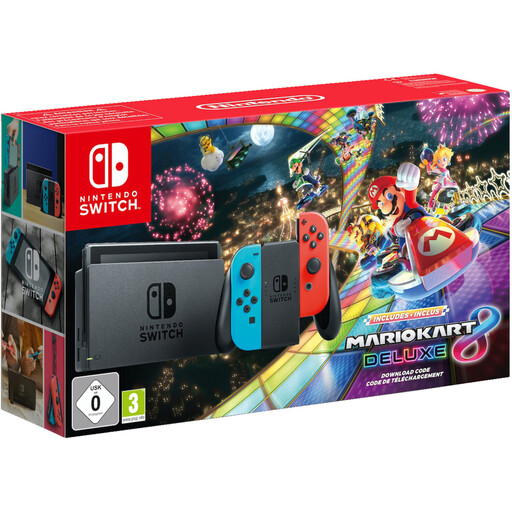
If you want to play in TV and tabletop modes, the product description mentions local play and split-screen. Check the local mode for the puzzle games you want to play.
Mario Kart 8 Deluxe is included. TV, tabletop and handheld modes are listed, along with Joy-Con controllers. The product description says up to 8 people can play locally and up to 12 online. Controller requirements vary by game.
 No image available
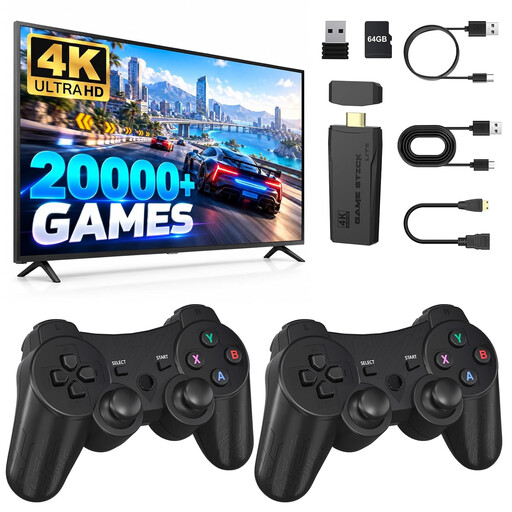
If you want to use an HDMI port on your TV, this game stick is designed for TV output and shared play, according to its description. Check whether it actually includes the puzzle games you want.
The description lists two 2.4 GHz wireless controllers, puzzle games and support for two-player games. Check which specific titles and local modes are available before choosing.
 No image available
If you want to switch between TV, tabletop and handheld play, the product description says the console supports all three modes.
Two Joy-Con 2 controllers and TV output are listed. Nintendo notes that some earlier Switch games may not be compatible, or may not be fully compatible, so check the titles you want to play.
Not just because you’re playing side by side: according to Electronic Arts, you don’t need an internet connection for local couch co-op in It Takes Two. If you’re playing online instead, check the requirements for online subscriptions separately.
Nintendo describes TV mode as using the dock supplied with Switch 2, which connects to a TV or monitor. You’ll need to remove the Joy-Con 2 controllers from the console. Nintendo notes that the Switch 2 console and the dock from the original Switch aren’t compatible.
If you buy in Germany, your statutory rights against the retailer are separate from any voluntary manufacturer’s warranty. The Verbraucherzentrale says that, in general, retailers are liable for faulty goods for two years. Keep your proof of purchase.
Yes. Check the age rating for each game if anyone under 18 will be playing. The Unterhaltungssoftware Selbstkontrolle explains that retailers must observe the sales restrictions associated with the ratings.