Who should think carefully about their console choice?

Fans of co-op adventures

You want to play through a story together on one console. Before buying, check whether the specific version of the game supports local co-op and which controllers it requires. Nintendo, PlayStation and Xbox list couch co-op with split-screen for selected titles.

Players in a bright living room

You play during the day in front of tall windows and want to avoid reflections. Take the screen, your seating position and where you could place the TV into account when choosing. Nintendo describes TV, tabletop and handheld modes for Switch 2, so playing somewhere else may be an option if the window light is an issue.

Buyers with an existing game collection

You want to keep playing games you already own. Check that the platform and specific game version are compatible, and whether your chosen console model has a disc drive. For example, the Xbox comparison page distinguishes between models with a disc drive and an all-digital option.

What should you look for when buying?

Nintendo Switch 2

A good fit if: you want to switch between the TV and another place to play, and your chosen game supports local co-op. Nintendo describes TV, tabletop and handheld modes.

Keep in mind: The Joy-Con 2 can only be used separately if the game and play style support that set-up. The console’s own screen can also reflect light.

PlayStation 5

A good fit if: you mostly play on a TV and are considering games such as It Takes Two or Split Fiction for two-player co-op. PlayStation describes these as couch co-op or split-screen adventures.

Keep in mind: The documented PS5 Digital Edition has no disc drive and includes one DualSense controller. Check what the game requires and what comes with the specific version you’re buying.

Xbox Series X or Series S

A good fit if: you want to play Xbox games; Xbox describes It Takes Two as couch co-op with split-screen.

Keep in mind: The compared models differ in features including the disc drive. Check the local mode for each game you’re interested in.

Buying consideration What to check Who it matters most to
Local co-op and controllers For the specific game and compatible platform, check for couch co-op, the player limit and the controllers required. Nintendo, PlayStation and Xbox provide these details for selected titles. If I want to play an adventure with someone else on one screen, I look for a confirmed local mode and compatible controllers. Around 33% of consumers put local co-op first.
Visibility in daylight Check the screen from your usual seat at the time you plan to play, and see whether windows or other light sources are reflected in it. RTINGS explains that a matte or glossy finish alone doesn’t fully describe how a screen handles reflections. If I play during the day in front of tall windows, I check the screen in the spot where I plan to use it rather than relying on the console’s specifications alone. Around 27% of consumers say a clear picture in daylight matters most to them.
Games and game formats Check that your existing games and the titles you want are compatible with the platform and specific game version. Also check whether the model has a disc drive. If I want to keep using games or discs I already own, I check that they’re compatible with the platform and disc drive before choosing. Around 20% of consumers put games and game formats first.
Controllers and features Compare what’s included with the controller requirements of the game. For extra Switch 2 storage, Nintendo lists compatible microSD Express Cards. If my game needs extra controllers or storage, I check exactly what’s included and which accessory standard is compatible. Around 20% of consumers say having everything they need and being able to manage extra purchases matters most.

Common buying mistakes

  • Assuming a high console resolution means a clear picture in front of a window

    Reflections from windows appear on the screen. Choosing a matte or glossy finish doesn’t fully explain how it handles reflections.

    Check the TV and its position in the daylight you usually play in. Then choose your console based on the games you want and how you plan to use it.

  • Assuming two controller halves will work for every two-player game

    Nintendo says that using Joy-Con 2 separately depends on the software and supported play style. The documented PS5 Digital Edition package includes one DualSense controller.

    Check the controller requirements for the game you want and what comes with the exact console version.

    Depending on the game, you may need another compatible controller.

  • Choosing a digital edition when you own game discs

    The PS5 Digital Edition described here and the Xbox Series S in the comparison don’t have a disc drive, so you can’t use your existing discs directly with these models.

    Before choosing a model, decide whether you want to play physical games and check the features of the specific model.

  • Choosing storage accessories based only on the name ‘microSD’

    Nintendo lists compatible microSD Express Cards for expanding Switch 2 storage.

    Before buying extra storage, make sure it meets the Express standard specified by Nintendo.

Key brands to consider

Nintendo

For buyers who want to play games on a TV or somewhere else, depending on the title.

  • Nintendo describes TV, tabletop and handheld modes for Switch 2. Depending on the software, Joy-Con 2 can be used separately.
  • Whether a specific co-op adventure works for two players with a particular controller set-up depends on the game version and play style. The screen specifications don’t confirm that it reduces reflections from windows.

Sony PlayStation

For buyers who mostly want to play confirmed two-player co-op adventures on a TV.

  • PlayStation describes It Takes Two as couch co-op and Split Fiction as a split-screen adventure for two.
  • The documented PS5 Digital Edition package includes one DualSense and has no disc drive. Check the game’s controller requirements and what comes with the version you choose.

Microsoft Xbox

For buyers who want to play Xbox titles together and choose between a console with a disc drive and an all-digital option.

  • Xbox describes It Takes Two as couch co-op with split-screen.
  • The difference between the Series X with a disc drive and the Series S without one doesn’t tell you whether every Xbox game supports local co-op.

Related products at Joybuy

The following Joybuy products are for console gaming on a TV and playing together. With retro consoles, check before buying that the game you want and its local multiplayer mode are actually supported.
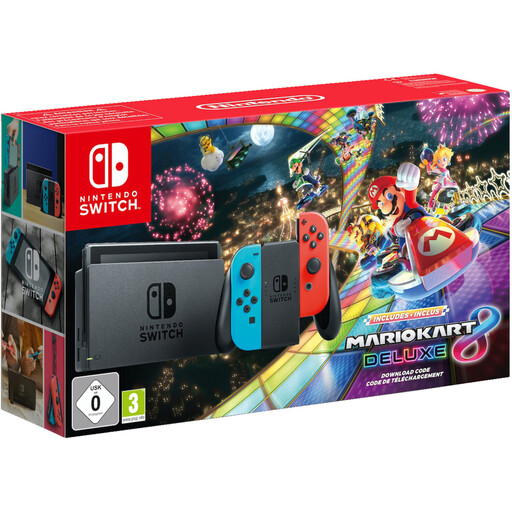
Nintendo Switch bundle with Mario Kart 8 Deluxe

Nintendo Switch bundle with Mario Kart 8 Deluxe

The product listing says Mario Kart 8 Deluxe supports local split-screen for up to four players, as well as TV, tabletop and handheld modes. Check the exact console and game version, and whether the controller set-up suits the number of players.

The listing mentions Joy-Con controllers, a dock and local play.

Joybuy
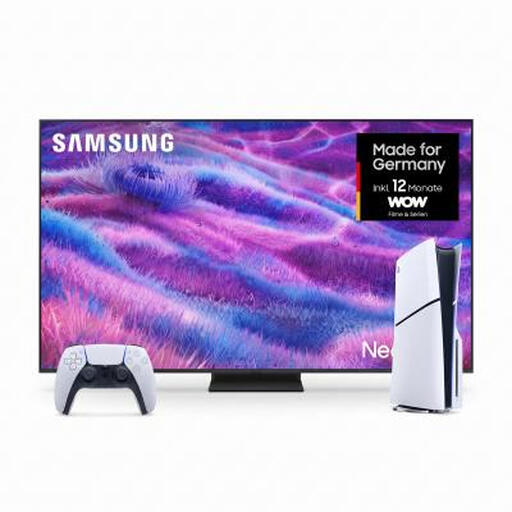
Bundle with Samsung Neo QLED TV GQ85QN80FAU and PlayStation PS5 Slim Digital Edition 825 GB

Samsung Neo QLED TV GQ85QN80FAU and PlayStation PS5 Slim Digital Edition 825 GB

This bundle pairs a TV with a PS5 Digital Edition for gaming on the big screen. PlayStation describes It Takes Two as couch co-op with split-screen; check the requirements for the specific game.

The Digital Edition has no disc drive, so physical games can’t be used directly with this model.

Joybuy

Retro game console with HDMI output and two 2.4 GHz wireless controllers

Retro game console, 20,000+ games, two 2.4 GHz wireless controllers

The product name lists HDMI output and two 2.4 GHz wireless controllers for connecting to a TV. Check whether the included games support the local co-op titles you want to play.

4K HDMI output is also listed.

Joybuy
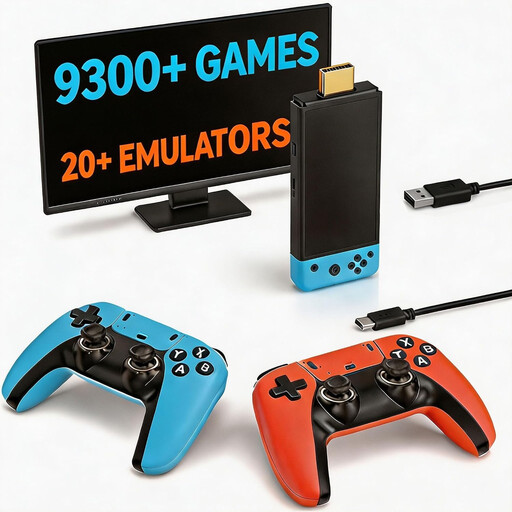
Retro game console with two controllers and HDMI output

Retro game console with 9,300+ classic games and two controllers

The product name lists two wireless controllers and HDMI output for connecting to a TV. Before buying, check whether the game you want and its local mode are included and supported.

Joybuy
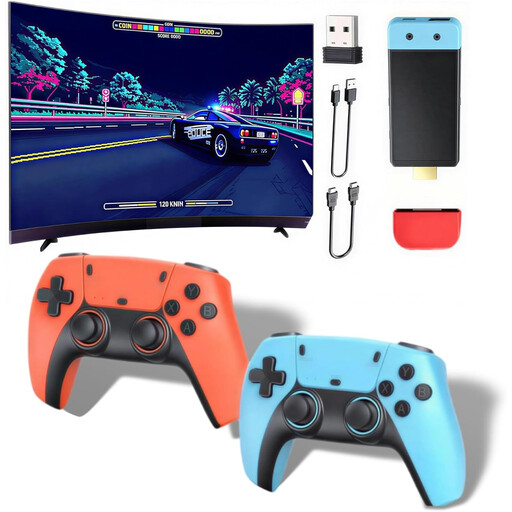
Retro games console with two wireless controllers and HDMI output

Retro games console, 20,000+ games and two wireless controllers

The listing mentions HDMI output and two wireless controllers for playing together on a TV. Check whether the local co-op game you want is included and works on this console.

The product name also lists 1080P/720P, a Dual-Core Cortex-A7 and 256 MB DDR3.

Joybuy

Frequently asked questions

Is ‘multiplayer’ enough to know we can play together on the sofa?

No. Check the specific game and compatible platform for couch co-op, local co-op or equivalent wording, as well as the controller requirements. Nintendo, PlayStation and Xbox describe It Takes Two as couch co-op with split-screen.

How do I set up a Nintendo Switch 2 for playing together on a TV?

Nintendo explains how to connect the dock to a TV or monitor, remove and sync the Joy-Con 2, and place the console in the dock. Nintendo recommends attaching wrist straps when the Joy-Con 2 are detached; whether the two halves can be used separately depends on the game.

Do we need an online subscription for couch co-op?

Online multiplayer requirements don’t mean that a subscription is always needed for local couch co-op. Check the requirements for the specific game and platform separately.

What should I know in Germany if a child is getting a co-op game?

Under section 12 of the Youth Protection Act, games distributed to minors on physical media must have an age rating and classification suitable for their age group to be accessible to them. The legislation sets out further restrictions for physical media that are unrated or marked ‘No age restriction’. Check the rating for the specific game, rather than assuming the console itself has an age rating. Section 12 JuSchG, published by the Federal Ministry of Justice and the Federal Office of Justice, is the relevant legislation.

Does a manufacturer’s warranty replace my rights if a product is faulty?

No. When you buy goods from a business seller in the EU, you have statutory consumer rights against the seller for at least two years from the date you receive the goods. Any additional manufacturer’s guarantee is separate, as explained by Your Europe, the European Union’s information portal.