Which console is right for you?

Motion-sports fans

You want to play motion-controlled sports together on the TV. Check the game mode, which Joy-Con controllers are supported and whether you’ll need a leg strap. Nintendo describes playing together on one console; Nintendo Switch Sports does not support Handheld Mode.

Sports players with their own media collection

You want to watch your own videos, or listen to your own music, or view your own pictures from USB after playing. Microsoft Xbox Support and PlayStation Support document media playback for certain files and systems, so check the file format and setup first.

Couch arcade duo

You’re after quick multiplayer matches on one screen. For Rocket League split-screen on Xbox, Epic Games specifies two controllers and separate accounts; check the requirements for the game you want to play.

What should you look for when buying?

Nintendo Switch, Switch OLED or Switch 2

A good fit if: Motion-controlled sports games on your TV are your priority. Nintendo lists these consoles as suitable for Nintendo Switch Sports in TV Mode.

Worth noting: Nintendo Switch Sports does not support Handheld Mode or Pro Controllers. Don’t assume it will play your own media files from USB.

Xbox Series X|S

A good fit if: USB videos, music or pictures matter to you. Microsoft Xbox Support documents playback through the Media Player, while Epic Games lists split-screen for Rocket League on Xbox.

Worth noting: Not every file is supported. For Rocket League split-screen, Epic specifies two controllers and separate Xbox accounts. The Series S and Series X Digital Edition do not have a disc drive.

PlayStation 5

A good fit if: You want to play supported videos and music from USB locally, as well as enjoy arcade games with others. Sony documents media playback, and Epic Games documents Rocket League split-screen on PlayStation.

Worth noting: The file system and file format need to be compatible. According to Sony, whether a disc drive is built in or can be added depends on the PS5 model.

What you’re looking for What to check before buying Who is it important to?
Motion-controlled sports Check the game you want, TV Mode, supported controllers and accessories. If I want to play motion-controlled sports with others on the TV, the game mode and input devices need to be right. Around 34% of consumers put motion sports first.
Your own media files Test the USB file system and a representative file of your own; distinguish media storage from game storage. If you want to play your personal collection from USB, check that your own files work before buying. Around 33% of consumers prioritise media use.
Local arcade matches Check the number of players, controllers and any accounts required for the game mode you want. For quick matches against one other person on the same console, local multiplayer options are key. Around 20% of consumers prioritise arcade-style matches.
Switching between TV and handheld play Check whether the specific game supports TV, Tabletop or Handheld Mode. If I want to play on the TV or on the go depending on the situation, the game I want needs to support both modes. Around 13% of consumers mainly look for flexibility in where they play.

Avoid common assumptions

  • A USB port doesn’t mean every media file will play

    Microsoft notes that the Xbox Media Player may display an error if the content isn’t supported. Instructions for transferring your own game captures also don’t prove that the console can play a personal media collection in general.

    Test a representative file and check the media features of the specific system before relying on playback.

    If a file you need isn’t supported, you may need an additional media player to play it.

  • Digital consoles and disc-drive models aren’t interchangeable

    The Xbox Series S and Xbox Series X Digital Edition do not have a disc drive; only the Series X with a disc drive offers the UHD Blu-ray player specified by Microsoft. For PS5, the option to add a disc drive is limited to certain model groups.

    Before choosing a model, decide whether you want to use your existing film or game discs, then check the drive options for the exact model.

  • Local multiplayer doesn’t mean a game is suitable for handheld play

    Nintendo Switch Sports does not support Handheld Mode or Pro Controllers. For Rocket League split-screen on Xbox, Epic Games specifies two controllers and separate accounts.

    Check the number of players, input devices and game mode for the specific game instead of assuming these features based on the console name alone.

Key brands at a glance

Nintendo

The Switch, Switch OLED and Switch 2 are options for Nintendo Switch Sports in TV Mode.

  • Nintendo describes playing motion-controlled games together on one console.
  • Nintendo Switch Sports does not support Handheld Mode or Pro Controllers. Don’t assume it will play your own films or music from USB.

Microsoft Xbox

The Series X with disc drive, Series X Digital Edition and Series S differ in a number of ways, including disc playback.

  • Microsoft Xbox Support documents playback of videos, music and pictures through the Media Player.
  • Files need to be supported; playback may fail if the content isn’t compatible. For Rocket League split-screen on Xbox, Epic Games specifies two controllers and separate accounts.

Sony PlayStation

PS5 models are worth considering for local playback of supported videos and music from USB, as well as compatible arcade games.

  • PlayStation Support explains media playback from USB, while Epic Games documents Rocket League split-screen on PlayStation.
  • A USB drive for media isn’t the same as expanded USB game storage. The disc drive option depends on the PS5 model.

Joybuy products

The following Joybuy deals range from Switch 2 bundles to portable and TV-connected retro gaming systems. For each model, check that the included games and intended use suit what you have in mind.
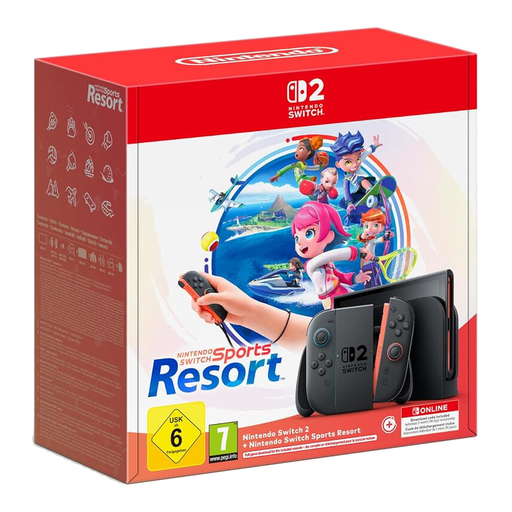
Nintendo Switch 2 with Nintendo Switch Sports Resort Bundle

Nintendo Switch 2 + Nintendo Switch Sports Resort Bundle

For motion-sports fans, with Nintendo Switch Sports Resort included as a download; the game is not included on a disc.

Includes a 90-day Nintendo Switch Online membership.

View at Joybuy
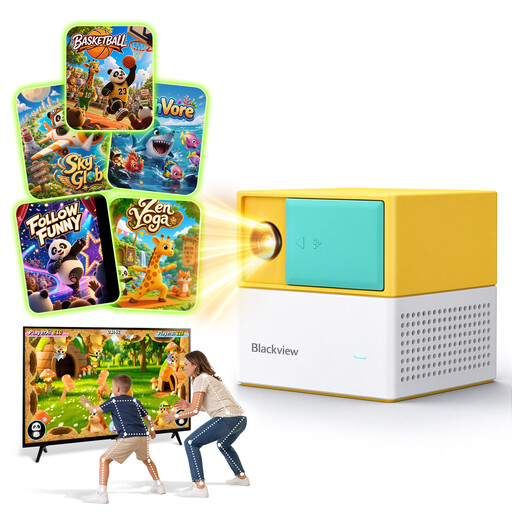
Blackview PlayPop 8 motion game console

Blackview PlayPop 8

For motion-focused play, with family and learning games pre-installed; the product title says it supports up to four players.

The title lists 17-point tracking, six game categories, 22 built-in games and 8GB+128GB. According to the product description, there is no built-in battery; children should be supervised when using it.

View at Joybuy
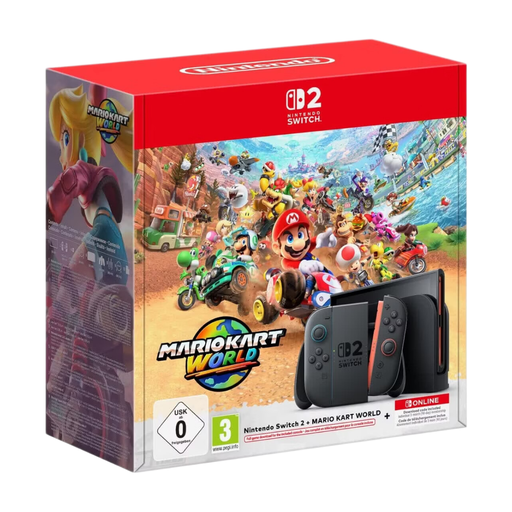
Nintendo Switch 2 Mario Kart Bundle

Nintendo Switch 2 Mario Kart Bundle, 256 GB

For TV and handheld play, with a Mario Kart World download included; Nintendo Switch Sports is not listed as a bundle game.

The title lists a 1080p screen, up to 4K TV output and Joy-Con 2 controllers.

View at Joybuy

Portable retro games console with 300 pre-installed games

Retro handheld console, 300 pre-installed games (Grey)

For portable gaming, with pre-installed retro sports and arcade games.

The product title lists a 3.2-inch screen and a rechargeable battery. The product description recommends using it under direct supervision and keeping it away from water and heat sources.

View at Joybuy

Retro games console with 20,000+ games and two wireless controllers

Retro games console with 20,000+ games

For retro sports and arcade games on a screen; the product description lists two wireless controllers.

The title lists 23 emulators and 4K HDMI output. The pre-installed games collection doesn’t replace checking whether the included games suit your needs.

View at Joybuy

Frequently asked questions

Can I simply play my own films, music and photos from USB?

It depends on the system and the file. Microsoft Xbox Support documents the Media Player app for videos, music and pictures, but notes that some content isn’t supported. PlayStation Support explains how to play supported videos and music from USB on PS5; the Nintendo guides mentioned here don’t confirm general playback of a personal USB media collection on Switch or Switch 2.

Can I play Nintendo Switch Sports on the go in Handheld Mode?

No. Nintendo explicitly rules out Handheld Mode for Nintendo Switch Sports and lists the Switch, Switch OLED and Switch 2 in TV Mode as suitable configurations for the game.

Can I play PS5 games directly from a USB drive?

No. PlayStation Support says PS5 games can’t be played directly from expanded USB storage. On Xbox, too, you need to distinguish between a USB media drive and the storage requirements for optimised Series X|S games.

What do I need for local two-player games?

It depends on the game. For Rocket League split-screen on Xbox, Epic Games specifies two controllers and separate Xbox accounts. PlayStation also requires two controllers, and according to Epic, guest accounts not signed in to PlayStation Network can only play offline.

Can I use my existing discs with a digital console?

The Xbox Series S and Xbox Series X Digital Edition cannot play discs; the Series X with a disc drive is the model that offers the UHD Blu-ray player specified by Microsoft. For PS5, whether a disc drive is built in or can be added depends on the exact model, so check the model group before buying.