Start with your game library
You’re looking for a console for particular story-driven adventure games, so you want to check which platforms they’re available on before choosing a screen and device.


For cinematic adventures at a small desk, first check whether the games you want to play are available on each platform. Then consider how much space you have and how you like to play. A home console is a good fit if you have a monitor and enough room, while the Switch 2 and Steam Deck OLED let you play away from a fixed monitor setup too. Manufacturers’ resolution and frame-rate specifications don’t guarantee that every game will reach those figures.
You’re looking for a console for particular story-driven adventure games, so you want to check which platforms they’re available on before choosing a screen and device.
You play at a small monitor setup and are comparing the space needed for a home console with a hybrid console you can put away when you’ve finished playing.
You don’t want to be tied to your desk, so you’re looking at options such as a built-in screen, tabletop mode or connecting to your monitor.
First check whether the games you want are available. Then decide whether a permanent monitor setup or the flexibility to play in different places suits your day-to-day life better.
| What matters | What to check before buying | Who it matters most to |
|---|---|---|
| Game availability | Check the platform and edition for each game you want individually. For Steam games, also check their Steam Deck compatibility rating. | If I want to play specific adventure games, their availability is the deciding factor before I choose a device. Around 36 % of consumers put specific games they want to play first. |
| Space for the console and screen | Compare the space available and cable routing with the device dimensions. Microsoft lists the Xbox Series S as measuring 6,5 × 15,1 × 27,5 cm; a home console still needs a suitable screen. | If my desk is short on space, I want to fit the console, screen and connections in sensibly. Around 29 % of consumers say finding a suitable setup is their main concern. |
| Flexibility when playing | Nintendo lists a 7,9-inch screen for the Switch 2; you’ll need the dock and a suitable connection to use it with a monitor. For the Steam Deck, check whether each game is suitable. | If I want to play without being tied to a fixed monitor setup, a built-in screen or the option to switch to an external display matters to me. Around 21 % of consumers prioritise this. |
| Discs and storage | Check the exact disc-drive version and internal storage. Nintendo lists compatible microSD Express cards for Switch 2 game storage; a standard microSD card isn’t an equivalent option. | If I want to use discs I already own or store several digital games, the specific version needs to suit my collection. Around 14 % of consumers prioritise disc use, storage or digital purchases. |
The gaming resolutions Microsoft lists describe the hardware’s capabilities. Nintendo says the Switch 2’s maximum 4K output is available in TV mode, with a supported game and a compatible screen.
Check your monitor and the games you want first, then consider the resolution and frame-rate specifications for the exact device setup.
The documented PS5 Digital Edition CFI-2116B01Y and the Xbox Series S have no built-in disc drive. The Xbox Series X Digital Edition is also different from the Series X with a disc drive.
Before ordering, check the full model name, storage capacity and disc-drive configuration. Consider whether you want to use compatible physical games.
Nintendo specifies microSD Express for additional Switch 2 game storage. Valve rates Steam Deck compatibility game by game, rather than for the entire library as a whole.
Check the required expansion standard or the compatibility rating for the specific use you have in mind.
The Xbox Series S is a slim, all-digital home console. The Series X is available with a disc drive or as a Digital Edition.
The PS5 family is worth considering if the adventure games you want are available on PlayStation. Be sure to choose between the disc and digital versions separately.
The Switch 2 offers handheld, tabletop and monitor play, as long as the games you want are available for the console.
The Steam Deck OLED suits compatible Steam games if you’re looking for a handheld PC that can also connect to an external screen.
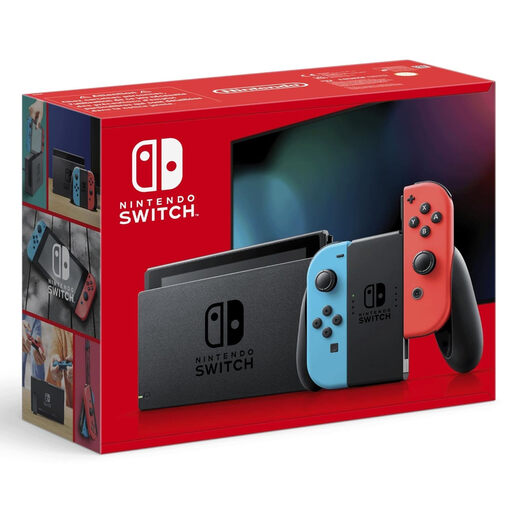
This selection features Nintendo hybrid consoles for handheld, tabletop and monitor play. Check that the specific games you want are available for the model you’re considering.
 No image available
A good fit if you want to switch between the built-in screen, tabletop mode and an external screen, depending on how much space you have.
Nintendo lists a 7,9-inch screen and 256 GB of internal storage for the Switch 2. You’ll need the dock to use TV mode; check that each game you want is compatible.
 No image available
A good fit if you want to switch between handheld, tabletop and monitor play, then clear the console from your desk when you’re finished.
You’ll need to connect it via a docking station for TV mode. Before buying, check that the games you want are compatible with this model.
Yes. Nintendo describes connecting the Switch 2 dock to a TV or monitor. You’ll need the dock for HDMI output, and the resolution available will also depend on your screen and the game.
Nintendo specifies compatible microSD Express cards for additional game storage. Before buying a memory card, check that it supports this standard.
According to Your Europe, when you buy from a trader in the EU, you’re generally entitled to a minimum two-year legal guarantee from the date you receive the goods; the seller is responsible for this. Online purchases are also generally covered by a 14-day withdrawal period from delivery. Exceptions apply, and separate rules may apply to digital games bought separately.
According to the German Federal Family Portal’s explanation of Section 12 of the Youth Protection Act, games on physical media may only be made available to children and young people in public if they are approved and labelled for their age group. Check the age rating on the specific game; the USK also highlights possible purchase and communication features. This concerns the supply of the game, not a general age limit for buying a console.