Readers with a set list of games
You have specific stories in mind, so you compare platforms, individual editions and on-screen text languages before choosing a console.


Start by choosing a console based on the specific visual novels you want to play and their on-screen text languages. Then consider where you’ll be playing, which games you already own and how you prefer to buy them. Nintendo’s Switch OLED and Switch 2 offer handheld, tabletop and TV modes, while the Steam Deck OLED is worth considering if your titles are available on Steam and compatible with the device. The PS5 and Xbox need an external screen for stationary play – but a larger display is no substitute for checking each game’s availability, text language and compatibility.
You have specific stories in mind, so you compare platforms, individual editions and on-screen text languages before choosing a console.
You want to read dialogue comfortably without having to hold your device all the time or make room for an extra screen.
You’d like to play PC games you’ve already bought and can check whether each one’s controls and presentation on Steam Deck meet your needs.
First, check that the titles you want are available on the platform and in your preferred text language. Then consider the screen, your workspace and the games or media you already own.
A good fit if: Your chosen titles are available for Switch and you want to switch between tabletop, handheld and connected-screen play.
Things to consider: Switch 2-exclusive games won’t run on it. Also check the on-screen text languages for each title.
A good fit if: You want to play Switch 2 games or would prefer a larger built-in screen.
Things to consider: Nintendo notes that some older Switch games may not be compatible. Check each title you want to play individually.
A good fit if: Your visual novels are available on Steam and their Deck compatibility suits the way you want to play.
Things to consider: Valve assesses games individually; a title in your Steam library isn’t automatically suitable for the Deck.
A good fit if: You already play at a monitor and your chosen titles are available for the specific PS5 model.
Things to consider: The Digital Edition has no built-in disc drive. Also check the text languages for the edition you’re buying.
A good fit if: Your Xbox library or other Xbox games you want to play make a stationary console a worthwhile choice.
Things to consider: The Series S is digital-only; disc use on the Series X depends on the version you choose. Check availability for each visual novel individually.
| Buying consideration | What to check | Who is this important to? |
|---|---|---|
| Availability of the titles you want | Check the platform and specific edition for each game. For Switch 2 and Steam Deck, also check the relevant compatibility information. | If I want to play a particular story, I want to know before buying whether that exact edition will run on the console. Around 33% of consumers put the availability of specific titles first. |
| Readability and desk space | Look at a text scene from the game and consider your viewing distance, available space, stand and connection options. | At a small desk, I want to be able to read without constantly holding the device or setting up another screen. Around 27% of consumers prioritise reading space and display quality. |
| On-screen text languages | Check the on-screen or text languages for the specific platform edition, and consider these separately from the spoken language. | If I need to read in a particular language, I want to know I can rely on the in-game text. Around 27% of consumers pay particular attention to on-screen text languages. |
| Existing library and purchase format | Check which platform account your existing purchases are linked to. For the exact model, check the disc drive and the type of memory card required. | If I already own games or discs, I want to know whether the new console can use them. Around 13% of consumers prioritise existing purchases and purchase format. |
The PlayStation Store listing checked for The Great Ace Attorney Chronicles names English as the on-screen language. The language of a store listing doesn’t necessarily tell you which language the game’s dialogue and menus are in.
Check the on-screen text languages listed for the specific edition, and distinguish these from the spoken language.
Nintendo notes that some older Switch games may not work on Switch 2. Valve also assesses Steam games’ suitability for the Deck on a title-by-title basis.
Before you buy, check the compatibility information for each of the games you want to play.
The PS5 Digital Edition and Xbox Series S have no built-in disc drive. Xbox Series X is available in versions with different disc drive options.
Compare the full model name and disc drive with the media you want to use.
The Switch OLED and Switch 2 offer handheld, tabletop and TV play for compatible Nintendo Switch titles.
The Steam Deck OLED is designed for portable play with compatible titles from your Steam library, and can also be used with an external screen.
The PlayStation 5 is a stationary option for compatible PlayStation titles when you have a screen to play on.
The Xbox Series S and Xbox Series X are stationary consoles. For visual novels, what matters is whether the specific titles you want are available for each model.
This selection includes a hybrid console that can be used in handheld, tabletop and TV modes.
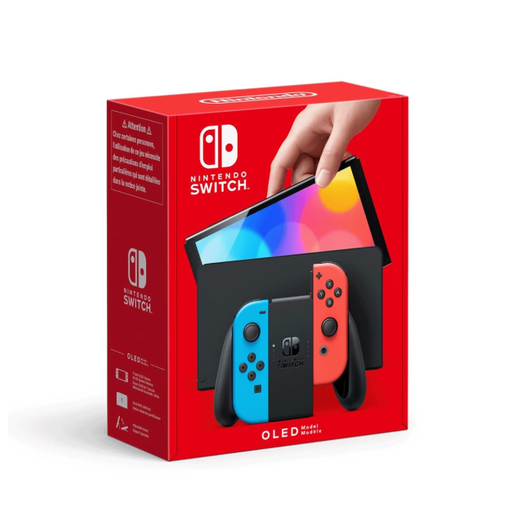 No product image available
A good fit if you want to switch between handheld, tabletop and TV modes, and use the console’s stand at your desk.
7-inch OLED screen and adjustable stand.
Not necessarily: screen size alone doesn’t tell you how easy a game’s text is to read. Look at text scenes from the titles you want to play, using the setup you intend to use.
Yes, both consoles support video output through their dock and HDMI. Nintendo describes connecting the Switch OLED to a TV or monitor via HDMI; the Switch 2 also uses HDMI for video output in TV mode. Check that you have a suitable input and the cables or dock you need.
That depends on the model and the games you own: the PS5 Digital Edition has no built-in disc drive, and the Xbox Series S is digital-only. The Switch OLED and Switch 2 also use different types of memory card for storage expansion.
In Germany, your statutory rights against the seller are separate from any voluntary manufacturer’s guarantee. The Verbraucherzentrale generally explains that new goods come with two years of statutory rights; if a product is faulty, you should first request that the seller put it right.
No. The Unterhaltungssoftware Selbstkontrolle explains that retailers must not sell a game rated 12 and over to a ten-year-old. This restriction applies to the sale of games; it isn’t a general age rating or purchasing restriction for the consoles compared here.