
Lieferung heute & morgen

Qualitätsgarantie

Willkommens-Angebote freischalten: KOSTENLOSE Lieferung | Bis zu 80 % RABATT | Kostenlose 30-Tage-JoyPlus-Testphase
App herunterladen
When buying content creator accessories for TikTok, YouTube, livestreams or video conferences, you will quickly find a wide range of gimbals, tripods, lights and monitors. However, not every product will suit your smartphone, filming location or workflow. Unnecessary spending often occurs because technical specifications are not compared properly.
A smartphone gimbal may work with many devices in principle, but the clamp width, device weight, connection and app compatibility must all be suitable. Magnetic mounts are not automatically compatible with every smartphone either. For example, the Rollei Easy Creator Selfie Monitor requires either a MagSafe-compatible case or the supplied magnetic ring.
When buying action camera accessories, you should also check whether the bag is suitable for your specific model and existing mounts. The STARTRC Carry Bag for Action 6 (Creator Combo) is designed for the Action 6. If you own a different camera, compare the internal dimensions and accessory compartments before buying.
The stated runtime of a smartphone stabiliser depends on factors including motor load, Bluetooth connection, lighting and charging habits. A high figure on the product page is therefore no substitute for practical planning. For longer days travelling, a power bank or additional charging plan is a sensible choice.
A lightweight travel tripod is easy to carry, but it can tip over more quickly in wind, on uneven ground or when supporting a heavy smartphone with accessories. The key factors are load capacity, footprint, locking mechanism and centre of gravity. A flexible mini tripod must also be securely wrapped around railings, branches or poles before you let go of the camera.
Three specifications are particularly relevant when choosing a gimbal:
You should also check whether the gimbal supports both portrait and landscape orientation and whether the required app is available for your smartphone. For the DJI Osmo Mobile 7P, certain Android devices require the DJI Mimo app to be downloaded from the official DJI website, as it is not available in the Google Play Store due to a platform compatibility issue.
A ring light for your mobile phone should not be chosen solely based on maximum brightness. Multiple colour temperatures and brightness levels are useful, allowing you to adapt the light to the room lighting, skin tones and background. According to the product specifications, the ULANZI 4-inch ring light offers three colour temperatures from 3,000 to 7,000 K and five brightness levels.
Important: LED lights should not be viewed directly at maximum brightness from a short distance. Protect the light from moisture and do not leave it switched on unattended for extended periods. For short selfie videos, a selfie light attached to your smartphone is often sufficient; for longer streams, a larger light that can be positioned separately may be more suitable.
For spontaneous filming while out and about, a travel tripod, flexible mini tripod or selfie stick with Bluetooth remote control can be very useful. Check the following:
The Rollei Easy Creator MonkeyPod has flexible legs, a 360-degree ball head, an extendable telescopic pole and a Bluetooth 5.4 remote control with a stated range of up to 10 metres. Its maximum load capacity is 2 kg. Nevertheless, the tripod should not be left unattended in windy conditions or on unstable surfaces.
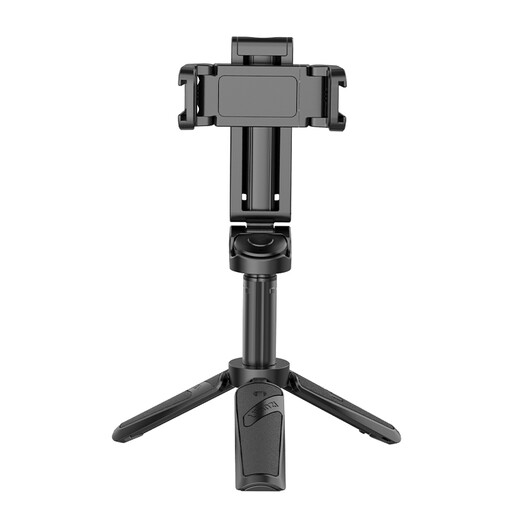
Why this product suits this profile: Combining a phone grip, extendable mini tripod and Bluetooth remote control, this accessory covers simple selfies, tabletop filming and short clips in one compact solution.
The three functions reduce the need for several separate accessories. Before use, however, secure attachment on a stable surface remains essential.
3-in-1 design, Bluetooth remote control and foldable format for smartphone filming.
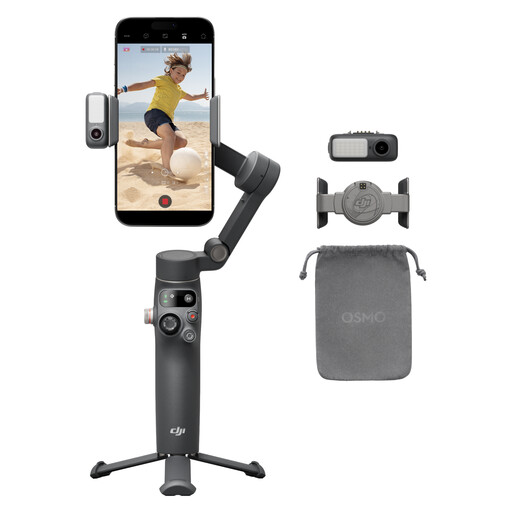
Why this product suits this profile: For regular vlogs and social media productions, this model offers 3-axis stabilisation, an integrated extension pole, tripod and a stated operating time of up to 10 hours.
The integrated equipment reduces the need for additional mounts. App availability and smartphone compatibility should still be checked before buying.
3-axis system, integrated extension pole, tripod and tracking module.
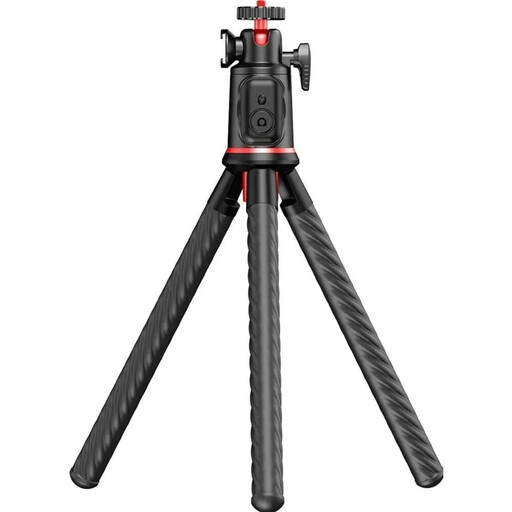
Why this product suits this profile: The bendable legs, ball head, telescopic pole and accessory shoe are ideal for changing filming positions while travelling or outdoors.
The maximum load capacity of 2 kg and lockable positioning help you make a choice based on measurable criteria. Additional securing is still required in windy conditions.
360-degree ball head, cold shoe connection, Bluetooth 5.4 and flexible legs.
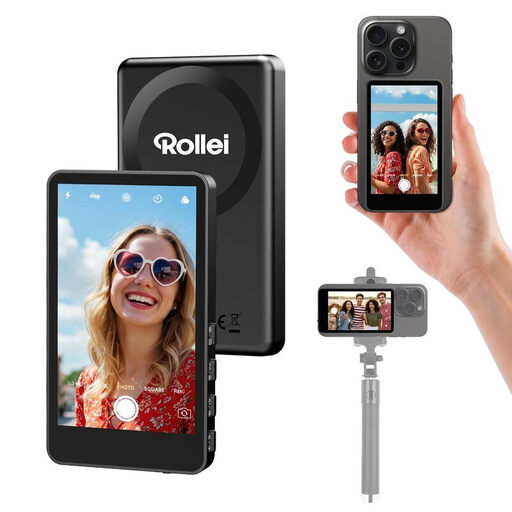
Why this product suits this profile: The monitor lets you check the image from your smartphone’s rear camera, making it ideal for filming yourself without assistance from another person.
The wireless connection has a stated latency of 40 milliseconds. Before use, check that the magnetic mount, range and battery life are suitable for your intended use.
3.97-inch IPS display, stated wireless range of up to 50 m and Bluetooth shutter release with a range of up to 10 m.
We have put together a complete, regularly updated list of products that fully meet these strict selection criteria and the safety regulations applicable in the EU.
For beginners, a stable mini tripod, Bluetooth remote control and small selfie light are often all you need. If you film while walking, you can also choose a smartphone gimbal. For longer vlogs, battery life, packed size and a secure smartphone clamp are more important than having the most extensive range of features possible.
Operating time depends on battery capacity, motor load, temperature and charging cycles. The specifications vary considerably between individual models. A gimbal with a stated runtime of 10 to 18 hours may be sufficient for many days of filming, but it should be fully charged before travelling and tested with your own smartphone.
The basic equipment can be the same: smartphone, tripod, lighting and, if required, a gimbal. The main difference is the filming orientation. TikTok generally uses portrait format, while YouTube often uses landscape format. A gimbal that allows you to switch quickly between both orientations, or a rotating ball head, makes changing between them easier.