Which device is right for you?

Confidential contracts at a shared desk

If other people could see your screen or documents, you’ll need to take your workplace rules and appropriate security measures into account. The German Federal Office for Information Security and the Federal Commissioner for Data Protection and Freedom of Information provide guidance on protecting mobile working and preventing unauthorised access to information.

Contract reviewers using specific software

If you work with documents using prescribed software, extensions or signature processes, check that the entire workflow works with the device’s operating system and processor architecture. Microsoft describes app emulation on Windows on Arm devices, while Dell lists the Latitude 7455 as a Windows 11 Arm laptop.

People who move between workspaces

If you regularly change desks, the display size, weight and ports you need all have to work together. Product specifications from Lenovo, HP and Apple show that the models described come with different display and port configurations.

What should you look for when buying?

Compact Windows business laptop

A good fit if: You often change desks and your contract software requires Windows.

The trade-off: The smaller display leaves less room to view a contract and your comments side by side; the Lenovo configuration reviewed is marked as discontinued by the manufacturer.

Windows laptop with a larger workspace

A good fit if: You work with longer documents and usually stay at the same desk.

The trade-off: The 14-inch display on the HP configuration described takes up more space; there’s no evidence that this specific model has an integrated privacy screen.

MacBook Air

A good fit if: Your contract software and workflows are approved for macOS, and you want a compact device.

The trade-off: Check that you have the right connection solution for HDMI or USB-A devices.

Windows on Arm laptop

A good fit if: Your required programmes, extensions and connected devices work with the specific Arm device.

The trade-off: Microsoft describes emulation for many apps, but this does not confirm compatibility with every contract programme or driver.

What matters when buying What to check Who is it important to?
Privacy at a desk where others can see your screen Check your organisation’s workplace rules and the privacy features of the specific display configuration; lock the screen when you leave. If I work on contracts within sight of other people, I want to follow the relevant rules and use appropriate security measures. Around 29% of consumers put privacy first.
Contract software compatibility Check that your programmes, extensions, signature processes and required peripherals work with the specific device. If my work depends on specific programmes and approval processes, the entire workflow needs to work on the device. Around 29% of consumers prioritise software compatibility.
Readability and room for annotations Compare the screen size, resolution and finish of the exact configuration with your desk space and preferred text layout. If I read and comment on lengthy contracts, I need a document workspace that suits my desk. Around 24% of consumers prioritise readability.
Portability and connections Check the weight, charging options, what’s included and the dock, monitor or USB connections you need for the exact configuration. If I often change desks, I want to be able to use my device and the connections I need easily at the next desk. Around 18% of consumers prioritise portability and connections.

Avoid common assumptions

  • “Business laptop” doesn’t automatically mean an integrated privacy screen

    Manufacturers list privacy screens separately for certain configurations. There’s no evidence that the HP EliteBook 840 G11 A26QBEA#ABD described here has this feature.

    Check the display configuration against the exact model number and find out whether you need a suitable separate filter. Your organisation’s security requirements still apply.

    If needed, an additional privacy filter must be compatible with your screen size and configuration.

  • Choosing Windows on Arm or macOS based on the name alone

    The platform name doesn’t tell you whether your specific contract programme, extensions, signature processes and connected devices will work. Microsoft describes emulation for many Windows applications, but this doesn’t confirm compatibility with every individual programme or driver.

    Check your entire workflow on the specific platform before choosing a device.

    If the workflow isn’t compatible, you may need to adapt the way you work or replace the peripherals you need.

  • Assuming ports and charging accessories from the product range name

    The documented configurations have different ports. What’s included may also vary depending on the specific offer.

    Check the ports and what’s included with the model you choose, particularly the power adapter and any adapters you need.

    Depending on the configuration, you may need a suitable adapter or a power adapter sold separately.

Key brands to consider

Lenovo

ThinkPad X13 and X1 Carbon configurations are options for compact Windows work laptops; check the specifications for the exact model.

  • Lenovo’s specifications list a matt 13.3-inch display, a German keyboard and several ports for the ThinkPad X13 Gen 5 21LU005KGE.
  • Lenovo marks this exact configuration as discontinued. Its features can’t be assumed to apply to other ThinkPad models.

HP

The EliteBook range includes business laptops; integrated Sure View privacy screens are available on selected configurations.

  • HP specifies Windows 11 Pro, 32 GB RAM and a 14-inch WQXGA display for the EliteBook 840 G11 A26QBEA#ABD.
  • There’s no evidence that this configuration has Sure View. Privacy screens on other EliteBook models don’t confirm that this configuration has one.

Apple

The MacBook Air M5 is a macOS option if your contract software and your organisation’s requirements allow macOS.

  • Apple lists a 13.6-inch display and two Thunderbolt 4/USB-C ports for the 13-inch model.
  • Check that you have the right connection for HDMI or USB-A peripherals.

Dell

The Latitude 7455 adds a Windows 11 Arm business laptop to the range of options.

  • Dell offers configurable storage and display options for the Latitude 7455.
  • Microsoft describes app emulation on Windows on Arm, but doesn’t confirm that specific contract programmes or device drivers will work.

Joybuy laptops for working with documents

The following Joybuy laptops are options for working with documents at a shared desk. Check that the operating system and software requirements, screen size and ports you need all suit your workflow.

HP OmniBook Ultra Flip 14-fh0670ng, 14-inch 2-in-1 laptop

HP OmniBook Ultra Flip 14-fh0670ng, 14-inch 2-in-1 laptop

Could be worth considering for reading and annotating documents if you’d like a touchscreen.

14-inch 2.8K OLED touchscreen, Intel Core Ultra 7 258V, 32 GB RAM, 1 TB SSD and Windows 11 Home. The stated weight is 1.34 kg; the product specifications list a stylus.

Joybuy

Ruzava 14-inch laptop with N5095 processor, 8 GB RAM and 256 GB SSD, red

Ruzava 14-inch laptop, N5095, 8 GB RAM, 256 GB SSD, red

Could suit you if you’re looking for a 14-inch display for documents and regularly move between desks.

14-inch FHD IPS display, N5095 processor, 8 GB RAM and 256 GB SSD; listed in the product name as expandable up to 1 TB. Stated weight: 1.39 kg. Ports listed include USB 3.0, Type-C and Mini-HDMI.

Joybuy
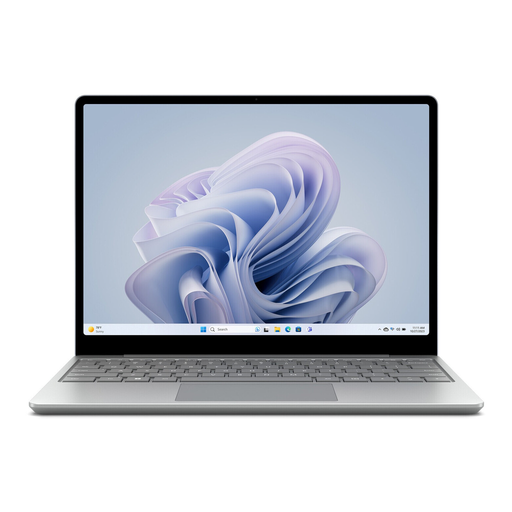
Microsoft Surface Laptop Go 3 with 12.45-inch touchscreen

Microsoft Surface Laptop Go 3, Core i5, 8 GB RAM, 256 GB SSD

Could be worth considering if you change desks often and a compact display suits the way you work with documents.

12.45-inch 3:2 touchscreen, Intel Core i5, 8 GB RAM, 256 GB SSD and Windows 11 Home. The stated weight is 1.13 kg. Features listed include USB-C, USB-A and a fingerprint reader.

Joybuy

Frequently asked questions

Is a privacy screen enough to protect confidential contracts at a shared desk?

No, a privacy screen alone isn’t enough in every situation. The German Federal Office for Information Security recommends setting out which information can be handled outside the organisation and what precautions are required when working remotely. When personal data is involved, those responsible must take appropriate technical and organisational measures based on the specific risks; this doesn’t create a general requirement to use a particular laptop or privacy screen.

What should I do when I leave a shared desk?

Set up the access controls and security measures required by your organisation, and lock your device when you leave. The German Federal Office for Information Security lists screen locking as a basic security measure. Also check which connections and storage locations your work policy allows.

Will my contract software run on a Windows on Arm laptop?

Don’t decide based on the Windows name alone. Microsoft explains that many applications run natively or through emulation; before buying, check your specific programme, any extensions you need and your connected devices.

Is a manufacturer’s warranty the same as your statutory rights?

No. For consumer purchases in Germany, statutory rights generally apply against the seller; a manufacturer’s warranty is an additional voluntary benefit with its own terms. If you’re buying for a business, check the contract terms separately. The German Consumer Advice Centre explains the difference between statutory rights and a guarantee.