Console players with a wired headset
You want to hear game audio through your controller, so check your console generation, headset plug and controller socket together.


First, choose a controller supported by your platform and the specific game you play. Then check whether headphone audio runs through the console, PC or controller. Mappable extra buttons can be useful for actions you perform often, but you should also consider the connection type, how the controller feels in your hands and the limitations of each connection.
You want to hear game audio through your controller, so check your console generation, headset plug and controller socket together.
You want to use a gamepad and headphones with your PC, and can connect your audio separately to the PC if needed. The key factors are the connection and support from the game.
You want to map frequently used actions to extra buttons without losing sight of platform and audio compatibility.
Start by checking your platform and game, then work out the audio connection. After that, you can weigh up extra buttons, cables and how the controller feels in your hands.
| What matters when buying | What to check | Who should consider it? |
|---|---|---|
| Platform and game compatibility | Check your console generation, operating system and whether the specific game is supported. | If I play on a console or PC, my controller needs to work with my device and the game. Around 29% of consumers put compatibility first. |
| Headphone audio | Check your headset plug, the chat features you want and the controller connection together. | If I want to hear game audio directly through my controller, the audio connection needs to work with my platform and connection. Around 29% of consumers focus primarily on this audio connection. |
| Quick-access controls | Check the number of extra buttons, whether you can map them and whether the game supports them. | If I want to trigger common actions quickly, mappable extra buttons matter to me. Around 24% of consumers prioritise this kind of quick access. |
| Comfort and freedom of movement | Consider how the controller feels in your hands and, for wired models, how far away your gaming device is. | If I play for long periods or want to move around while playing, comfort and cable management matter to me. Around 18% of consumers prioritise personal comfort and freedom of movement. |
Using a controller with a PC can be limited, depending on the controller and connection. Microsoft says Xbox headsets aren’t supported with Xbox controllers connected to a PC over Bluetooth. Sony requires a wired controller connection to use the DualSense Edge headset socket with a PC or Mac.
Before buying, check your platform, controller connection and headphone plug as a complete setup.
Depending on your setup, you may need to use a separate audio output on your PC or choose a different connection type.
Nintendo says the Switch 2 Pro Controller only works with Switch 2. The older Switch Pro Controller can be used wirelessly with Switch 2, but that doesn’t mean it has the newer model’s headphone socket.
Check the full model name against your console generation.
If you choose the wrong generation, you may need to buy an extra controller that’s compatible with your console.
A general controller review won’t necessarily assess compatibility with your specific game, platform and headphone setup.
Check compatibility and the audio connection first, then compare reviews and extra features.
The Xbox Wireless Controller is an option for Xbox and supported Windows PCs if you want to connect a compatible wired headset to the controller.
DualSense is relevant for PS5 and supported PC games. DualSense Edge is a separate model with extra customisation options.
The older Switch Pro Controller and the Switch 2 Pro Controller belong to different console generations.
The G7 SE is a wired option for the Xbox consoles and Windows versions listed by GameSir.
Revolution X Unlimited is an Xbox/PC option for buyers considering a controller with a wider range of features.
These Joybuy products are controllers for Xbox, PlayStation, Switch and PC. Check compatibility, the headphone connection and the audio route for your specific device and game.
 No image available
For Xbox Series X|S or PC if you want to customise extra inputs. It connects via a detachable 3 m USB-C cable, so check that the cable will reach your gaming setup.
 No image available
For PS4 or PC if you want to connect headphones directly to your controller. The 3.5 mm headphone and microphone socket needs to work with your headset, connection and specific game.
 No image available
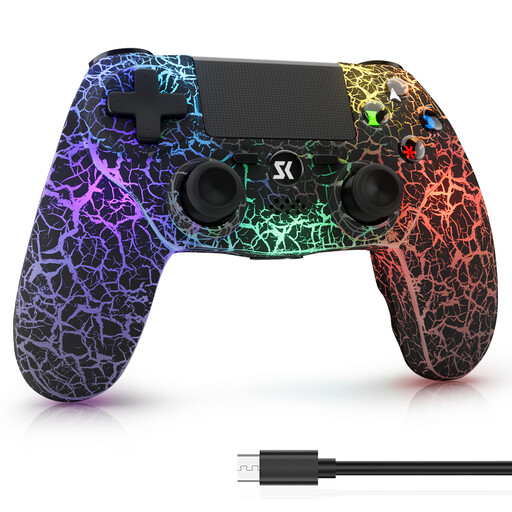
For PS4, PS4 Pro or a Windows PC if you want to play wirelessly and connect headphones to the controller. Check first whether your game and the connection you’re using support audio and microphone functions.
The product title lists RGB lighting, a 1000-mAh battery, dual vibration and a 6-axis motion sensor.
 No image available
For Switch or PC if gyro controls and dual vibration suit the way you like to play. Check that your game supports the controller, and plan your headphone connection separately from your gamepad.
 No image available
For PC players who want extra rear buttons and prefer a PS5 button layout. The product title lists Hall effect sticks, 255-step Hall triggers, RGB lighting, a 1000-mAh battery and USB-C. Some features may require game support or a wired USB connection.
No, the connection matters too. Microsoft says Xbox headsets aren’t supported with Xbox controllers connected to a PC over Bluetooth. For the DualSense Edge headset socket to work with a PC or Mac, Sony requires a wired controller connection. Check the requirements for your exact model, or use a suitable audio output on your PC instead.
No. Nintendo says the Switch 2 Pro Controller is only for Switch 2. According to Nintendo, the older Switch Pro Controller can be used wirelessly with Switch 2, but that doesn’t mean the older model has a headphone socket.
Nintendo says a maximum of two wireless controllers can be connected at the same time while Bluetooth audio is in use. Bluetooth audio is disabled in local multiplayer mode, and Bluetooth microphones can’t be used. Nintendo also warns that there may be audio delays.
First, check the pairing or USB connection, game support and any available device updates. If the product is faulty, your statutory rights against the seller are separate from any voluntary manufacturer’s guarantee.
Online purchases generally come with a 14-day right to cancel, and you must notify the other party to the contract that you’re cancelling. The German Federal Network Agency monitors Bluetooth devices, among other products, to check they comply with relevant regulations. According to the agency, a CE mark is the manufacturer’s own declaration of conformity, made under its own responsibility, and is not an independent quality mark.