Players with a specific console
If you play on PS5, Xbox or Switch 2 using your TV, your controller needs to work with that exact console. Also check that your particular game supports the controls you want to use.


Choose a controller based first on the platform your exploration game runs on. A big screen doesn’t automatically make a controller compatible with every console or game. Next, check that a wired or wireless connection will work from where you sit. Only then consider whether extras such as haptics or additional buttons are supported by the specific game and connection.
If you play on PS5, Xbox or Switch 2 using your TV, your controller needs to work with that exact console. Also check that your particular game supports the controls you want to use.
If your PC streams the game to the big screen, the key things to consider are the game’s controller support, how it connects to your PC and whether the connection will reach where you sit.
If you’re after haptics, extra buttons or a particular charging option, check that your game and platform actually support the feature.
First, check that the controller works with your gaming device and game. Then consider the connection between your device and where you sit. After that, you can compare comfort, power options and the extra features you want.
| What matters | What to look for | Who it matters to |
|---|---|---|
| Platform and game | Check compatibility with your console or PC operating system. On PC, also check support for the specific game. | If I want to make sure the controller works with my gaming device, platform and game compatibility is the top priority for around 36 % of consumers. |
| Connection from your seat | Check the distance and possible cable routing. For wireless connections, make sure you use the connection mode intended for your platform. | If my device is further away from the sofa, I want a suitable connection and a cable that won’t be too short. Around 29 % of consumers say a connection that works from where they sit matters most. |
| Comfort and power | Consider how the controller feels in your hands and the button layout. Check which charging option is available for the specific model. | If I’m planning longer gaming sessions, I want a controller that feels comfortable to hold and to think about how it’s powered. Around 21 % of consumers make this their top priority. |
| Extra features | Check that the specific game supports the feature you want. For DualSense haptics on PC, plan to use a USB connection. | If I want to use particular effects or additional inputs, I need to know whether they’re available on my platform. Around 14 % of consumers put extra features first. |
According to its documentation, the GameSir G7 Pro connects to Xbox by cable, while 2.4 GHz is intended for PC.
Check the connection mode for your specific gaming device and take the distance to your seat into account.
Sony says haptic feedback on PC requires both game support and a USB connection.
Before you buy, check which features your specific game supports through the connection you plan to use.
The manufacturers’ specifications for the 8BitDo Ultimate 2 Wireless and Ultimate 2C Wireless differ. Nintendo states that the Switch 2 Pro Controller is designed for Switch 2.
Check the full model name and stated platform rather than relying on the brand or product image alone.
An option for Xbox and Windows PCs, provided the stated connection works with your device.
DualSense is an option for PS5 and supported PC games when game-specific features are important to you.
The Switch 2 Pro Controller is designed for players who use their Switch 2 with a TV.
The Ultimate 2 Wireless is a PC-focused option if a USB receiver and charging dock suit your setup.
The G7 Pro is worth considering if you can play on Xbox using a cable, or want 2.4 GHz and customisation options on PC.
These Joybuy options cover a range of platforms and features. For each model, check that it works with your gaming device and supports the connection you want.
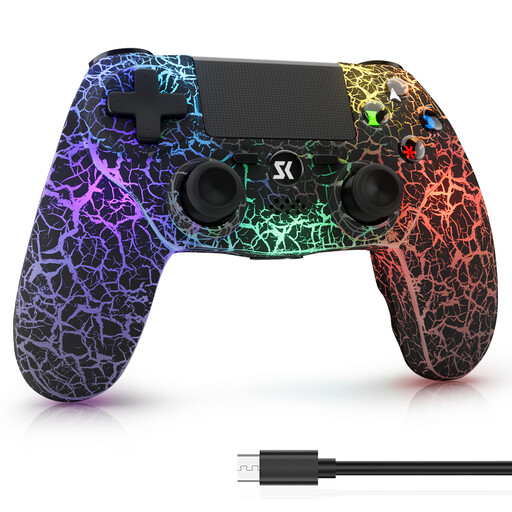 No image available
The product title lists PS4/Pro and PC (Windows) as platforms. Check that these match your gaming device.
The title lists RGB lighting, a 1,000-mAh battery, dual vibration and 6-axis motion control.
 No image available
The product title lists PC as the platform. The PS5 button layout describes the button arrangement; it doesn’t confirm PS5 compatibility.
The title lists Hall Effect joysticks, 255-level Hall triggers, programmable rear buttons, RGB lighting, a 1,000-mAh battery and USB-C.
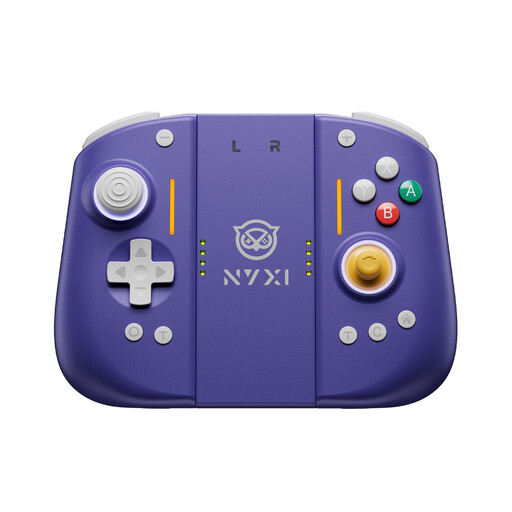 No image available
The product title lists Switch 2 as the platform. Check that the model works with your console and game.
The title lists a 9-axis gyroscope, Hall Effect joysticks, mechanical buttons, two rear buttons and adjustable vibration.
 No image available
The product title lists PC, Switch Lite and PS4 as platforms, and specifies wired use on PC. Make sure you can route the cable to where you sit.
The title also lists a 6-axis gyroscope, macros, turbo, customisable buttons, vibration feedback and RGB lighting.
 No image available
DualSense is an option for PS5 or for PC games that support the DualSense features you want.
According to Sony, haptic feedback on PC requires a USB connection and support from the specific game.
Not necessarily. Check whether the game supports the controller and which connection your PC needs. Steam describes Big Picture as a way to play PC games with a TV and controller, but it doesn’t guarantee that every feature will work with every game and controller.
For the first pairing, Sony says to connect the switched-on controller to the PS5 using a USB cable, then press the PS button. Sony also describes wireless pairing through the accessories settings for additional controllers.
Nintendo says the Switch 2 Pro Controller is designed for Switch 2 only. Nintendo confirms that the older Switch Pro Controller can be used wirelessly with a Switch 2.
In Germany, online purchases generally come with a 14-day right of cancellation from the day you receive the goods. You must notify the retailer that you wish to cancel. Exceptions and contract terms may apply in individual cases.