First, choose a controller that’s supported by your console or PC and the specific game. Then decide whether you want to connect your headphones to the controller, console or PC: a headphone socket on the controller doesn’t guarantee sound with every type of connection. According to Sony, using the DualSense headphone socket on PC and Mac requires a wired connection. The Switch 2 Pro Controller is designed exclusively for Nintendo Switch 2.
Who should give this choice particular thought?
Console players using headphones
If you play on a console you already own, check that the controller matches both your console generation and your headphone connection. Microsoft and Nintendo each specify the platforms or consoles their documented controllers are designed for.
PC players connecting a headset to the controller
If you want to connect your headset directly to your gamepad, the specific connection to your PC matters just as much as whether the game supports the controller. Sony requires a wired connection to use the DualSense headset socket on PC and Mac.
PC players using a separate audio connection
If your headphones are already connected to your PC, you can choose a controller mainly according to game support and the button layout you need. 8BitDo lists Windows compatibility and customisable inputs for the Ultimate 2 Wireless.
What should you look for when buying?
Start by checking that the platform and game match. Then check where your headphones will connect and whether the audio setup works with your particular connection.
| Consideration |
What to check |
Who is this important to? |
| Platform and console generation |
Check your exact console or PC system against the stated compatibility and full model name. |
If I want to play on a console I already own, the controller needs to match the right platform and generation. Around 36% of consumers put platform compatibility first. |
| Headphone connection and audio setup |
Check the headphone plug, socket and supported audio connection to your device. For the DualSense headset socket on PC and Mac, a wired connection is required. |
If I want to hear audio through headphones connected directly to the controller, I check the whole signal path rather than just the socket. Around 29% of consumers prioritise the audio setup. |
| Controls in the specific game |
Check the listing for your chosen game to see whether it supports controllers and, where applicable, which controller types are supported. |
If controls for a particular detective game matter most to me, I need to check that game’s support rather than assume it works because another game does. Around 21% of consumers put in-game controls first. |
| Seating comfort and cable reach |
Compare wired and wireless use with your seating position, the cable length you need and the power supply. |
If I don’t want a cable that’s too short to restrict me while playing, I check the distance from my seat to the device and the power requirements. Around 14% of consumers prioritise seating comfort and cable reach. |
Common misconceptions
-
A socket on the controller doesn’t guarantee wireless PC audio
Sony requires a wired connection to use the DualSense headset socket on PC and Mac. So the presence of a socket alone doesn’t prove that audio will come through the controller with every type of PC connection.
Before buying, check the entire signal path from your headphones, through the controller, to your device.
-
Switch controllers with similar names aren’t interchangeable
Nintendo says the Switch 2 Pro Controller can only be used with Nintendo Switch 2; it isn’t designed for the original Switch.
Check the full model name against your console generation.
-
PC compatibility doesn’t mean every game is supported
Controller support can depend on the specific game and, in some cases, the type of controller. Being able to customise the buttons doesn’t replace confirmed support for the game.
Check the listing for your chosen game and the input devices it names.
Key brands to consider
Microsoft Xbox
The documented Xbox Wireless Controller is designed for Xbox consoles and Windows PCs. Microsoft specifies Bluetooth for the controller connection and a 3.5 mm headset socket.
- The platforms and headset socket listed are documented for this model.
- This doesn’t confirm that headphone audio will come through the controller with every type of PC connection.
Sony PlayStation
The DualSense is an option for PS5 and is also described by Sony as suitable for compatible PC games.
- Haptic features are available in supported games.
- Sony requires a wired connection to use the headset socket on PC and Mac. Haptic features on PC also require USB and game support. These conditions apply to the documented DualSense.
Nintendo
The Switch 2 Pro Controller is designed for Nintendo Switch 2 and has a headphone socket.
- Nintendo specifies a four-pole 3.5 mm connection that follows the CTIA standard.
- Nintendo rules out the original Switch as a compatible console for this model; the older Switch Pro Controller is a different product.
PowerA
The documented Enhanced Wired Controller is a wired option for the specified Xbox consoles and Windows, and has a 3.5 mm socket.
- PowerA lists a detachable 3 m cable and mappable extra buttons for this model.
- Make sure the cable reaches your seat; how useful the extra buttons are depends on the game.
8BitDo
The Ultimate 2 Wireless is a PC-focused option if you connect your headphones separately from the controller.
- The manufacturer lists Windows compatibility and customisable inputs for this model.
- An audio path for a headset through the controller hasn’t been confirmed for this model. Also check that your specific game is supported.
Controller selection at Joybuy
The following Joybuy selection includes controllers for PC and PS4, as well as a wired model for Xbox and Windows. Check the stated compatibility and headphone connection against your platform and game.
 No image available
The G-Lab K-PAD-HELIUM-WL Wireless Controller
An option for wireless gaming on a Windows PC; a USB RF receiver is used for the wireless connection.
2.4 GHz connection; two rear buttons.
Joybuy
 No image available
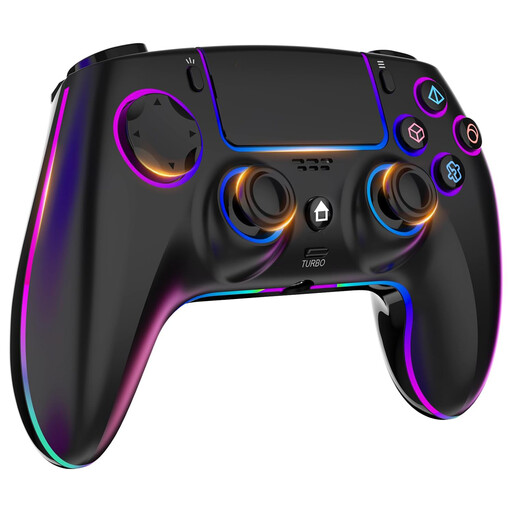
Wireless Controller for PS4/PC with Headphone Socket
For use with PS4 or PC and headphones connected to the controller; the product description lists a 3.5 mm headphone socket.
Touchpad; 1,000 mAh battery.
Joybuy
 No image available
Razer Wolverine V3 Tournament Edition, White
For wired gaming on Xbox or Windows; the detachable USB-C cable is listed as 3 m long.
Four rear paddles; six mappable buttons.
Joybuy
 No image available
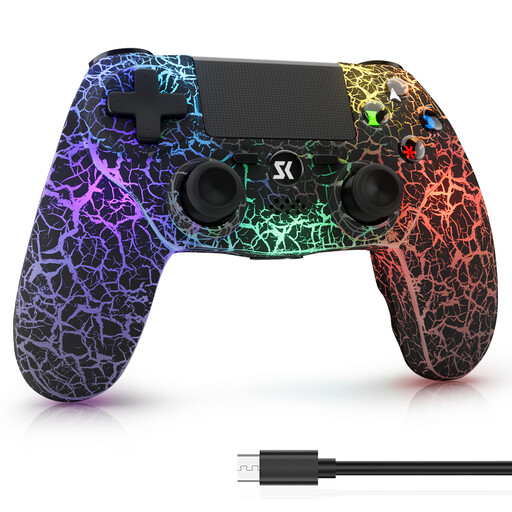
Wireless Controller for PS4/PS4 Pro/PS4 Slim and Windows
A wireless option for PS4 or Windows PC; check compatibility with your specific system.
1,000 mAh battery; RGB lighting.
Joybuy
 No image available
VIELLAN Wireless Gaming Controller with Hall Effect Sticks
For PC or PS4 with headphones connected to the controller; the product description lists a 3.5 mm headphone socket. Check compatibility with your platform.
Hall effect sticks; 255-step Hall effect triggers; programmable rear buttons; USB-C.
Joybuy
Frequently asked questions
Is a 3.5 mm socket on the controller enough to use headphones on PC?
No, the socket alone isn’t enough to confirm that it’ll work. Sony requires a wired connection to use the DualSense headset socket on PC and Mac; this doesn’t establish a general rule for audio on other models.
How can I check whether my detective game works with a controller?
Check the listing for the specific game and note which controller support it mentions. Don’t assume that information applies to other games or controller types.
Does the Switch 2 Pro Controller work with the original Switch?
No. Nintendo says the Switch 2 Pro Controller can only be used with Nintendo Switch 2.
What should I look for in a wired controller?
Check that the cable reaches from your seat to your device and gives you the freedom of movement you want. The detachable cable on the documented PowerA Enhanced Wired Controller is 3 m long.


