First, choose a controller that’s supported by your console or PC and the specific game you want to play. Having a compatible connection alone isn’t enough to confirm compatibility. In a shared bedroom, audio output and the option to turn off vibration matter too, while comfort, power supply and cable routing become important during longer sessions. Available features depend on the model and platform.
Which features suit different players?
Players with a specific platform
If you’re playing a historical adventure on a particular console or PC, first check that both the device and game support the controller. The platforms and connection methods listed by Microsoft and 8BitDo vary by model.
Considerate bedroom gamers
If you want to adjust sound and vibration for a shared space, check audio output and vibration settings separately. Nintendo describes a setting for turning controller vibration on or off. Nintendo also lists a headphone jack on the Switch 2 Pro Controller.
Players who enjoy longer sessions
If you play for longer, pay particular attention to how the controller feels in your hands, freedom of movement and the power supply. Information from Nintendo and Microsoft shows that power options vary between controllers.
What should you look for when buying?
Start by checking platform and game support, then consider audio and vibration options, followed by comfort and power supply. The figures below show the main buying concern for consumers looking for a controller for historical adventures in a shared bedroom.
| Buying concern |
What to check |
Who is most affected? |
| Platform and game |
Check your console or PC, the specific game and the supported connection. |
If I want to use the controller with different devices, each one and the game must be supported. Around 33% of consumers put compatibility first. |
| Sound and vibration |
Check the system’s audio output, headset connection and vibration options. |
If someone else is in the bedroom, I want to be able to adjust sound and vibration to suit the situation. Around 27% of consumers prioritise being considerate of others. |
| Comfort and cable routing |
Try the grip and button layout for yourself; allow space for cables or a receiver. |
For longer gaming sessions, I want a grip and connection that suit my hands and the distance from the device. Around 20% of consumers prioritise comfort and ease of use. |
| Power supply |
Check the batteries, charging requirements and what’s included with the specific version. |
If I want to avoid interruptions and the hassle of extra power supplies, power is a key consideration. Around 20% of consumers put ongoing power requirements first. |
Avoid common misconceptions
-
Assuming wireless connectivity means compatibility
A controller may offer different connection methods for different platforms. For example, 8BitDo lists different connection methods for Windows and Android for the Ultimate 2C Wireless.
Before buying, check the model, platform, connection and support for the specific game.
-
Assuming the controller is the only possible source of noise
A headphone jack and a vibration setting affect different aspects of how you use a controller. Neither tells you how loud the buttons are when you play.
Check the system’s audio output and the vibration options on your console and in the game. If possible, try the controller yourself to see how noisy the buttons are.
-
Treating manufacturers’ battery-life estimates as guaranteed session times
Nintendo describes the Switch Pro Controller’s battery life as an estimate that depends on how it’s used. Microsoft lists AA batteries for the standard Xbox controller.
Check the power supply and what’s included with your chosen version before you decide.
A guide to relevant brands
Microsoft Xbox
Xbox Wireless Controller for supported Xbox consoles and Windows PCs.
- Microsoft lists Bluetooth and customisable button mapping.
- Microsoft lists AA batteries for the standard controller; the stated battery life isn’t an independent measure of how long it will last for you.
Sony PlayStation
DualSense, the PS5 controller for games that support its additional input features.
- Sony lists haptic feedback and adaptive triggers.
- Whether a particular adventure uses these features, or how disruptive they are in a bedroom, depends on the game and how you play.
Nintendo
Switch Pro Controller for Switch, and also for wireless use with Switch 2; the Switch 2 Pro Controller is a separate option.
- Nintendo lists HD rumble and motion controls for the older Pro Controller. Nintendo also describes a system setting for turning controller vibration on or off.
- The headphone jack is confirmed for the Switch 2 Pro Controller, not the older Pro Controller.
8BitDo
Ultimate 2C Wireless, with connection methods for Windows and Android according to the manufacturer.
- 8BitDo lists Hall Effect joysticks and an included 2.4 GHz receiver.
- Connection options depend on the platform; the information provided doesn’t confirm compatibility between this model and Xbox or PS5.
GameSir
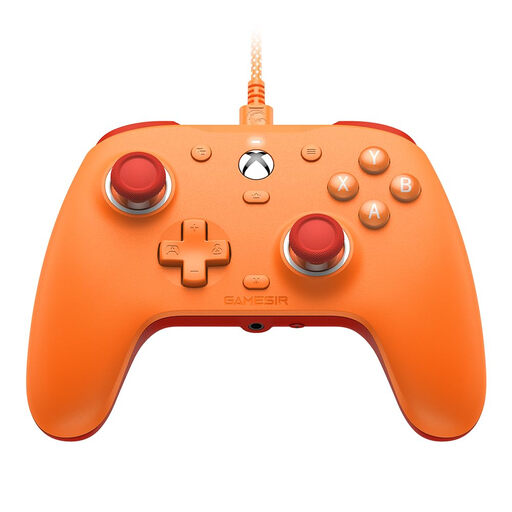
G7 SE, a wired option for Xbox and PC.
- GameSir promotes Hall Effect sticks and triggers.
- The manufacturer’s information doesn’t guarantee that stick drift will never occur; the cable needs to suit your gaming setup.
Controllers at Joybuy
The models below cover Xbox and Windows systems, PS5, and Nintendo Switch and Switch 2. Support for your specific game and the right connection type remain essential.
 No image available
Microsoft Xbox Wireless Controller – Deep Pink
An option for supported Xbox consoles and Windows PCs if you want to play wirelessly.
The standard controller uses AA batteries, so plan for battery replacements or a suitable alternative power supply.
View at Joybuy
 No image available
Nintendo Switch Pro Controller – Black
For Switch games that support a Pro Controller and its motion controls or HD rumble; Nintendo also confirms that it can be used wirelessly with Switch 2.
Nintendo estimates battery life at around 40 hours and notes that it depends on how the controller is used. Vibration can be adjusted in the system settings.
View at Joybuy
 No image available
PlayStation DualSense Wireless Controller – Midnight Black
For PS5 games that support the DualSense and use its haptic features.
Haptic feedback and adaptive triggers require support from the game. According to the product information, a USB cable isn’t included.
View at Joybuy
 No image available
GameSir G7 SE Wired Controller – Orange
A wired option for the Xbox systems and Windows 10/11 listed in the product name, provided the cable works with your setup.
The product name lists Hall Effect sticks and a 3.5 mm audio jack. The controller needs to be connected by cable.
View at Joybuy
 No image available
Nintendo Switch 2 Pro Controller
For Switch 2, if you want a wireless connection and personal audio through the controller.
Nintendo lists a headphone jack and additional GL and GR buttons. These connections and controls aren’t available on the older Switch Pro Controller.
View at Joybuy
Frequently asked questions
Can I use an Xbox or PC controller with any console just because it has Bluetooth?
No. Bluetooth alone doesn’t prove that a controller is compatible with a console. Microsoft lists specific supported platforms, while 8BitDo distinguishes between Windows connections and Bluetooth for Android on the Ultimate 2C Wireless. Check that the specific game supports it too.
How do I turn off controller vibration on Nintendo Switch?
Nintendo explains that you can go to ‘System Settings’ and then ‘Controllers and Sensors’, where you can toggle ‘Controller Vibration’. According to Nintendo, the setting applies to controllers synced with the console.
Does every Nintendo Pro Controller have a headphone jack?
No. The headphone jack is listed for the Switch 2 Pro Controller. This feature isn’t confirmed for the older Switch Pro Controller, so check the full model name.
What are my rights if I buy a faulty controller as a consumer in Germany?
If a product is faulty, the seller’s statutory liability for defects is separate from any voluntary guarantee. Consumer information from the European Union states that there is generally a minimum two-year period from receipt of the goods; free repair or replacement may be available in the first instance. For a standard online purchase, you’ll also generally have a 14-day right to cancel, as explained by the consumer advice centre.


