What should you look for when buying?
First check that the game and platform are supported, then choose the right connection and finally consider handling and extra features.
| Buying priority |
What to look for |
Who it matters most to |
| Game and platform compatibility |
Check support for the specific game, operating system and controller you want to use. |
If I want to play a particular fantasy game, I’ll first check whether the platform and game support the controller and the feature I want. Around 36 % of consumers prioritise compatibility. |
| Clear play area and connection |
Check the model’s Bluetooth support, receiver type, available ports, power supply and cable routing. |
At a small desk, I want to keep my play area clear without overlooking a USB port I need or an awkward cable route. Around 29 % of consumers prioritise space and connection. |
| Comfort during longer gaming sessions |
Compare the dimensions, weight, grip and button accessibility of the specific model. |
For longer adventures, the grip, weight and button layout need to suit my hands. Dimensions alone don’t guarantee comfort. Around 21 % of consumers prioritise ease of use. |
| Button mapping and extra features |
Check which buttons can be remapped, whether software is needed and what the game supports. |
If I want to assign actions to extra buttons, I’ll check whether that specific model supports remapping and whether I need software. Around 14 % of consumers prioritise customisation options. |
Controllers to suit your platform and connection
This selection includes wireless controllers for PCs and consoles, as well as a wired model for Windows PCs and Xbox. The key thing is whether your specific game and platform support the controller.
 No image available
EasySMX D10 PC Controller
If your PC and game support the controller, the wireless Bluetooth connection stated in the title keeps a controller cable off your play area.
The title lists a TMR joystick, dual-mode triggers, mechanical buttons, a 1000 Hz polling rate and RGB lighting. The listed platforms are PC, Switch, Android and iOS.
View at Joybuy
 No image available
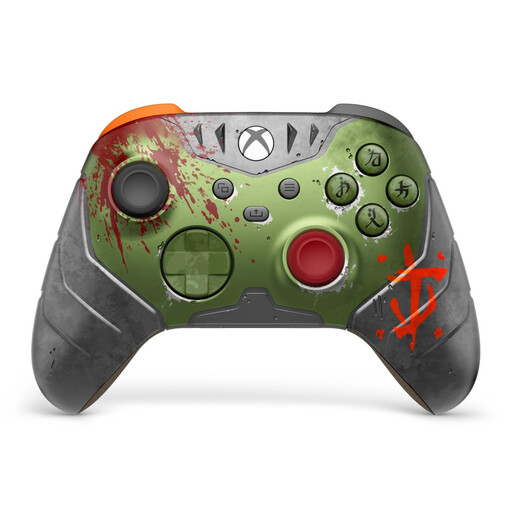
Microsoft Xbox Wireless Controller – DOOM: The Dark Ages Limited Edition
An option for Xbox or PC if you want to play wirelessly. First check that your game supports the controller and what connection options your PC has.
The title lists Xbox One, Xbox Series X/S and PC. The product description lists Bluetooth, a wired connection and two AA batteries.
View at Joybuy
 No image available
PlayStation DualSense Wireless Gaming Controller, White
For PS5 or a supported PC game. Check the connection and support for the features you want in the specific game.
The product title lists PS5 and PC. Sony describes USB and Bluetooth for a PC connection; haptic feedback on PC requires a supported game and USB.
View at Joybuy
 No image available
Nintendo Switch 2 Pro Controller
If your fantasy game runs on Nintendo Switch 2 and you want to use a separate controller, this model is designed for that console.
Nintendo lists remappable GL and GR buttons, while the product description specifies a wireless connection.
View at Joybuy
 No image available
GameSir G7 HE Wired Controller
A wired option for Windows PC or Xbox if you have a USB port within reach and can route the cable safely around your small desk.
The product title lists Hall Effect joysticks and Xbox Series X|S, Xbox One and Windows 10/11. The product description lists a detachable 3 m USB-C cable.
View at Joybuy
Frequently asked questions
Is “PC compatible” enough to guarantee that every controller feature will work in my fantasy game?
No. Check whether the specific game supports controllers and the feature you want to use. For DualSense haptics on PC, Sony specifically requires a supported game and a USB connection. Steam also lets you filter games by the controller types they support.
How do I connect an Xbox Wireless Controller to a Windows PC via Bluetooth?
According to Microsoft’s instructions, switch on the controller, press and hold the Pair button, then add it in Windows under Bluetooth devices. Before you start, check that Bluetooth is enabled on your PC and that your version of Windows supports the connection.
If space is limited, can I use any wireless controller with PC Bluetooth?
No. For the Ultimate 2C Wireless on Windows, 8BitDo lists 2.4 GHz with a USB-A receiver or a USB cable; Bluetooth is listed for Android. So check the connection options for the exact model variant and platform.
What are my rights in Germany if a controller bought online is faulty?
Your statutory rights generally apply against the retailer and are separate from a voluntary warranty. The Verbraucherzentrale explains that goods you buy are generally covered by a two-year statutory warranty; for a typical online purchase, you’ll usually also have a 14-day right to cancel. The relevant terms depend on the specific purchase.
What should I check regarding compliance when buying a wireless controller online?
Products covered by relevant EU harmonisation rules and placed on the EU market must carry a CE mark. The Bundesnetzagentur lists labelling, manufacturer details and a declaration of conformity among the points it checks during market surveillance. A CE mark alone doesn’t prove that a particular product listing has been inspected by the authorities.


