What to look for when buying
Check compatibility and the number of player slots the game actually supports first. Then you can choose the lighting and connection that suit your seat.
| What matters to you |
What to look for |
Who it matters most to |
| Compatibility |
Compare the full model name, platform and connection with your device and the specific version of the game. 8BitDo lists the Ultimate 2C Wireless for Windows and Android, while the Ultimate 2C Bluetooth is listed for Switch and Switch 2, subject to the relevant system requirements. |
If I want to play on my existing device, I need the exact controller version that works with it. Around 36% of consumers put compatibility first. |
| Separate player slots |
Check both the number of local players supported by the game and the system requirements. Sony says the PS5 can use up to four controllers at the same time; Nintendo generally lists up to eight wireless controllers for Switch and Switch 2, with limitations depending on controller type and features. |
I want to make sure everyone can actually join in, rather than ending up with an extra controller and no free player slot. Around 29% of consumers prioritise having additional local player slots. |
| Finding your way in the dark |
Sony describes a coloured player indicator on the DualSense; PowerA lists three adjustable light zones for the Spectra Infinity. Neither confirms that the button symbols are illuminated. |
In a dark room, I want to be able to identify my controller or its controls more easily. Around 21% of consumers prioritise visibility in the dark. |
| Connection and power |
Plan your cable route and seating position, or check the wireless mode, any required USB receiver and charging options. GameSir lists wired play on Xbox, and 2.4 GHz wireless or wired play on PC for the G7 Pro. |
I need a connection that works from my seat, without a cable getting in the way, and a controller that’s ready to use. Around 14% of consumers prioritise freedom of movement and power. |
Brands worth considering
The product ranges listed here differ in platform compatibility, player indicators and connections. Similar product family names don’t necessarily mean you’re looking at the same version.
Sony PlayStation
The DualSense is worth considering for PS5 sessions if you want to use colour-coded player identification.
- Sony says the PS5 can use up to four controllers at the same time; pressing the PS button assigns a colour to each player.
- The indicator doesn’t confirm that the button symbols are illuminated. Haptic feedback and adaptive triggers require support from the game you’re playing.
Nintendo
The Switch Pro Controller and Switch 2 Pro Controller are different product versions, each for its corresponding Nintendo console.
- Nintendo describes a player indicator on the Switch 2 Pro Controller; the Switch Pro Controller includes features such as motion controls, HD Rumble and amiibo functionality.
- Nintendo generally lists up to eight wireless controllers for Switch and Switch 2, but the maximum is subject to limitations depending on the controller type and features in use. The game may support fewer players.
Microsoft Xbox
Microsoft lists the Xbox Wireless Controller as compatible with Xbox consoles and Windows.
- Microsoft lists Bluetooth, button mapping, a textured grip and a hybrid D-pad.
- These specifications don’t confirm that the button symbols are backlit or indicate how many players a particular game supports.
PowerA
The Spectra Infinity Enhanced Wired Controller is a wired option for Xbox Series X|S if a cable works with your seating position.
- PowerA lists three independently adjustable light zones, two mappable back buttons and trigger locks.
- The light zone specifications don’t confirm that the button symbols are illuminated; you’ll also need to route the cable sensibly while playing.
8BitDo
With the Ultimate versions, the exact model suffix determines the platform and connection.
- 8BitDo lists a receiver with a charging dock for the Ultimate 2 Wireless on Windows. The Ultimate 2C Wireless is listed for Windows and Android, while the Ultimate 2C Bluetooth is listed for Switch and Switch 2, subject to the relevant system requirements.
- The manufacturer’s specifications apply to specific variants and aren’t an independent comparison of wireless performance or durability.
GameSir
With the G7 Pro, the connection you need depends on the platform you’ll be using.
- For the standard G7 Pro, GameSir lists wired play on Xbox, 2.4 GHz wireless or wired play on PC, and Bluetooth on Android.
- Manufacturer claims about polling rates or response times aren’t an independently measured advantage for every arena game.
Joybuy products for local arena sessions
Depending on the model, the Joybuy products below offer wired or wireless use, support for various platforms and, in some cases, RGB lighting. Before buying, check the exact compatibility with your device and game.
 No image available
BIGBIG WON Fight Master Leverless Controller
For arcade fighting games if you want an all-button layout and use one of the listed platforms.
The title lists Switch 2, Switch, PC, iOS and Android, as well as Bluetooth, 2.4 GHz and wired connections. The description lists RGB lighting and hot-swappable mechanical switches.
View at Joybuy
 No image available
EasySMX D10 PC Controller
For gaming on one of the platforms listed in the product title if you’re looking for a wireless controller with RGB lighting.
The title lists PC, Switch, Android and iOS, a TMR joystick, dual-mode triggers, mechanical buttons, a 1000 Hz polling rate and RGB backlighting.
View at Joybuy
 No image available
Wireless Dualshock Game Controller for PS4 and PC
For PS4 or PC sessions, provided the stated compatibility matches your device and game.
The description lists a touchpad, two vibration motors, a 6-axis gyroscope and a headset or microphone jack.
View at Joybuy
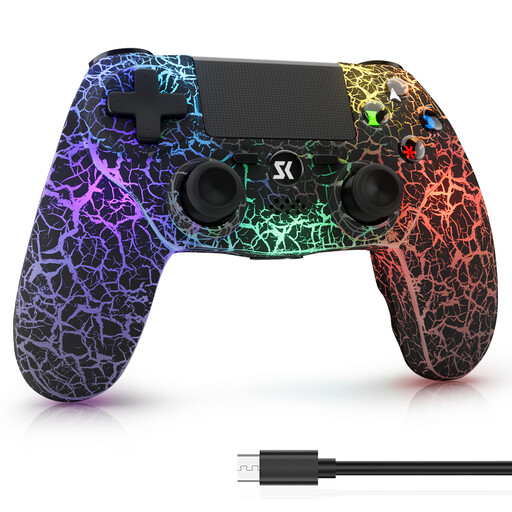 No image available
Wireless Controller for PS4, PS4 Pro, PS4 Slim and Windows PC
For gaming on one of the listed devices if you’re looking for a wireless controller with RGB lighting.
The description lists five customisable RGB lighting modes, a 1000-mAh battery, dual vibration and a 6-axis motion sensor. RGB lighting doesn’t automatically mean the button symbols are illuminated.
View at Joybuy
 No image available
VIELLAN Wireless Gaming Controller for PC
For PC gaming if you want RGB lighting and additional programmable back buttons.
The description lists Hall Effect sticks and triggers, 255-level Hall triggers, two programmable back buttons, RGB lighting, a 1000-mAh battery and USB-C charging. The PS5 button layout mentioned in the title doesn’t prove PS5 compatibility.
View at Joybuy
Frequently asked questions
Are four paired controllers enough for a four-player arena game?
Not necessarily. Sony documents up to four PS5 controllers in use at the same time, but you’ll also need to check whether the specific version of the arena game supports four local players on your platform.
How can I tell whose PS5 controller is whose in the dark?
Sony says pressing the PS button assigns a colour to each player. However, this player indicator doesn’t tell you whether the button symbols are illuminated.
How do I connect an extra controller to a Switch 2?
Nintendo describes pairing the Switch 2 Pro Controller via USB or through the HOME menu by selecting ‘Controllers’ and ‘Change Grip/Order’, then pressing the SYNC button. After that, check the player indicator and the number of players supported by the game.
Can the standard GameSir G7 Pro play wirelessly on an Xbox?
For this model version, GameSir lists wired play on Xbox and 2.4 GHz wireless or wired play on PC. So check the full model name before relying on specifications for another G7 Pro version.
Who is responsible if a newly purchased controller is faulty in Germany?
Your statutory rights are against the seller; a voluntary manufacturer’s guarantee is separate. Germany’s Federal Ministry of Justice states that, for new goods bought by consumers, the limitation period is two years and cannot be reduced.


