Console gamers using headphones
If you play puzzle games on a PlayStation, Xbox or Nintendo console, choose a controller that’s compatible with your specific device and check the headphone connection at the same time.


Start by choosing a controller for your gaming platform, then check how you want your headphones to receive game audio. A 3.5 mm jack on the controller isn’t enough on its own: on PC, the DualSense needs a wired connection for headset audio, while Nintendo specifies a CTIA headphone jack on the Switch 2 Pro Controller. Then check that the D-pad and button layout suit your puzzle game, and consider whether you really need any extra features.
If you play puzzle games on a PlayStation, Xbox or Nintendo console, choose a controller that’s compatible with your specific device and check the headphone connection at the same time.
On PC, both the game and your preferred controller and headphone connection need to work. In particular, don’t assume that Bluetooth controls mean headset audio will work too.
If a D-pad, easy-to-reach buttons and a suitable layout matter more to you than extra features, compare the specific button arrangement and controls on each model.
A good fit if: you want to play on PS5 or in a supported PC game with a DualSense.
Worth noting: PlayStation requires a wired connection to use the headset jack on PC and Mac.
A good fit if: you’re looking for an Xbox-compatible gamepad for an Xbox console or Windows PC.
Worth noting: According to Xbox Support, an Xbox controller connected to a PC via Bluetooth doesn’t support Xbox headsets.
A good fit if: you want to plug wired headphones straight into the Switch 2 Pro Controller.
Worth noting: Nintendo specifies a four-pole 3.5 mm CTIA jack for this model. Still, check that it’s compatible with your game and headset.
A good fit if: your puzzle game supports controller input and you want to use a controller attached directly to your iPhone.
Worth noting: With the Backbone One, you’ll need the Lightning or USB-C version that matches your iPhone.
| Buying criterion | What to check | Who it matters most to |
|---|---|---|
| Platform and game | Check the console or operating system, the full controller model and whether the specific game supports controllers. | If I want to be sure the game and device work together, compatibility comes first. Around 36% of consumers prioritise platform and game compatibility. |
| Audio connection | Check the headphone type, connection standard and audio path for the specific platform and controller connection you’ve chosen. | If I want to hear game audio directly through the gamepad, the jack also needs to work with my connection method. Around 29% of consumers prioritise the actual audio path to their headphones. |
| D-pad and buttons | Compare the D-pad, button positions and, where relevant, button mapping with the controls used in your puzzle game. | If I use directional controls or menus a lot, what matters most is whether the buttons are comfortable and easy to use. Around 21% of consumers prioritise how the controls feel and the button layout. |
| Cables and features | Check what’s included, which connection cable you need and whether any extra features will be useful to you. | If I’m looking for a simple, suitable setup without unnecessary features, I also want to factor in cable routing and any accessories I’ll need. Around 14% of consumers prioritise keeping the cost and effort of buying and using a controller to a minimum. |
That isn’t always the case: according to PlayStation, the DualSense needs a wired controller connection to use the headset jack on PC and Mac. Xbox notes that a controller connected to a PC via Bluetooth doesn’t support Xbox headsets.
Check the controller connection and audio path separately for your gaming device and headphone model.
If you want to use the DualSense headset jack on PC, factor in the required wired connection and a suitable cable route.
Nintendo specifies a four-pole CTIA headphone jack for the Switch 2 Pro Controller. This doesn’t prove that every older or differently named Pro Controller has the same feature.
Compare the full model name and connection details of the controller you’re thinking of buying.
DualSense for PS5 and supported PC games, if you want to use this controller.
Xbox Wireless Controller for Xbox consoles and Windows PCs, with a specified 3.5 mm headset jack.
Switch 2 Pro Controller for Switch 2 players who want a headphone jack on their gamepad.
G7 SE, a wired alternative for Xbox and Windows with a headphone jack.
Ultimate Wired Controller for Xbox, a wired option with customisable button mapping.
This selection includes wired Xbox and Windows controllers, as well as a wireless controller for PS4 and Windows with a specified headset jack.
 No image available
A wired option if you’re looking for an Xbox or Windows gamepad with extra mappable buttons.
The description lists a detachable 3 m USB-C cable, four rear paddles and six assignable buttons. It doesn’t support a wireless connection, according to the description.
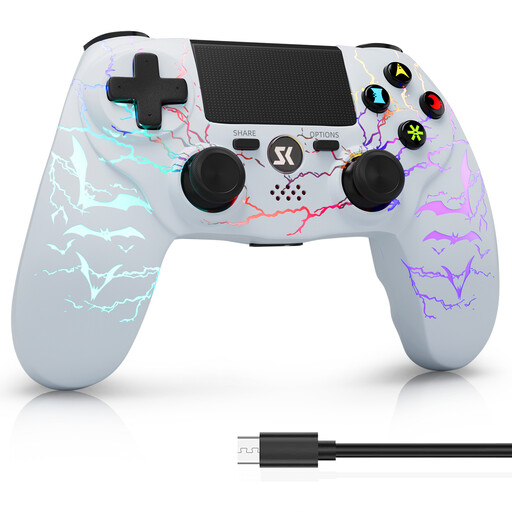 No image available
A wireless option if you’re looking for a controller for PS4 or a Windows PC and want to use a headset jack on the gamepad.
The product description lists Bluetooth, a rechargeable battery and a 3.5 mm audio jack for headsets. Check that the audio path works with your specific connection.
No. PlayStation requires the DualSense to be connected by wire to use the headset jack on PC and Mac; Bluetooth pairing alone doesn’t meet this requirement.
While Bluetooth audio is in use, Nintendo allows a maximum of two wireless controllers to be connected to the Nintendo Switch. Bluetooth audio is disabled in local mode, and there may also be a delay depending on the audio device.
First, check the USB or wireless connection specified for your model, along with the game’s button mapping. For an Xbox Series X|S controller connected to a Windows PC by cable, Microsoft lists a USB-C cable that supports data transfer as an option. PlayStation explains how to pair the DualSense again when switching devices.
The Verbraucherzentrale states that goods bought new are covered by a statutory two-year warranty from the date of handover or receipt; the seller is responsible for statutory warranty rights. A voluntary guarantee is separate. Online purchases generally also come with a 14-day right to cancel, subject to the conditions in each case.
The Bundesnetzagentur outlines labelling and conformity requirements for the sale of electrical and electronic equipment. CE marking is a declaration by the manufacturer, not an independent quality mark. According to the Federal Ministry for the Environment, end-of-life electrical equipment should be taken to an authorised collection point rather than put in household waste. Separate free return options are available for used batteries.