PC co-op players
You play platform games on PC and need a controller for each player that the specific game will recognise. Steam Support points out that not every Steam game supports controllers.


Choose a controller to suit your PC or console first, then check whether the specific platform game supports local multiplayer and recognises each player’s inputs. For local media files, the playback player matters too: a controller that works in Steam won’t necessarily be set up in Kodi.
You play platform games on PC and need a controller for each player that the specific game will recognise. Steam Support points out that not every Steam game supports controllers.
You’re looking for an extra controller for a PlayStation or Nintendo Switch you already own. Check the exact console model and game separately; Nintendo Germany, for example, confirms that the Switch Pro Controller can be used wirelessly with Switch 2.
You want to control games and local files from the sofa. As well as the gamepad, you’ll need to consider the playback device and how your media player, such as Kodi, is configured.
Check the platform and multiplayer support first, then the button layout and connection options where you’ll be sitting. Treat the media app as a separate compatibility check.
| Buying priority | What to check | Who should pay particular attention |
|---|---|---|
| Platform and local multiplayer | Check which platform the controller is designed for, whether the specific game supports it and how many simultaneous inputs you need. | If you want to play with someone else on PC or console, you need a device and game that recognise both players’ inputs; around 36% of consumers put platform and local co-op support first. |
| D-pad and action buttons | Look for a D-pad, easy-to-reach action buttons and options for mapping controls in the game. | For frequent changes of direction, the right layout matters more than extra features; around 29% of consumers put platform-game controls at the heart of their decision. |
| Connection where you’ll be sitting | Check the cable length or supported wireless connection, along with any ports, receivers and power supply you’ll need. | If you want to move freely on the sofa or power several controllers, the connection is key; around 21% of consumers prioritise connectivity and power. |
| Controlling local media | Check whether the media app recognises the controller, how you can map its buttons and whether local files have been added as a source. | If you want to control games and local videos with the same input device, you’ll also need to set up the player; around 14% of consumers prioritise media controls. |
Steam Support points out that not every Steam game supports controllers. Kodi’s documentation explains that a controller must be recognised separately and its buttons configured; the gamepad itself doesn’t play local files.
Steam support for controllers varies from game to game. For Kodi, you’ll also need to make sure the controller is recognised and configured.
Test the specific game, the number of players and the media player separately.
If the controls aren’t suitable, you may need to spend extra time setting things up, or end up with an unused second controller.
For the 8BitDo Ultimate 2C Wireless, 8BitDo lists Bluetooth for Android, while Windows connections are via 2.4 GHz or cable.
Compare the connection details for the exact variant with your playback device, and check that you have a free port for the receiver if needed.
GameSir says the G7 SE is wired. Make sure the cable can safely reach from the port to where you’ll be sitting.
Plan the connection and cable route in advance, especially if several people will be playing on the sofa.
An option for supported Xbox consoles and Windows PCs.
The Ultimate 2C Wireless is designed for Windows and Android setups, with different connection options for each.
The DualSense is an option for a PS5 setup and supported applications on a Windows PC.
The Switch Pro Controller is an option for Nintendo Switch setups.
According to GameSir, the G7 SE is a wired option for Xbox One, Xbox Series X|S and Windows 10/11.
The models below are listed for Windows PC and Nintendo Switch gaming setups. Check compatibility with your specific game, and set up the media app separately from the controller.
 No image available
The product name lists the controller for PC and Switch. Before buying, check that your game and media app support it.
Features named in the product title: wireless BT, TMR joystick, dual-mode triggers and mechanical buttons.
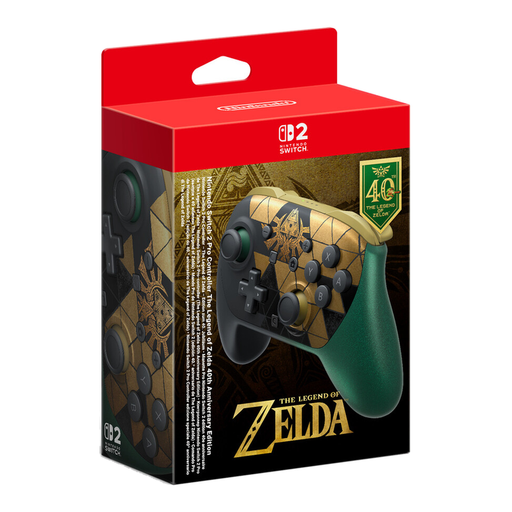 No image available
Listed as a Pro Controller for Nintendo Switch 2; check that your specific co-op game supports it before buying.
The product name lists HD Rumble 2, Mouse Controls, Amiibo and GameChat.
 No image available
The product name lists Xbox One, Xbox Series X/S and PC as supported platforms. Check the connection and support for the game you want to play.
The product name describes this version as a wireless controller in Deep Pink.
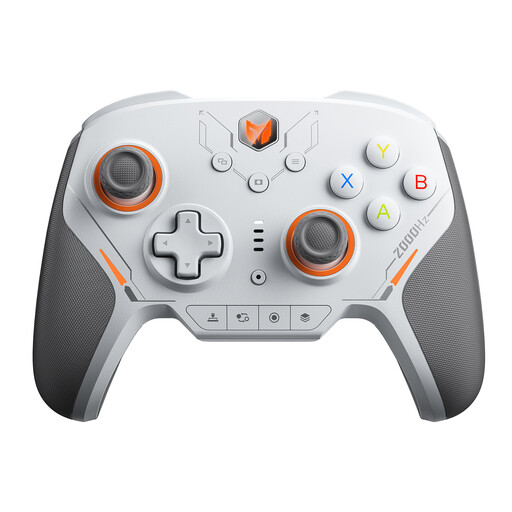 No image available
The product name lists PC and Switch as platforms; check compatibility with your game and preferred connection.
The product name lists 16 mechanical micro-switch buttons, TMR joysticks and a 2000 Hz report rate.
 No image available
The product name lists PC and Switch 2 as platforms. Check that your game supports the controller and the local inputs you need.
Features named in the product title: capacitive joystick, 16 mechanical buttons, 6-axis gyroscope and a 2000 Hz polling rate.
No. Steam Support points out that not every Steam game supports controllers. For the specific game, also check whether local multiplayer is available and how many inputs are needed.
First, add your video files as a source in Kodi. Once Kodi recognises the controller, you can configure its buttons and assign playback actions.
Check which connection your device supports and whether you need a receiver or cable. If a product is faulty, you have statutory warranty rights against the seller; the Verbraucherzentrale distinguishes these from a voluntary manufacturer’s guarantee.
No. The German Environment Agency explains that old electrical equipment must be collected separately. Remove the batteries if possible and take them to a separate battery collection point.