Who is a controller suitable for?

PC gamers playing on a TV

If you play PC puzzle games on your TV, check both whether the game supports controller input and how the connection will reach your seat. Steam Big Picture is designed for use on a TV, but the PC remains the device the game runs on.

Console gamers

If you play on a PlayStation or Nintendo Switch, choose a model that’s confirmed as compatible with your specific console. PC controllers that look similar aren’t automatically compatible with a console.

Point-and-click gamers

For puzzles that require precise object selection, check the input details for the specific game. The Point & Click label alone doesn’t confirm that you can play the entire game with a gamepad.

What should you look for when buying?

What matters to you What to check before buying Who it matters most to
Platform compatibility Check the exact controller model, the operating system or console generation, and which connection methods it supports. If I switch between PC and console, I want to be sure the controller works with the device I’ll actually play on. For around 36% of consumers, platform compatibility is the top priority.
In-game controls Check the input details for the specific version of the game. Don’t assume that controller support in menus means it’s supported during gameplay. If I want to play a particular point-and-click puzzle, I check in advance whether I can use a gamepad for the required inputs. For around 29% of consumers, controls in the specific game are the main consideration.
Connection from your seat Check the cable length and distance, or make sure the device supports the wireless connection you want to use. If my PC isn’t right next to the sofa, I need a connection that reaches where I’m sitting. Around 21% of consumers pay particular attention to this.
Comfort and accessories Check the button layout, what’s required for any extra features you want, and what’s included with the specific version. If certain buttons or accessories matter to me, I want to know whether the game and my device support those features, and whether any parts I need are included. Around 14% of consumers focus on comfort and potential accessories.

Common misconceptions

  • ‘Playable on a TV’ doesn’t mean ‘connects directly to the TV’

    With Steam Big Picture, the PC remains the device the game runs on. The controller and connection therefore need to work with the PC that sends the picture to your TV.

    First, work out where the game runs and how its picture gets to your TV. Then choose a controller with a suitable connection method.

  • Point-and-click puzzles aren’t automatically gamepad-friendly

    The Steam page for Portal 2 lists full controller support; the page for The Room Two has no such information. The absence of this information doesn’t mean an alternative control method is impossible.

    Check the input options for the specific version of the game before buying a gamepad specifically for it.

  • Bluetooth doesn’t mean support on every device

    The manufacturer’s information for the 8BitDo Ultimate 2C Wireless specifies a 2.4 GHz receiver for Windows and Bluetooth for Android. Platform compatibility and available features can vary for other models too.

    For the exact model, check that the platform, connection type and feature you want all match.

  • Don’t assume TV accessories are included with the Nitro Deck+

    The CRKD Nitro Deck+ is designed for Nintendo Switch and Switch OLED. Versions and their included items can differ.

    For TV use, check the specific version and whether it includes the HDMI adapter you need.

    Depending on the version, you may need to buy an HDMI adapter separately. Check whether it’s included before you buy.

Brands to consider

Microsoft Xbox

An option for Xbox and supported Windows configurations.

  • Microsoft lists USB, Bluetooth and the Xbox Wireless Adapter as connection options for the Xbox Wireless Controller on Windows.
  • Microsoft says controller audio and connected accessories aren’t supported over Bluetooth. This doesn’t apply to every Xbox model or TV.

Sony PlayStation

DualSense controllers for PS5; Sony also describes connecting them to supported PCs and mobile devices.

  • Sony lists USB-C and Bluetooth as connection options.
  • According to Sony, haptic feedback on PC requires game support and a USB connection. Available features also depend on the device and game.

Nintendo

Controllers for games running on a Nintendo Switch.

  • Nintendo confirms that the older Switch Pro Controller can be used wirelessly with a Switch 2.
  • This compatibility doesn’t confirm that every Switch accessory or new control feature will work in the same way.

8BitDo

The Ultimate 2C Wireless is a model-specific option for Windows PCs or Android devices.

  • For this model, 8BitDo lists a 2.4 GHz receiver or cable for Windows, and Bluetooth for Android.
  • This information doesn’t confirm general Bluetooth compatibility with Windows or support for consoles.

Logitech G

The F310 is a wired PC option if your seat is within reach of the cable.

  • Logitech lists a 1.8 m USB cable, as well as XInput and DirectInput.
  • According to Logitech, DirectInput requires software to be installed. The model specifications don’t confirm native console compatibility.

Joybuy products

This selection of controllers includes options for PS5, Nintendo Switch 2, PC and Xbox. Also check whether the specific puzzle game supports controller input.
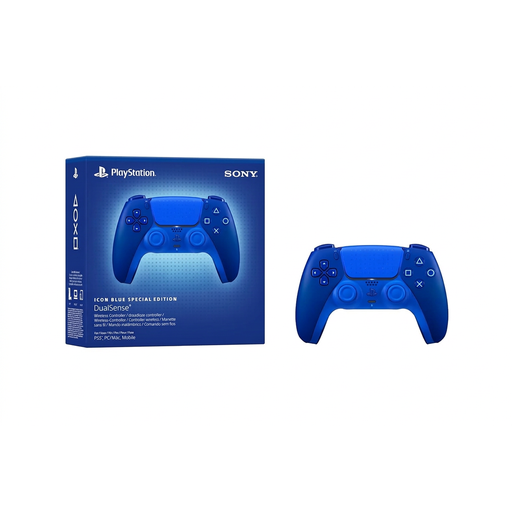
PlayStation DualSense Wireless Controller CFI-ZCT2WZBX Icon Blue Special Edition

PlayStation DualSense Wireless Controller CFI-ZCT2WZBX Icon Blue Special Edition

An option for puzzle games on PS5, provided the specific game supports controller input.

Version: Icon Blue Special Edition.

Joybuy
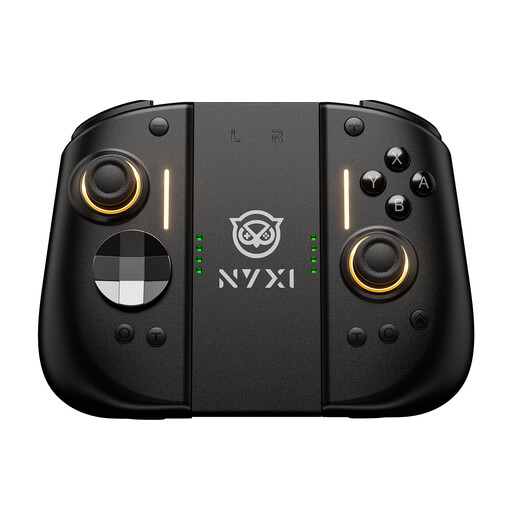
NYXI Wireless Controller for Switch 2 Hyperion 3, Black

NYXI Wireless Controller for Switch 2 Hyperion 3, Black

For puzzle games on Nintendo Switch 2, provided the specific game supports controller input.

Features listed in the product name: Hall Effect joysticks, mechanical buttons and two programmable back buttons.

Joybuy
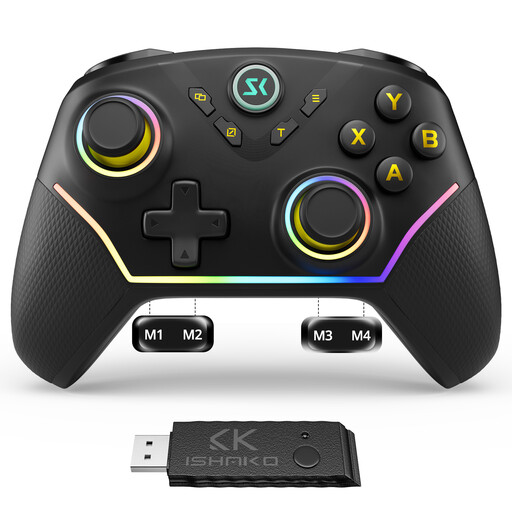
CHENGDAO Wireless Controller for Windows PC and Nintendo Switch, Black

CHENGDAO Wireless Controller for Windows PC/Nintendo Switch, Black

An option for games on a Windows PC or Nintendo Switch, provided the specific game supports controller input.

Feature listed in the product name: wireless controller.

Joybuy

Microsoft Xbox Series X/S Wireless Controller, Deep Pink

Microsoft Xbox Series X/S Wireless Controller, Deep Pink

An option for Xbox or PC games, provided the specific game and device support the controller.

Platforms listed in the product name: Xbox Series X/S and Xbox One; colour: Deep Pink.

Joybuy

BIGBIG WON GALE HALL Wireless Controller for PC, iOS and Android

BIGBIG WON GALE HALL Wireless Controller, PC/iOS/Android

An option for games on PC, iOS or Android, provided the device and game support controller input.

Feature listed in the product name: wireless controller.

Joybuy

Frequently asked questions

Does Steam Big Picture make every puzzle game fully playable with a gamepad?

No. Steam Big Picture is for using Steam on a TV; it doesn’t confirm that every game supports gamepad controls. Check the input details for the specific game: the Steam page for Portal 2 lists full controller support, but the page for The Room Two doesn’t.

How do I connect a DualSense to a supported PC?

Sony lists USB-C and Bluetooth as connection options. For Bluetooth pairing, Sony says to hold down the PS and Create buttons with the USB cable unplugged. Available features depend on the device and game; according to Sony, haptic feedback on PC requires game support and a USB connection.

Which accessories should I check before buying?

For the specific model, check whether the receivers, HDMI adapters or charging components you need are included with your chosen version. For the CRKD Nitro Deck+, pay particular attention to the version for TV use and what’s included.

What warranty and cancellation rights apply to online purchases?

When you buy goods from a trader in the EU, you’re generally entitled to a legal guarantee of at least two years from the date you receive them. Online purchases generally come with a 14-day right to cancel, although legal exceptions apply. A voluntary manufacturer’s warranty is separate from these rights.

What should I look out for regarding product safety in Germany?

The German Federal Network Agency notes that the applicable European regulations apply to covered electrical and electronic devices, along with correct CE marking where required. Wireless controllers must also meet the relevant requirements for radio equipment. Check the specific version and its markings.