Choose your controller based on your console or PC, the specific version of the game and the number of inputs needed at the same time. For Overcooked! 2 on Nintendo Switch, Nintendo describes one Joy-Con per chef. A full gamepad offers a different grip and button layout, while a wired controller is only suitable if you can route the cable safely to your seat. In a bright living room, check the screen and seating in your usual lighting. Changing controllers won’t solve a poor screen position.
Who should consider what
Co-op sessions with extra players
The key question is how many people can play the specific cooking game at the same time with the controllers you have. For Overcooked! 2 on Switch, Nintendo UK describes one Joy-Con per chef; with other games, usability depends on the software.
Sofa players sitting some distance from the device
The connection and power supply should suit your seating position. A wired controller is only an option if you can route the cable safely across the room.
Players who prefer a full gamepad
If you’d rather use a full controller than a single Joy-Con held horizontally, first choose a version that’s compatible with your platform.
What to look for when buying
| Priority |
What to check when buying |
Who it matters to most |
| Platform and game |
Check the console or PC, game version and full model name. Don’t assume Joy-Con and Joy-Con 2, or similarly named controller variants, are interchangeable. |
If I want to avoid buying the wrong thing, I first check that the controller and game work with my system. Around 31% of consumers put compatibility first. |
| Inputs for everyone |
Count the controllers you have and the inputs you need. Only plan to use individual Joy-Con if the specific game supports that control option. |
If I need enough places for everyone in a co-op session to play at the same time, support in the relevant game version is what counts. Around 25% of consumers prioritise extra player slots. |
| Connection to the sofa |
For a wired controller, check the cable route across the room. For a wireless connection, consider whether your device supports it and how the controller is powered. |
Will the connection reach from the device to your seat? Around 19% of consumers place particular importance on a safe cable route or a suitable wireless connection. |
| Grip and control layout |
Ask other players what size grip they prefer, and compare the control layout they need with the devices you already have. |
If I’m looking for a controller that feels comfortable for everyone in my group, I pay attention to the grip and button layout. Around 13% of consumers put ease of use first. |
| Visibility in bright light |
Check the screen and seating in your usual daylight conditions. Assess visibility separately from the controller’s connection and usability. |
If I want to make sure everyone can see the screen clearly, I check the seating positions in the usual lighting. Around 12% of consumers put visibility first. |
Avoid common buying mistakes
-
Confusing Joy-Con and Joy-Con 2 because their names are similar
According to Nintendo UK, Joy-Con 2 are designed exclusively for Nintendo Switch 2. Original Joy-Con can be used wirelessly with that console, but can’t be charged directly on it.
Before buying, check which generation of console you have and think about how you’ll charge the controllers.
You may need an original Nintendo Switch or suitable charging accessories to charge original Joy-Con.
-
Assuming a pair of Joy-Con automatically gives you two player slots
Nintendo’s guidance on using one Joy-Con per chef applies to Overcooked! 2 on Switch. Controls in other games depend on the play options they support.
Count the inputs you have and check the control options for the specific game version.
-
Assuming similarly named controller variants are the same
8BitDo lists the Ultimate 2C Bluetooth as compatible with Switch, and the differently named Ultimate 2C Wireless as compatible with Windows and Android. For Switch 2, 8BitDo also specifies a firmware requirement for the Bluetooth version.
Check the full model name, platform and any required firmware.
-
Expecting a new controller to fix screen reflections
In a bright living room, screen visibility also depends on the position of the screen and seating. A controller isn’t a proven solution to reflections.
Check the screen and seating in your usual lighting, and treat this separately from choosing a controller.
Brands to help you choose
Nintendo
Joy-Con are designed for separate inputs in Switch games that explicitly support them; Joy-Con 2 belong to the accessory range for Switch 2.
- Nintendo UK describes using one Joy-Con per chef in Overcooked! 2 on Switch.
- Usability depends on the game. Joy-Con 2 don’t work with the original Switch, and original Joy-Con can’t be charged directly on Switch 2.
PlayStation
The DualSense is a full wireless controller, particularly suited to an existing PS5 setup.
- PlayStation describes extra DualSense controllers as a way to equip additional players.
- Haptic feedback and adaptive triggers are manufacturer features, but aren’t a proven advantage in any particular cooking game.
Xbox
The Xbox Wireless Controller is designed for Xbox consoles and supported Windows PCs.
- Microsoft lists Bluetooth as a connection option. For Windows, it also describes using a USB cable or Wireless Adapter.
- The power supply and connection you choose should suit your seating position.
GameSir
The G7 HE is a wired controller option specifically for Xbox and Windows.
- GameSir specifies USB-C wired use and supported systems.
- The cable must reach your seat safely. Hall Effect sticks alone don’t prove an advantage in a co-op cooking game.
8BitDo
The Ultimate 2C Bluetooth is listed for Switch, while the differently named Ultimate 2C Wireless is for Windows and Android.
- The manufacturer’s information distinguishes between the platforms and connection types for each version.
- For Switch 2, 8BitDo specifies a firmware requirement for the Ultimate 2C Bluetooth. The model names aren’t interchangeable.
Controllers at Joybuy
This selection includes controllers for local multiplayer on Nintendo Switch and Switch 2, as well as for compatible Xbox and Windows setups. Which devices and games work together depends on the platform and game version.
 No image available
Nintendo Switch 2 Joy-Con 2 pair, blue/light yellow
For local multiplayer on Nintendo Switch 2, when you need one left and one right Joy-Con 2 for compatible games.
The set includes two controllers and two wrist straps. According to the product description, it’s designed exclusively for Nintendo Switch 2.
Joybuy
 No image available
BEITONG KP70 Elite Wireless Gaming Controller
A full gamepad option if the listed platform and connection suit your setup.
The product description lists PC, Nintendo Switch, Switch 2, Steam and Android, with wired, wireless and Bluetooth connections. It also lists six programmable buttons and a 1.500-mAh battery.
Joybuy
 No image available
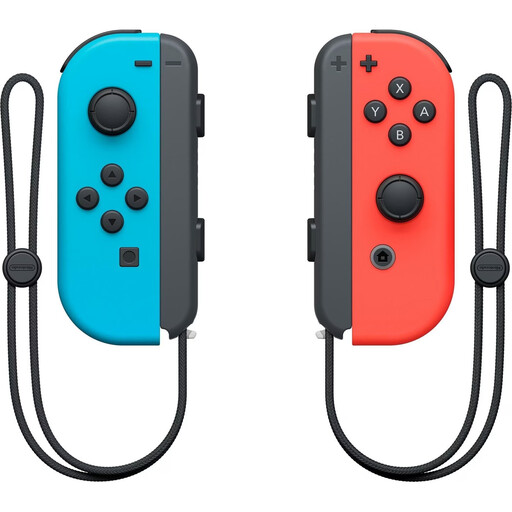
Nintendo Switch Joy-Con pair, neon red/neon blue
For compatible Switch games that need two separate inputs from one pair of Joy-Con. Nintendo UK describes using one Joy-Con per chef in Overcooked! 2 on Switch.
The product description lists Bluetooth, built-in batteries and the option to use the Joy-Con separately or in the Joy-Con Grip. In other games, single Joy-Con use depends on the play options supported.
Joybuy
 No image available
GameSir G7 HE Wired Controller, black
For Xbox or Windows, if a wired controller suits your seating position and you can route the cable safely.
Listed for Xbox Series X|S, Xbox One and Windows 10|11. The product description specifies Hall Effect sticks and a detachable 3-m USB-C cable.
Joybuy
 No image available
Xbox Wireless Controller, Shock Blue
For Xbox or a compatible Windows PC, if you want a full controller without a cable running to your seat.
The product description lists Bluetooth, Xbox Wireless, a 3,5-mm headset socket and two AA batteries included.
Joybuy
Frequently asked questions
Does everyone need a full gamepad to play Overcooked! 2 on Switch?
No. Nintendo UK describes local multiplayer for this game using one Joy-Con per chef. For another cooking game, check the control options for the version you’re playing.
How do I set up extra Joy-Con for multiplayer?
For horizontal single Joy-Con use, Nintendo UK describes using the SL and SR buttons on each Joy-Con. Whether you can use this orientation in a game depends on its supported play options.
Can I keep using original Joy-Con with Switch 2, and charge them on it?
Yes. Nintendo UK says original Joy-Con can be used wirelessly with Switch 2, but they can’t be charged directly on the console. You’ll need an original Switch or suitable charging accessories to charge them.
Can I put an old controller in my household rubbish?
No. Germany’s Federal Ministry for the Environment advises that electrical and electronic waste must be taken to an authorised collection point, such as a local authority collection site or a take-back point, subject to the applicable conditions. The German Environment Agency recommends handing in removable batteries separately.


