For long recordings and multiple tracks, an ultrawide monitor with a resolution of 3440 × 1440 is a sensible choice if your timeline needs more room than a native UHD preview. If you need to display UHD footage at its full resolution of 3840 × 2160 pixels, a 4K UHD monitor is a better fit. For reliable colour decisions, your output format, monitor mode and calibration also need to work together. Adobe describes Rec.709 as a suitable working space for SDR-to-SDR projects that use predominantly Rec.709 sources.
Who are the different monitors best suited to?
Editing with long timelines
If you review a lot of raw footage and want to arrange clips and tracks clearly, compare the horizontal workspace with your editing software’s layout. Dell and LG each offer 34-inch ultrawide models with a resolution of 3440 × 1440 pixels.
Colour-critical cooking video editing
If you want to assess colour and brightness accurately, set up your monitor to suit your SDR or HDR workflow. Adobe recommends using a colourimeter for objective colour calibration. A quoted colour gamut alone doesn’t show how accurately the display performs at your workstation.
Editing on a laptop
If you move between editing spaces, check video transmission, charging power and screen positioning with your laptop and the cable you plan to use. BenQ and Dell list Thunderbolt ports with Power Delivery on certain models, while EIZO’s specifications describe the CS2740 as a UHD model for video work.
What should you look for when buying?
34-inch ultrawide with a resolution of 3440 × 1440
A good fit if: your workflow depends on long recordings, multiple tracks and editing windows side by side.
The trade-off: With 1440 vertical pixels, UHD footage won’t be displayed natively at 2160 lines. Dell and LG list this resolution for their respective 34-inch models.
27- to 32-inch 4K UHD with a resolution of 3840 × 2160
A good fit if: native UHD detail checking or a suitable Rec.709 mode for SDR output matters more to you than extra width.
The trade-off: A 16:9 display isn’t as wide as the 34-inch ultrawide models considered here. ASUS lists a Rec.709 preset for the PA279CRV.
Specialist ColorEdge models
A good fit if: controlled colour work and regular colour grading are your priorities.
The trade-off: EIZO lists the CS2740 for video work and specifies a built-in calibration sensor for the CG3100X. This doesn’t mean they’ll automatically make editing faster.
| Buying criterion |
What to check before buying |
Who is it especially important for? |
| Space for long timelines |
Compare the aspect ratio and resolution, and how your editing software arranges the preview, footage bins and timeline. |
If I’m organising long raw recordings and lots of tracks, I mainly need room along the timeline. Around 36% of consumers share this priority. |
| Colour you can control |
Decide whether you’ll output in SDR or HDR, then check the available Rec.709 modes, calibration options and project settings. Adobe describes Rec.709 as a suitable working space for SDR-to-SDR projects that use predominantly Rec.709 sources. |
When I’m correcting colour, I want to assess footage using the right output workflow, rather than relying on a colour gamut figure alone. Around 29% of consumers prioritise colour control. |
| UHD picture detail |
Match the resolution of your source and output footage to the screen resolution and software scaling. ASUS and BenQ list a resolution of 3840 × 2160 pixels for the models mentioned. |
If I want to check UHD detail natively, 3840 × 2160 matters more to me than extra width. Around 21% of consumers have this as their main priority. |
| Laptop connectivity and comfort |
Check your laptop’s video output and power requirements against the monitor’s video input, Power Delivery and adjustable stand. |
If I move my laptop and monitor around frequently, I need a suitable video connection and an adjustable screen position. Around 14% of consumers put laptop connectivity and ergonomics first. |
Which pitfalls can you avoid?
-
Assuming a wide screen gives you a native 4K preview
The 34-inch ultrawide monitors considered here have a resolution of 3440 × 1440 pixels, so they don’t display UHD at its native resolution of 3840 × 2160 pixels.
Before buying, decide whether timeline width or native UHD display on the same screen matters most to you.
-
Assuming colour gamut percentages guarantee accurate video colours
Colour decisions also depend on the project colour space, monitor settings and lighting conditions. Manufacturers’ colour gamut coverage figures don’t confirm how accurately the display performs at your workstation.
Check that the monitor mode suits your output workflow. Adobe recommends using a colourimeter for objective calibration. If you need this level of accuracy, you may need to buy one separately.
-
Relying on USB-C as a complete one-cable solution without checking compatibility
A USB-C port alone doesn’t guarantee that your laptop supports video output or that it will receive enough power to charge.
Compare the full port specifications for your laptop, monitor and the cable you plan to use. If they aren’t compatible, you may need a different connection or power supply.
Key brands to consider
Dell
Dell lists the UltraSharp U3425WE as a 34.1-inch ultrawide with a resolution of 3440 × 1440 pixels and a Thunderbolt hub.
- Dell specifies an adjustable-height stand and 90 W power delivery for this model.
- Its 1440 vertical pixels don’t display UHD footage natively at 2160 lines.
LG
LG’s business range includes the 34BA85QE-B, a 34-inch ultrawide designed for working with windows side by side.
- For this model, LG lists a resolution of 3440 × 1440 pixels, typically 99% sRGB and USB-C with 90 W.
- It won’t display UHD footage natively at 2160 lines, and the manufacturer’s specifications are no substitute for checking your own colour workflow.
ASUS
According to ASUS specifications, the ProArt PA279CRV combines a 27-inch 4K UHD display with presets including Rec.709.
- ASUS lists 96 W USB-C Power Delivery and an adjustable-height stand for this model.
- As a 16:9 display, it doesn’t offer the aspect ratio of an ultrawide. The stated colour figures are no substitute for checking your own workflow.
BenQ
BenQ describes the PD3225U as a 31.5-inch 4K UHD model with a Rec.709 mode.
- For this specific model, BenQ lists 100% Rec.709, a factory calibration report and Thunderbolt 3 with 85 W Power Delivery.
- These manufacturer’s specifications aren’t independent test results for every unit or other BenQ models.
EIZO
According to EIZO, the ColorEdge range includes the 27-inch UHD CS2740 for photography and video work, as well as the 30.5-inch DCI 4K CG3100X for post-production.
- EIZO lists a typical maximum Rec.709 colour gamut coverage of 100% for the CS2740, among other specifications, and a built-in calibration sensor for the CG3100X.
- These features don’t automatically make either model the best choice if you mainly need a wide timeline.
Monitors at Joybuy
This selection includes 34-inch ultrawide models for extra timeline width, as well as 27- and 32-inch 4K UHD models for checking UHD detail natively. Each takes a different approach to balancing resolution and workspace.
 No image available
INNOCN E34A1R 34-inch curved monitor
For long recordings and multiple editing windows, when timeline width matters more than a native UHD preview.
3440 × 1440 pixels, 21:9, VA, 200 Hz and adjustable-height stand, according to the product name. This display won’t show UHD footage natively at 2160 lines.
View at Joybuy
 No image available
ASUS TUF Gaming VG34VQ3B 34-inch monitor
For long timelines when a wide 21:9 workspace takes priority over native UHD detail checking.
3440 × 1440 pixels, 21:9, 180 Hz and 1 ms MPRT, according to the product name. The product description lists HDMI, DisplayPort and USB ports, as well as an ergonomic stand. UHD footage won’t be displayed natively at 2160 lines.
View at Joybuy
 No image available
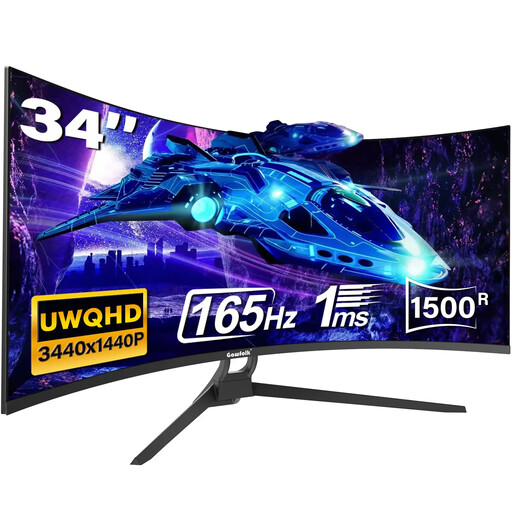
Gawfolk 34-inch UWQHD curved monitor
For long timelines and multiple editing windows side by side, when extra width matters more than native UHD display.
UWQHD, 1500R, 21:9, 165 Hz and HDMI 2.1/DP 1.4, according to the product name. This 3440 × 1440 display won’t show UHD footage natively at 2160 lines.
View at Joybuy
 No image available
KTC M27P6 27-inch 4K Mini LED monitor
For checking UHD detail at its native resolution, if a 16:9 display suits your editing layout better than the extra width of an ultrawide.
3840 × 2160 pixels; the product description lists Type-C with 65 W and an adjustable-height stand. Its 16:9 aspect ratio gives you less horizontal timeline space than a 34-inch ultrawide.
View at Joybuy
 No image available
ASUS ROG Swift OLED PG32UCDMR 32-inch 4K UHD monitor
For checking UHD detail natively when picture detail matters more than the wider workspace of an ultrawide.
3840 × 2160 pixels, 16:9 and 240 Hz, according to the product name. The product description lists USB-C with 90 W Power Delivery and an ergonomic stand. Its 16:9 aspect ratio gives you less horizontal timeline space than a 34-inch ultrawide.
View at Joybuy
Frequently asked questions
Do I have to buy an HDR monitor for cooking videos?
No, not just because of the type of video you’re making. For an SDR-to-SDR workflow using predominantly Rec.709 sources, Adobe describes Rec.709 as a suitable working space. If you plan to output in HDR, check your source footage, sequence settings and output settings separately.
How should I set up my monitor for colour correction?
Match your project and output colour spaces to the right monitor mode. Adobe recommends using a colourimeter for objective calibration and advises keeping lighting conditions consistent, with no direct light falling on the screen.
Is USB-C enough to connect and charge my editing laptop at the same time?
Not without checking your specific laptop and cable. Compare your laptop’s video output and power requirements with the video input and Power Delivery rating of the model you’re considering. The manufacturer specifications quoted for the models listed range from 85 to 96 W, but that doesn’t guarantee general compatibility.
What should I know about my rights and electricity costs when buying a monitor?
For consumer purchases in the EU, the seller is responsible for the statutory two-year legal guarantee from the date you receive the goods. An additional manufacturer’s warranty doesn’t replace it. The European Commission describes an A-to-G energy label for electronic displays. To estimate running costs, check the label and specifications for the specific model.
Can I put an old monitor in household waste in Germany?
No. The German Environment Agency explains that electrical and electronic waste must be collected separately from unsorted household waste. It lists local recycling centres as a free disposal option.


