
Lieferung heute & morgen

Qualitätsgarantie

Willkommens-Angebote freischalten: KOSTENLOSE Lieferung | Bis zu 80 % RABATT | Kostenlose 30-Tage-JoyPlus-Testphase
App herunterladen
The daily commute to work or university often means juggling multiple bags: one for your laptop, one for documents, and another for your lunch. This daily logistical challenge can be cumbersome. A cooler backpack combines the functionality of a laptop backpack with that of an insulated lunch container, offering a single, integrated solution. This article introduces various models and explains the key criteria to consider when choosing such a multi-functional backpack.
To find the right model for your needs, a few technical features are crucial. The following points will help guide your decision.
The insulated compartment is the core feature. Pay attention to the interior material—an aluminum foil lining is often used because it is easy to clean and enhances temperature insulation. Most models keep contents cool or warm for two to four hours. Also, check the dimensions of the cooler compartment to ensure your lunch boxes and drinks will fit comfortably. Some compartments are designed to be compressed when not in use, increasing the storage space in the main section.
A good laptop backpack with a cooler should offer more than just an insulated section. A separate, padded laptop compartment is essential for safely transporting electronic devices. Compare the specified maximum laptop size (e.g., 15.6-inch or 17-inch) with your device's dimensions. Additional organizer pockets for pens, notebooks, and cables help keep things tidy, making the backpack a fully-fledged work backpack for women and men.
Modern backpacks often come with useful extras. A waterproof backpack with a USB port allows you to charge devices on the go, provided a power bank is connected inside. A luggage strap on the back for securing it to a rolling suitcase handle is practical for travellers. For air travel, a TSA-friendly design that allows the backpack to open a full 180 degrees can speed up security checks.
Based on the criteria mentioned, we have compiled a selection of models that stand out for their functionality and specific features.
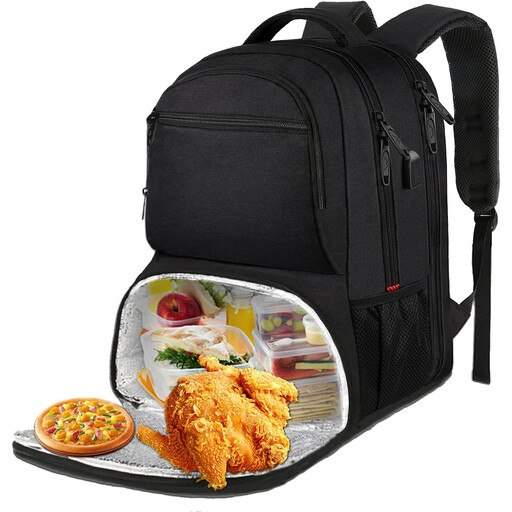
What makes it stand out: This model combines a large capacity with travel-friendly features. The spacious, insulated cooler compartment and separate laptop section make it an all-in-one solution for work, university, or day trips. The TSA-friendly design makes airport security a breeze.
Pros:
Who is this model for? This commuter backpack for men and women is ideal for users who carry a large laptop and need ample storage for meals, work documents, or travel essentials.
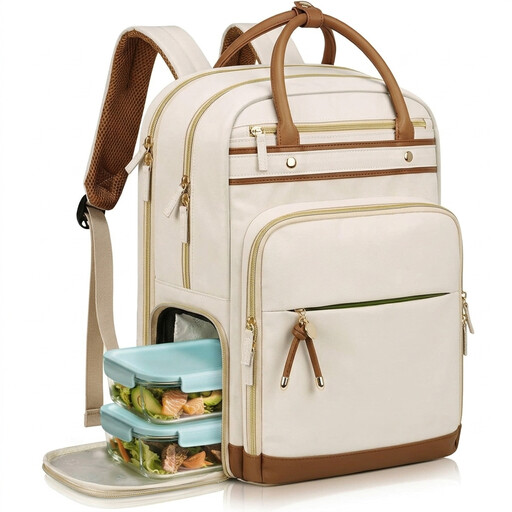
What makes it stand out: The standout feature of this model is its detachable, insulated lunch compartment. This 2-in-1 construction offers maximum flexibility: use both parts together for a full workday or just the backpack when you don't need to carry meals.
Pros:
Who is this model for? Perfect for professionals like teachers, nurses, or office workers who need an organized and flexible bag that adapts to different daily routines.
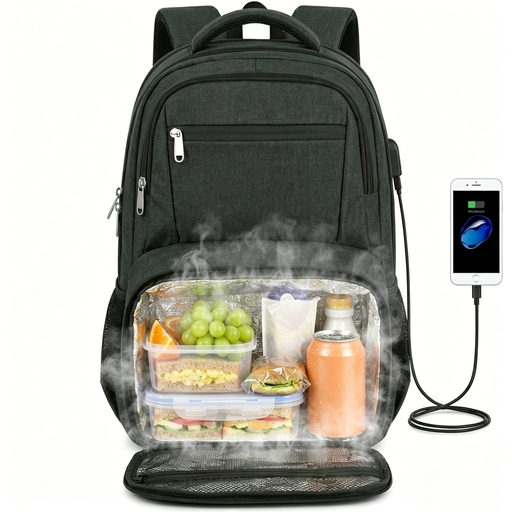
What makes it stand out: This lunch backpack focuses on a balanced combination of storage, security, and comfort. The cooler compartment is compressible, and an anti-theft pocket on the back provides extra protection for valuables in crowded areas.
Pros:
Who is this model for? A great choice for commuters, students, and travellers who value flexible space management and added security features for daily use.
Haven't found the perfect model for your specific needs yet? If you're looking for a wider selection of functional bags for the workday, you can find more options tailored to the needs of professionals in our Work Laptop Backpack category.
1. How long does a cooler backpack keep food and drinks cool? The insulation time depends on the model, the outside temperature, and the initial temperature of the contents. Most manufacturers state a duration of two to four hours. For longer cooling, small ice packs can be added.
2. Is a laptop backpack with a cooler suitable for air travel? Yes, many models are explicitly designed for travel. Look for features like a TSA-friendly design, which allows the backpack to open completely for security screening, and a luggage strap to attach it to a suitcase.
3. How does the USB port on the backpack work? The USB port on the backpack is a pass-through. Inside the backpack, there is a cable that you connect to your own power bank (not included). Your external device can then be charged via the external port without having to take the power bank out of the bag.