Co-op players on a single platform
If you know which console or PC you’ll be using, first check that the controller works with the specific game and provides the separate input you need for the second player.


For a co-op adventure in a bright room, first check that the game supports local co-op and separate inputs on your platform. Then choose either a suitable full-size controller or, for supported Switch 2 games, Joy-Con 2 that can be shared between players. Make sure the cable, wireless receiver and power supply suit your seating position. Adjust screen brightness separately: there’s no proven benefit to be gained from a controller’s lighting.
If you know which console or PC you’ll be using, first check that the controller works with the specific game and provides the separate input you need for the second player.
Check whether you can use Joy-Con 2 individually for your game, or whether each player will need a full-size controller.
Check the connection from where you’ll actually be sitting, and decide whether the cable route, wireless receiver and power supply will work for you.
Start by checking platform compatibility and separate inputs, then consider your seating position and power supply. That way, you can confirm the game will work before thinking about comfort and convenience.
| What you need | What to check before buying | Who it matters most to |
|---|---|---|
| Platform and game compatibility | Check the console or operating system, exact model variant and local co-op mode. On PC, also check that the game supports gamepads. | If I play on a particular platform, I want to know that my game and controller will work together. Around 36% of consumers put platform and game compatibility first. |
| Separate inputs | Check the game description for the local player limit and supported controller set-up. Sony describes the PS5 assist controller as providing a shared input for one person. | I want to be sure before buying that both players will have separate inputs. Around 29% of consumers prioritise a second, separate gaming input. |
| Seating position and visibility in a bright room | Check the distance, cable route and USB port you’ll need. Assess screen brightness separately from the controller. | When we play together in a bright room, I want to check the connection and screen visibility from where we’ll be sitting. Around 21% of consumers focus on seating position and visibility. |
| Power supply | Check whether the exact model uses batteries or a battery pack, and how it charges. Rechargeable AA batteries for the Xbox Wireless Controller are charged externally. | I want to know whether I’ll need to keep batteries or time for charging handy, or whether I’d rather use a cable. Around 14% of consumers prioritise power supply and ongoing running costs. |
That isn’t always the case: Sony describes the PS5 assist controller mode as providing one shared input for a single person. According to Nintendo, whether Joy-Con 2 can be used individually depends on the supported play style.
Before buying, check the specific game’s local co-op mode and supported controller set-up.
For the 8BitDo Ultimate 2C Wireless, the manufacturer specifies 2.4 GHz for Windows and Bluetooth for Android. So you can’t assume that the connection method for one device will work with another.
Check the full model name, the device you want to use it with and the connection type specified for that device.
Nintendo treats Switch 2 screen brightness as a separate display setting. There’s no proven benefit to using a controller with lighting instead.
Assess the screen and your seating position separately from your choice of controller.
The Verbraucherzentrale distinguishes between statutory consumer rights and a voluntary guarantee. The latter does not replace your rights against the seller.
If there’s a fault, check your proof of purchase and your rights against the seller, and distinguish these from any voluntary manufacturer’s guarantee.
The DualSense is designed for PS5 and can also connect to supported PCs.
Depending on the game, Joy-Con 2 can be used individually for supported shared inputs. The Switch 2 Pro Controller is another option for this console.
The Xbox Wireless Controller is designed for supported Xbox consoles and Windows PCs.
The Ultimate 2C Wireless is a Windows option with a 2.4 GHz receiver.
According to the manufacturer, the Enhanced Wired Controller for Xbox Series X|S is a wired alternative that also works with Xbox One and Windows.
These Joybuy products offer specific options for Windows PC, Xbox, PS5 and Switch 2, with both wireless and wired models available.
 No image available
For wireless gaming on a Windows PC, if you can plug a 2.4 GHz USB receiver into your computer.
The product specifications list Windows 10/11, a rechargeable battery and up to 8–10 hours of play time.
 No image available
A wireless option for the Xbox consoles and Windows PCs listed in the product specifications.
The product description says that two AA batteries are included. Microsoft also lists a compatible battery pack as a power option; rechargeable AA batteries are charged externally.
 No image available
For an extra input on PS5. The product description also lists PC compatibility.
According to Sony, features on PC depend on the game. Sony says USB is required for haptic feedback on PC.
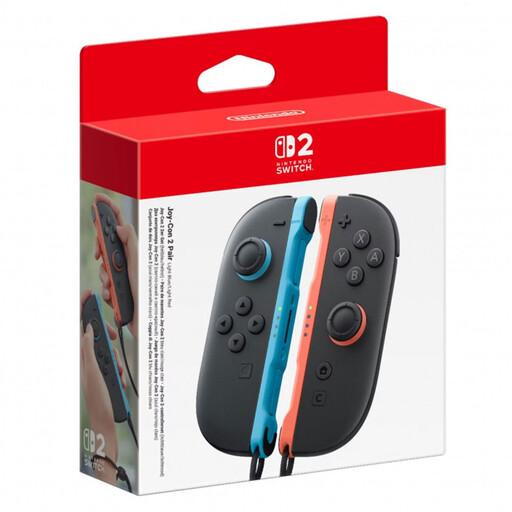 No image available
A Switch 2 set with a left and right Joy-Con 2, plus wrist straps.
According to Nintendo, each Joy-Con 2 can be used horizontally as a single controller if the game supports this play style.
 No image available
A wired option for Xbox Series X|S, Xbox One and Windows 10/11.
The product specifications list Hall Effect sticks and a 3-m USB-C cable. Make sure the cable will reach your seating position.
They can be, if the game supports using each one horizontally on its own. Nintendo says this depends on the software and the game’s play style, so check the specific co-op game before buying another controller.
No. Sony describes the feature as letting two controllers work together to provide one input for the same person. It doesn’t automatically provide two separate co-op inputs.
For this model, 8BitDo specifies a 2.4 GHz USB-A receiver or a wired connection. Bluetooth is listed on the product page for Android, not for connecting to Windows.
Check the display settings separately from the controller. If the console screen is too dark or too bright, Nintendo recommends, among other things, turning off automatic brightness adjustment and setting the brightness manually.
Microsoft lists AA batteries or a compatible battery pack. Rechargeable AA batteries are charged externally. Also check which batteries or accessories are included with the specific product.