Co-op players sharing a screen
If you’re playing together, check whether your particular puzzle game needs two separate inputs, and whether one Joy-Con per person is enough or everyone needs a full gamepad.


Choose a controller based first on your console or PC, the specific game and the number of separate inputs you need. Nintendo says whether a single Joy-Con is enough depends on the software. If the main problem is that the picture is hard to see, check your seating position and display settings separately – a different controller won’t show you more of the game.
If you’re playing together, check whether your particular puzzle game needs two separate inputs, and whether one Joy-Con per person is enough or everyone needs a full gamepad.
If the picture is small or split between players, it may help to check your seating distance and display settings separately from your controller. Zoom needs to work with the game mode and may reduce how much of the picture you can see at once.
If certain buttons are hard to reach or you want to control one character together, check the button mapping and shared-input features before simply choosing a second standard controller.
Start by checking the game, platform and inputs you need. If clues are hard to read, treat that as a separate display issue; connection and seating only become important after that.
| What matters | What to check before buying | Who will find this most useful? |
|---|---|---|
| Compatibility and separate inputs | Check the console, game version and local co-op mode. Nintendo says the software determines whether individual Joy-Con are suitable. | If we’re controlling separate characters together, we want to know whether the specific game supports the inputs we have in mind. Around 33% of consumers put compatibility and player numbers first. |
| Readability on a small or split screen | Check your seating distance, along with the game’s and device’s zoom and display settings. Nintendo notes that some modes don’t support zoom. | If we can barely make out important clues on a small screen, we check the display aids first and bear in mind that zoom may show less of the overall picture. Around 27% of consumers prioritise screen readability. |
| Accessible buttons and shared controls | Check whether the button mapping you want is supported and whether two controllers provide separate or shared inputs. According to Microsoft, Xbox Controller Assist combines two controllers into one input. | If a button is hard to reach or we want to control the same character together, the right button mapping or input-sharing option matters. Around 20% of consumers put adapted controls first. |
| Connection and seating | Check the connection options for your device and make sure there’s a safe cable route for both seats. Microsoft lists USB, a wireless adapter and Bluetooth for the Xbox Wireless Controller on Windows. | If the seating positions aren’t convenient for the connection, we want to choose a suitable option and route any cables so they’re not in the way. Around 20% of consumers prioritise seating and connection. |
Whether two people can play independently, and how a Joy-Con is held, depends on the specific game and mode.
Before buying, check the game’s details for local co-op and supported controllers.
A controller won’t make the text or clues on screen any bigger. Zoom and display settings are features of the device or game.
First, try adjusting your seating distance and using the available display aids. Choose extra controller features only if you actually need them.
8BitDo lists the Ultimate 2C Wireless for Windows and Android, while the Ultimate 2C Bluetooth is listed for Switch. Nintendo says Joy-Con 2 are designed for Nintendo Switch 2 only.
Check the full model name, console generation and, where applicable, the required system version.
Connection types and available features depend on the controller and the device you’re using.
Check the connection type for your platform and, if you’ll be using a wired controller, plan a safe route for the cable.
Joy-Con are suitable for supported co-op games on Nintendo Switch; Joy-Con 2 are a separate platform variant for Nintendo Switch 2.
DualSense is suitable for PS5 and supported PC games; the extra settings on the DualSense Edge are mainly useful if you plan to use them.
The Xbox Wireless Controller is suitable for compatible Xbox and Windows setups, especially if you need wireless freedom or want to share control of one character.
According to the manufacturer, compatibility varies between Ultimate 2C models and platforms.
The G7 HE is a wired option for compatible Xbox and Windows devices; the G7 Pro’s connection options vary by platform.
This selection includes controllers for local co-op on Nintendo Switch and Switch 2, as well as Xbox, Windows and PS5 gaming setups. Check the display settings separately to make sure clues are easy to read.
 No image available
For local co-op on Nintendo Switch 2, provided the specific game supports separate Joy-Con inputs.
Left and right Joy-Con 2; designed for Nintendo Switch 2, not the original Nintendo Switch.
 No image available
For compatible Xbox and Windows setups if you want a wired connection and extra customisable controls.
Four rear paddles and six assignable buttons; wired connection with a 3 m USB-C cable.
 No image available
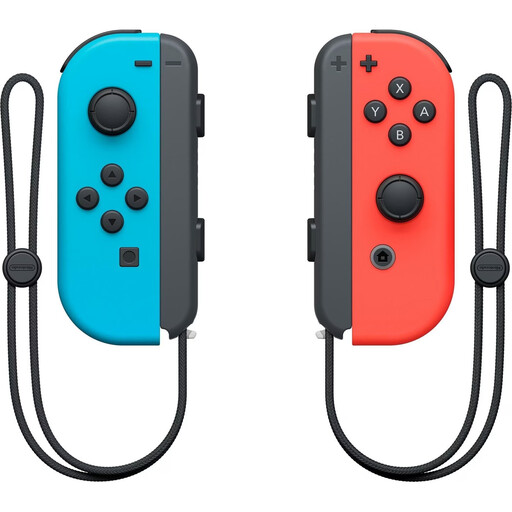
For local co-op on Nintendo Switch, if the game supports using the Joy-Con separately as you intend.
Joy-Con pair in Neon Red and Neon Blue; listed for Nintendo Switch.
 No image available
For a wired gaming setup with a compatible connection to Xbox, Windows or Steam.
Hall Effect sticks; wired connection with a 3 m USB-C cable. The product details list Xbox, Windows and Steam.
 No image available
For a PS5 setup that needs another gamepad; features on other devices depend on the game.
Bluetooth and USB-C are listed as connection options. Sony says haptic feedback on PC requires a supported game and a USB connection.
No, it depends on the game. Nintendo says the way you can hold a Joy-Con depends on the software. For It Takes Two on Switch, Electronic Arts specifically lists either a pair of Joy-Con or one controller per person; check each game’s details on local co-op for other titles.
First, check the display settings on your game and device. Nintendo describes zoom for Switch and Switch 2, while Xbox offers a console magnifier that you can control with a controller. Some game modes don’t support zoom, and magnification may reduce how much of the overall screen you can see.
Yes. Microsoft says Xbox Controller Assist combines two controllers into one shared input. To control two separate characters, you’ll need two inputs supported by the specific game mode instead.
Not necessarily. Sony lists Bluetooth and USB for supported devices, but some features depend on the game and connection. Sony says haptic feedback on PC requires a supported game and a USB connection.
For online purchases, you generally have 14 days from delivery to cancel your order; exceptions and possible return costs apply. Separately, if the product is faulty, you have a statutory right to a minimum two-year guarantee from the seller. These details are provided by the EU consumer portal Your Europe; a voluntary manufacturer’s guarantee does not replace your statutory rights.