
Lieferung heute & morgen

Qualitätsgarantie

Willkommens-Angebote freischalten: KOSTENLOSE Lieferung | Bis zu 80 % RABATT | Kostenlose 30-Tage-JoyPlus-Testphase
App herunterladen
A cordless drill driver should be able to drill, drive screws and, depending on the model, work in masonry. In practice, however, high torque figures or a well-known brand alone don’t lead to the right purchasing decision. What really matters is the battery system, the intended use, what’s included in the box, and how well the power and handling are balanced.
A high figure in newton metres sounds impressive at first. For assembling furniture, putting up shelves or carrying out small repairs, however, a finely adjustable torque setting can be more important than maximum power. If a screw is driven in with too much force, the screw head, workpiece or thread can be damaged.
With an impact driver, different standards apply: the hammer mechanism delivers short bursts of power and is better suited to stubborn screws, larger fasteners or assembly work. For precise screwdriving in furniture making, a classic screwdriver with a torque clutch is usually easier to control.
An 18V cordless drill driver offers a popular platform for DIYers and professional use. But the voltage alone doesn’t tell you how long the tool will run or how much power reaches the chuck. The motor type, gearbox, battery capacity and torque all work together.
Even a 24V cordless drill driver like the Greenworks model isn’t automatically better for every task. Before buying, you should check whether you already have batteries and chargers, and whether the system will work with other tools in the future.
‘Cordless’ doesn’t always mean ‘ready to use straight away’. Some models are sold as a bare tool without a battery or charger. That can make sense if you already own a compatible battery system. If you’re looking for a cordless drill with charger, be sure to check the product description carefully for what’s included.
For screwdriving, torque settings are important because they let you control the force. A two-speed mechanism typically combines a slower range with higher torque and a faster range for drilling. Figures like 0–450 and 0–2,000 rpm describe the no-load speed and don’t automatically reflect working performance under load.
For wood, plastic and metal, you should also pay attention to the maximum drilling diameters. These figures are the manufacturer’s guidelines and depend on the drill bit, material, battery and how you work.
A brushless cordless drill driver works without mechanical carbon brushes in the motor. This means those wear parts are eliminated. That doesn’t mean the whole tool is wear-free: the gearbox, chuck, battery and switch still need to be used correctly.
A brushless motor can be particularly worthwhile for regular work and longer periods of use. For occasional assembly tasks, a simpler model may be perfectly adequate.
Pay attention to specific compatibility, not just the voltage. A battery will only fit the tools and contacts it’s designed for. With brand systems like Makita 18V LXT, Bosch 18V POWER FOR ALL or Greenworks 24V POWERALL, existing batteries can affect the overall cost.
Capacity is given in Ah. A higher figure can allow longer working intervals, but usually adds weight and increases charging time. For overhead work or furniture assembly, a lighter battery can be more comfortable.
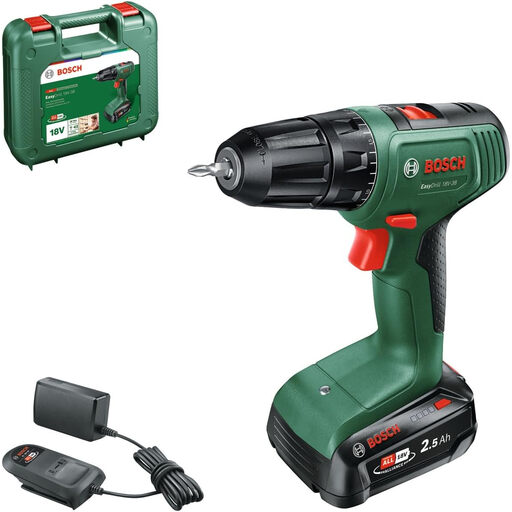
Why this product fits the profile: This set is designed for typical household and DIY tasks and comes with an 18V battery. That means you don’t have to search for a compatible power source separately.
The set’s contents are clearly aimed at getting you started straight away. 20 torque settings help you limit the screwdriving force during assembly work.
38 Nm maximum torque, 2-speed gearbox, 10 mm keyless chuck and 1.2 kg weight with battery.
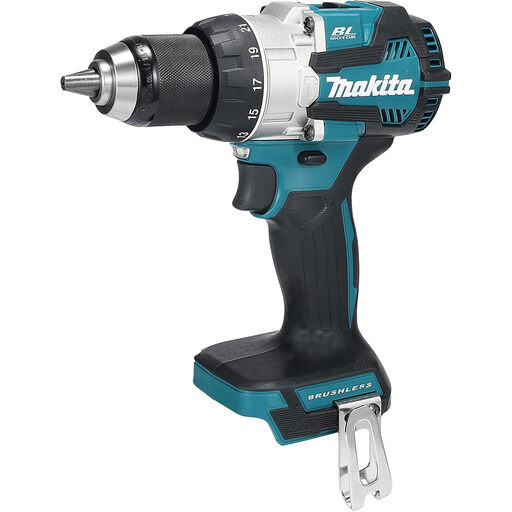
Why this product fits the profile: This Makita cordless drill driver is aimed at users who already own the 18V LXT system and need a tool for wood, metal and masonry.
The product details clearly state that the battery and charger are not included. This lets you budget separately for the bare tool and your existing LXT batteries.
73 Nm maximum torque, brushless motor, 13 mm chuck, LED light and XPT protection against dust and water.
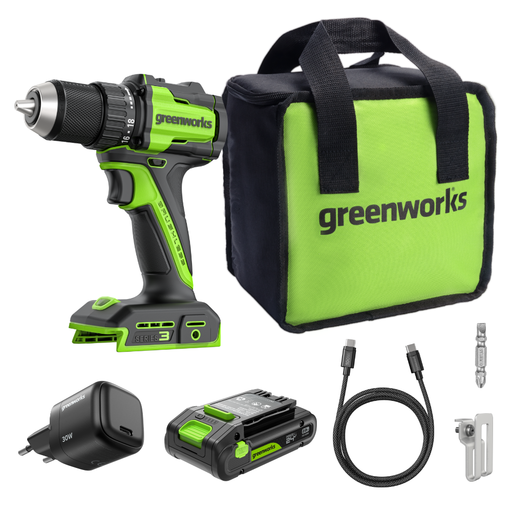
Why this product fits the profile: This model combines a brushless motor with a 2.0 Ah battery and charger. It’s suitable for DIY projects, furniture assembly and drilling in wood, steel and masonry.
The specifications list specific torque settings, drilling diameters and speed ranges. This makes it easier to match the tool’s intended use with your own materials.
45 Nm torque, 18+1 settings, 0–450/0–2,000 rpm, LED light and battery plus 30 W USB-C charger included.
We’ve put together a full, regularly updated list of products that fully meet these strict selection criteria and the safety regulations in force in the EU.
The lifespan depends on usage, storage, battery quality and maintenance. Regular overloading, excessive heat and deep discharge can put strain on the battery. Many tools have protection against deep discharge or overload. After use, keep the contacts clean and store the tool in a dry place.
For wood, metal, furniture assembly and many general screwdriving tasks, an 18V model is often sufficient. For hard mineral surfaces, a cordless hammer drill driver with a hammer function is more suitable. For larger drill holes or continuous heavy use, you should consider the chuck, torque, battery capacity and manufacturer’s specifications together.
The ongoing costs mainly consist of electricity for charging, possible replacement batteries and wear parts. An existing battery system reduces the entry price, while a set with battery and charger is ready to use straight away. So before you buy, check whether a bare tool or a complete drill with battery is more economical for your existing tool collection.