
Lieferung heute & morgen

Qualitätsgarantie

Willkommens-Angebote freischalten: KOSTENLOSE Lieferung | Bis zu 80 % RABATT | Kostenlose 30-Tage-JoyPlus-Testphase
App herunterladen
A corner desk can transform an unused corner into a productive workspace. However, the selection is vast, and not every model lives up to what the product images promise. Many buyers only realise after assembly that their new desk wobbles, the storage is impractical, or the L-shape doesn't fit the intended corner. As your Joybuy Product Recommendation Officer, I'll help you navigate these common pitfalls and make an informed decision.
Before you decide on a model, you should be aware of the most common issues that often only become apparent after the purchase.
To avoid a bad purchase, you should check three core parameters. These features determine the durability and functionality of your new workspace.
The foundation of any good desk is its stability. Look for the following features:
Modern desks offer more than just a work surface. Check which features are relevant to you:
A corner desk is ideal as a desk for small rooms, but only if the dimensions are right. Measure your intended corner precisely, also accounting for space for your chair and any nearby doors or drawers that need to open. The depth of the tabletop should be at least 50 cm to provide enough space for a monitor and keyboard without you sitting too close to the screen.
Here are three models tailored to different user profiles that meet the quality criteria mentioned.
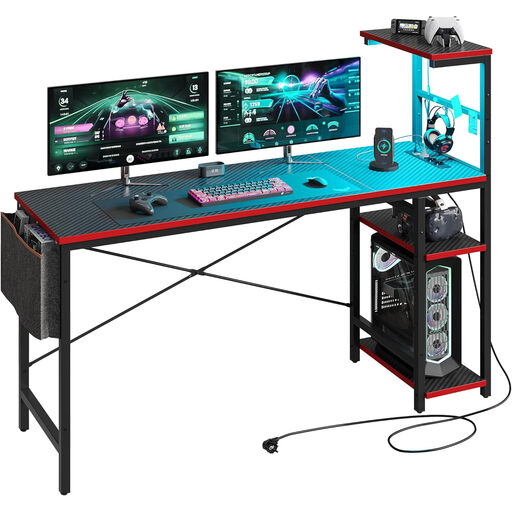
Why This Fits Their Persona: This model combines a gaming-optimised aesthetic (carbon fibre texture) with practical tech features like an integrated power strip and LED lighting to create a complete and immersive setup.
The steel frame with X-shaped bracing and adjustable feet counteracts the problem of instability. The design is also reversible, thus avoiding the pitfall of inflexibility.
Integrated power strip for easy cable management; customisable LED lighting with 7 colours and 20 modes; reversible design for flexible setup.
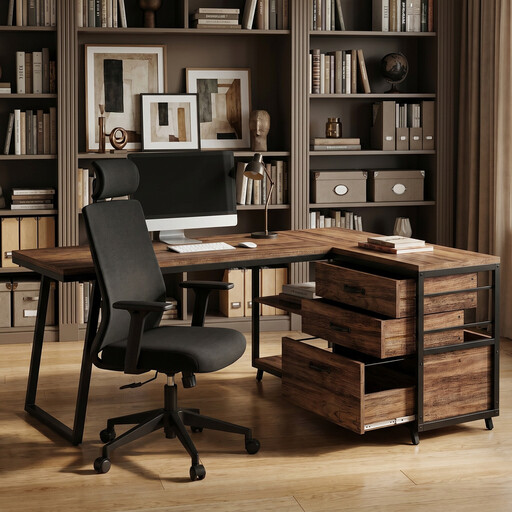
Why This Fits Their Persona: For home office users who value organisation and maximum storage. The combination of drawers and open shelves allows for a clear separation of work materials and personal items.
This model solves the problem of impractical storage with one large file drawer and two smaller drawers. The sturdy metal frame ensures the necessary stability, even when fully loaded.
Three integrated drawers, including one for file folders; two open shelves for quick access; reversible design for flexible room adaptation.
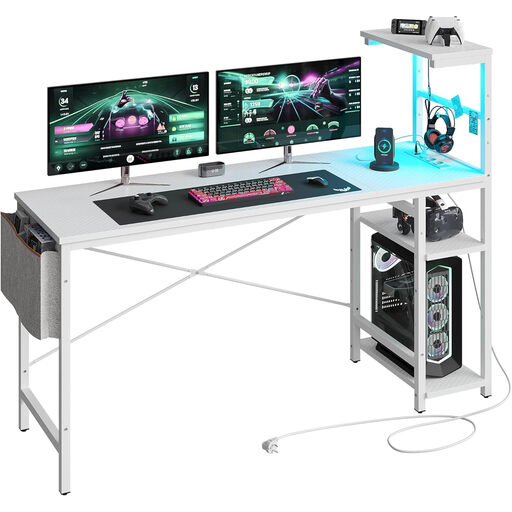
Why This Fits Their Persona: Ideal for students or professionals with limited space who need a flexible and modern solution. The light colour makes small rooms feel larger, and the reversible design adapts to any corner.
The design, explicitly conceived as a reversible desk, prevents the common mistake of a fixed-orientation L-shaped desk. The adjustable feet guarantee stability even in older apartments.
Fully reversible design for left or right assembly; bright, modern aesthetic; integrated power outlets and LED lighting for added functionality.
We have curated a comprehensive, up-to-date list of products that meet these strict selection criteria.
Measure the length of both walls that form the corner. Compare these measurements with the dimensions of the desk's sides (e.g., 135 cm x 100 cm). Remember to leave a buffer of a few centimetres for cables or uneven walls. Also, check the height under any windowsills and the space needed for your office chair.
No, not usually. The assembly instructions for reversible desks typically show both setup options (left- or right-sided) in separate steps. The components are designed to fit both configurations. It's important to decide on one orientation before you begin and follow the corresponding instructions carefully.
Check the number of power outlets and USB ports to ensure it's sufficient for your devices. Pay attention to the position of the power strip—it should be easily accessible but not in the way. Another key point is safety: the power strip should have overload protection and comply with the safety standards applicable in your region.