
Lieferung heute & morgen

Qualitätsgarantie

Willkommens-Angebote freischalten: KOSTENLOSE Lieferung | Bis zu 80 % RABATT | Kostenlose 30-Tage-JoyPlus-Testphase
App herunterladen
Setting up a functional work or gaming area at home can be a challenge: How do you make the most of your available space without compromising on functionality? A corner desk is often a smart solution. It makes efficient use of room corners and provides a generous work surface.
This article serves as your guide. We'll outline objective criteria for making your selection and present a range of models with different features to help simplify your decision.
Your Joybuy Product Recommendation Officer
Before you make a decision, it's helpful to consider a few key aspects. The following points can help you find a model that perfectly suits your needs.
A desk's durability largely depends on the materials used. A powder-coated steel frame offers excellent stability and is resistant to scratches. For the desktop, high-quality engineered wood panels are a common choice. Surfaces with special coatings, such as a carbon fibre texture, can provide extra protection against wear and spills and are especially popular for a gaming desk. Look for a solid construction to ensure the desk won't wobble, even when supporting multiple monitors and other equipment.
A tidy workspace promotes focus. A computer desk with drawers and open shelves provides valuable storage for documents, office supplies, and accessories. Models designed as an office desk with power outlets and USB ports allow for clean cable management and keep your devices charged and within reach. For better ergonomics, an integrated monitor riser can also be beneficial, as it can help reduce strain on your neck and back.
A corner desk for a home office should adapt flexibly to your space. Measure the intended area precisely before deciding on a size. Some models offer a reversible design, meaning the longer side of the L-shaped desk can be assembled on either the left or the right. This flexibility is particularly useful if you plan to move or redecorate your room in the future.
Here is a curated selection of models that cater to various needs regarding design, storage, and technical features.
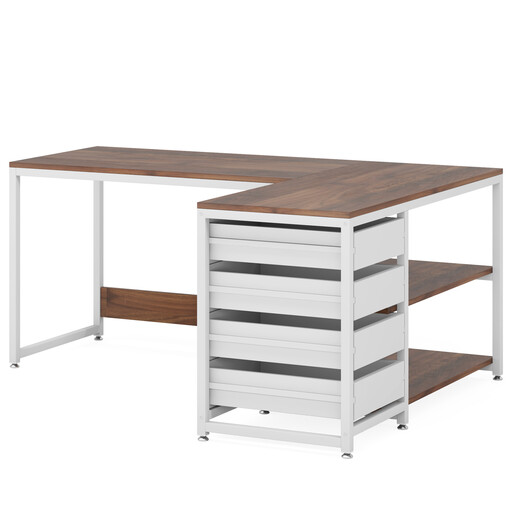
Why it stands out: The LANTINE desk combines a classic aesthetic with a high degree of functionality. Its two-tone walnut and white design blends harmoniously into various interior styles, while the generous storage space keeps things organised.
Advantages:
Who it's for: This desk is an excellent choice for home office users or students looking for a desk with plenty of integrated storage and a timeless design.
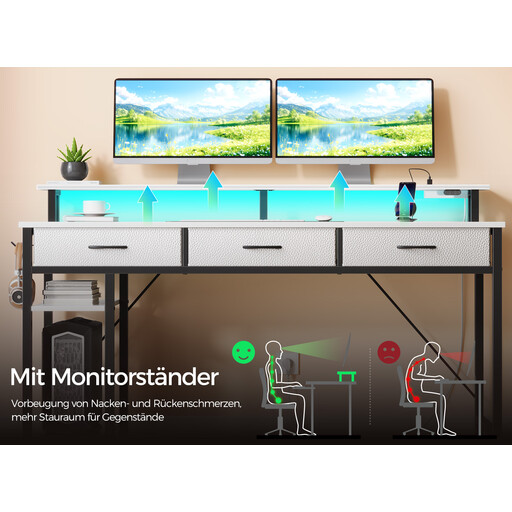
Why it stands out: The Rolanstar desk is tailored to the needs of gamers and tech-savvy users. It integrates modern technology like an RGB LED strip and a charging station directly into the workspace.
Advantages:
Who it's for: Ideal for gamers and streamers looking for a fully-equipped gaming desk that combines functionality, atmosphere, and organisation in one package.
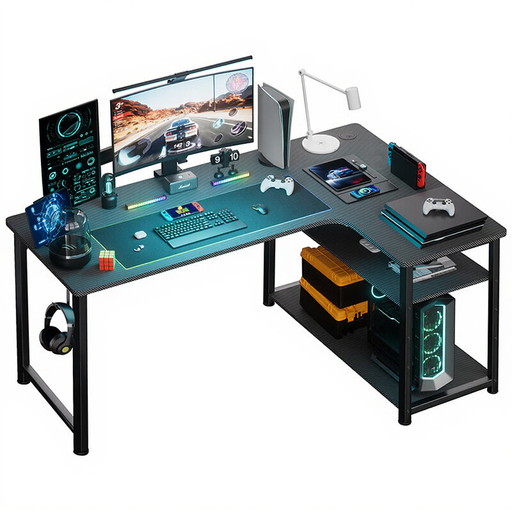
Why it stands out: The COMHOMA desk is a compact and modern solution that packs essential features into a small footprint. Its sleek black design and integrated tech make it a versatile piece of furniture.
Advantages:
Who it's for: This desk is suitable for those who need a functional and space-saving corner desk for a home office or gaming setup and value integrated charging options.
Sometimes, your workflow requires special features, like a pull-out keyboard tray, to further improve ergonomics and keep the main work surface clear. If you prefer such a solution, there are suitable models available.
Discover our selection of computer desks with keyboard trays for more specialised workstation solutions.
1. How do I measure correctly for a corner desk? Measure the length of both walls where the desk will be placed. Be sure to account for doors, windows, and radiators. Compare these measurements with the desk's dimensions (e.g., 150 x 110 cm). Also, plan for enough clearance for your chair and for movement.
2. Is an L-shaped desk ergonomic? An L-shaped desk can support good ergonomics by offering a larger work surface. This allows you to position your primary work area (e.g., monitor and keyboard) directly in front of you, while using the side section for secondary tasks like writing or filing documents. This can reduce frequent twisting of your upper body.
3. What are the benefits of a gaming desk with integrated power outlets? An office desk with power outlets and USB ports significantly reduces cable clutter. Your PC, monitors, speakers, and chargers can be plugged in directly at the desk, eliminating the need for multiple extension cords. The result is a clean, organised, and safer setup.