
Lieferung heute & morgen

Qualitätsgarantie

Willkommens-Angebote freischalten: KOSTENLOSE Lieferung | Bis zu 80 % RABATT | Kostenlose 30-Tage-JoyPlus-Testphase
App herunterladen
A cluttered workspace with tangled cables and insufficient surface area can seriously hinder productivity. A corner desk with an integrated power outlet promises to solve these issues by making optimal use of unused corners and simplifying cable management. However, the market is flooded with models of widely varying quality. Many buyers only discover after assembly that their new desk is wobbly, the power strip is subpar, or the surface scratches easily.
This guide will walk you through the crucial criteria to consider before you buy, helping you to avoid common pitfalls. We'll focus on the objective features that separate a functional workspace from a frustrating one.
Before making a decision, you should be aware of the most common flaws that often only become apparent with daily use.
To avoid these traps, carefully examine the following three aspects. They are crucial for the longevity and functionality of your new workspace.
A desk's stability is directly dependent on its frame. A solid steel frame is the foundation of a durable desk. Look for the following features:
An L-desk with USB ports and power outlets is only as good as its electronic components.
A good home office computer desk or gaming desk must do more than just provide a surface.
L-shaped gaming desk or a black corner desk makes efficient use of corners and logically separates work zones—for example, one area for the PC and another for writing. An L-shaped 120 cm PC desk often offers more usable space than a straight 140 cm desk.desk with shelves below or above the desktop helps maintain order. Adjustable shelves offer flexibility for PC towers, binders, or printers. A monitor stand not only creates a more ergonomic viewing height but also provides additional space underneath.Here are some options tailored to specific user profiles that meet the quality criteria mentioned above.
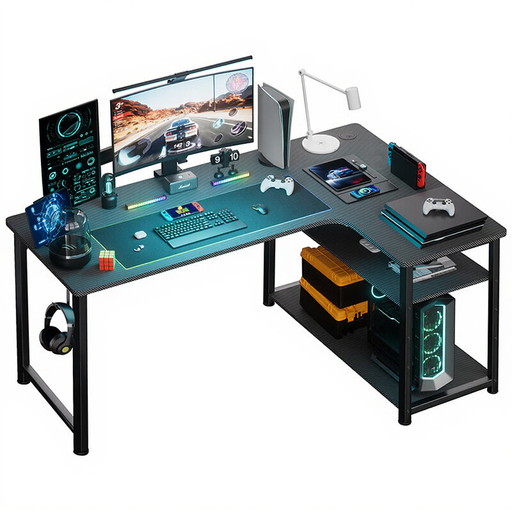
Why It's a Great Fit: The L-shape is ideal for multi-monitor setups and separates the gaming zone from the work area. The integrated power supply with an outlet and USB ports is designed for connecting peripherals and charging controllers or headsets.
The steel frame provides the necessary stability to withstand intense gaming sessions without wobbling. The integrated power supply is a well-thought-out component, not a cheap add-on.
An all-in-one solution that combines space, cable management, and power in a functional design. The shelf offers extra storage for games or accessories.
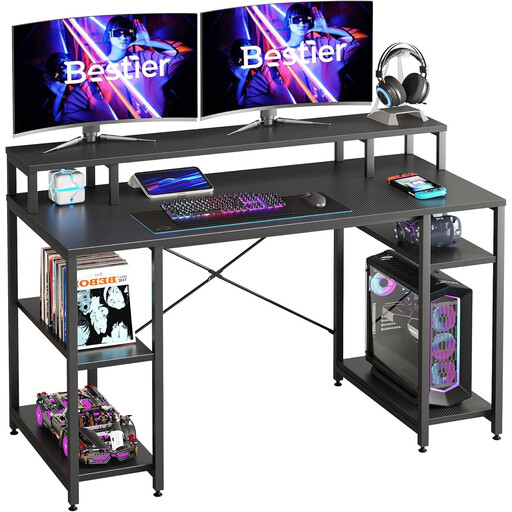
Why It's a Great Fit: The generous 140 cm work surface provides space for a laptop, a second monitor, and documents. The raised monitor stand promotes better posture, while the adjustable shelves underneath create space for a printer, binders, or a PC tower.
The construction of P2 particle board and a metal frame with X-bracing ensures high stability. The carbon fibre texture is more resistant to scratches than simple laminate finishes.
Maximum organisation on a straight surface. The combination of a large desktop, monitor stand, and flexible shelving creates a highly functional workspace.
We have compiled a complete, up-to-date list of products that fully meet these strict selection criteria and local safety regulations.
Yes, as long as they meet the relevant safety standards. Always look for the CE marking on the product or in its description. This confirms that the manufacturer declares conformity with EU safety directives. An additional GS mark (Tested Safety), awarded by an independent testing body, offers an even higher level of confidence in the product's safety and quality.
Assembly can typically be done by one person but may take 1-2 hours depending on the model. Quality manufacturers simplify the process with clearly labelled parts (e.g., with letters or numbers) and an illustrated step-by-step guide. It's a good idea to check the assembly manual online before purchasing, if available.
For a comfortable setup with two 24-inch monitors side-by-side on a straight desk, a width of at least 140 cm is recommended. A corner desk has an advantage here: even with shorter sides (e.g., 120 cm), the monitors can be placed across the corner, which uses the space more efficiently and often allows for a more ergonomic arrangement.