
Lieferung heute & morgen

Qualitätsgarantie

Willkommens-Angebote freischalten: KOSTENLOSE Lieferung | Bis zu 80 % RABATT | Kostenlose 30-Tage-JoyPlus-Testphase
App herunterladen
A corner gaming desk can be the centrepiece of any setup—or a source of constant frustration. Many models promise high functionality on paper but prove to be impractical or unstable in practice. Before you make a decision, it's crucial to understand the common pitfalls and know which features truly matter. This guide will help you separate the quality from the hype and make an informed choice for your gaming room or home office.
Marketing hype can easily lead to a regrettable purchase. Pay close attention to these three areas where manufacturers often overpromise and underdeliver.
To avoid the problems mentioned above, you should focus on objective and verifiable features. These three parameters are critical for the longevity and functionality of your desk.
The foundation of any good desk is its stability. Look for a powder-coated steel frame, as this offers high torsional rigidity and corrosion resistance. The desktop should be made from a dense composite wood board (often called MDF or particle board) and be thick enough to support the weight of multiple monitors and other peripherals without sagging. Adjustable feet are also an important detail for levelling out uneven floors and ensuring wobble-free stability.
A well-designed workspace promotes healthy posture. A desk with a monitor stand positions the screen at eye level, which can help prevent neck and back pain. At the same time, it creates a second tier for speakers or accessories. A computer desk with storage in the form of drawers and shelves is essential for a clutter-free surface. Check if the storage is practical—deep drawers for documents or open shelves for consoles and books are more functional than small, inaccessible compartments.
If you opt for a model with integrated technology, check the specifications carefully. A good corner desk with drawers and outlets should feature a power strip with sufficiently rated connections (e.g., 2 outlets, 2 USB ports). It's important to note that these are typically designed for low-power devices like monitors, laptops, and chargers. High-consumption appliances like space heaters should never be powered through them. For LED lighting, models with app or controller-based controls and a solid mounting system are preferable.
Here are some recommendations tailored to specific needs that meet the criteria mentioned above.
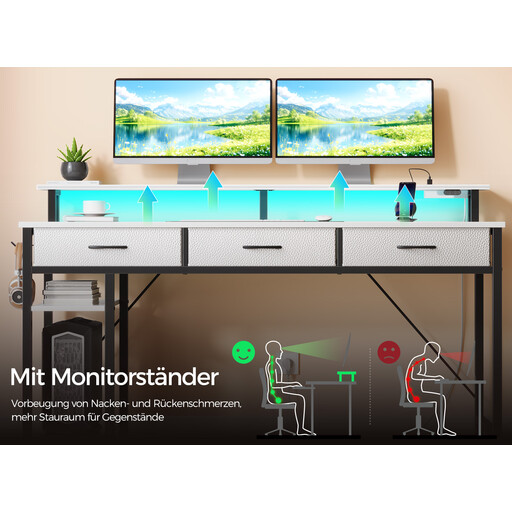
Why This Fits Their Persona: Perfect for users who want a seamless transition between work and play. This L-shaped desk combines professional home office features with gaming amenities without compromising on organisation.
The integrated power supply with 2 outlets and 2 USB ports is designed for peripherals, avoiding the risk of unsafe external strips. The steel frame ensures the necessary stability.
The combination of drawers, shelves, and a monitor stand offers a comprehensive solution for storage and ergonomics. Its reversible design allows for flexible adaptation to any room layout.
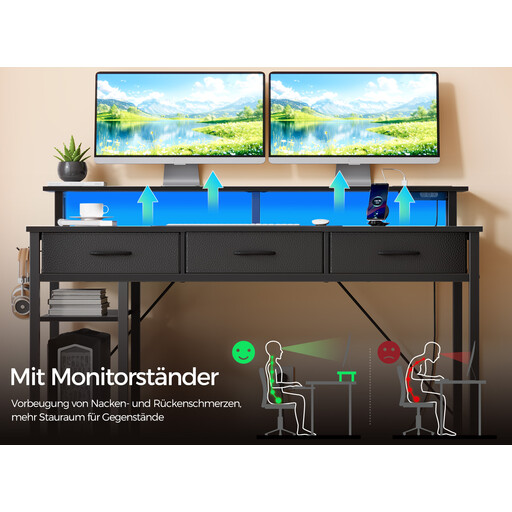
Why This Fits Their Persona: For gamers who need an immersive atmosphere and a large, stable surface for their setup. This desk offers ample space for multi-monitor setups and gaming peripherals.
Instead of a basic LED strip, this model features app-controlled RGB lighting with a music sync mode. The powder-coated steel frame prevents the dreaded wobble during intense gaming sessions.
The large, carbon-fibre-textured desktop is scratch-resistant and provides plenty of space. The monitor stand promotes an ergonomic posture during long gaming sessions.
We have compiled a complete, real-time list of products that fully satisfy these strict selection criteria and UK safety regulations.
1. How stable is a corner gaming desk, really? Stability largely depends on the construction and materials used. Models with a powder-coated steel frame and a thick desktop offer excellent stability. Look for cross-braces and adjustable feet to minimise wobbling on uneven floors. Correct assembly according to the instructions is also crucial.
2. Can I plug any device into the integrated power strip? No, and this is an important safety warning. The power strips integrated into desks are designed for low-power devices like PCs, monitors, speakers, or smartphone chargers. Never connect high-consumption appliances like space heaters, kettles, or microwaves, as this can lead to overheating and a fire hazard.
3. Is assembling an L-shaped desk complicated? Assembly requires some time but is generally manageable. Most manufacturers provide detailed step-by-step instructions, as well as numbered parts and the necessary tools. For reversible models, where the corner can be assembled on the left or right, you should decide which orientation best fits your room before you begin. Plan for about 1 to 2 hours for assembly.