
Lieferung heute & morgen

Qualitätsgarantie

Willkommens-Angebote freischalten: KOSTENLOSE Lieferung | Bis zu 80 % RABATT | Kostenlose 30-Tage-JoyPlus-Testphase
App herunterladen
As a Joybuy Product Recommendation Officer, I analyse the market to provide you with objective, hands-on advice. The goal is to help you make informed decisions that go beyond marketing promises. When selecting a new PC case, especially models with panoramic glass, there are several common pitfalls that can lead to disappointment.
The aesthetic of a panoramic PC case is tempting, but it often conceals inadequate cooling performance. Many buyers invest in a visually appealing case only to find their high-end components suffering from thermal throttling. Another point is the advertised "future-proofing." New standards like reverse-connect motherboards promise an ultra-clean setup, yet not every modern-looking case offers the necessary cutouts and space for this technology. Finally, the pre-installed fans are frequently a compromise, providing basic lighting but quickly reaching their limits in terms of airflow and noise levels.
To avoid these problems, you should check three core parameters before buying. These define the functionality and longevity of your build far more than pure aesthetics.
A crucial trend for clean cable management is support for motherboards with rear-facing connectors, known as ASUS BTF or MSI Project Zero. With this technology, power, SATA, and USB connectors are moved to the back of the motherboard tray.
A PC case with a glass front and side can quickly lead to heat buildup if the design doesn't actively promote airflow. High airflow is critical to keeping CPU and GPU performance stable.
The longevity and ease of building and maintenance depend heavily on material quality.
Here are some recommendations tailored to the different priorities of PC builders, taking the above criteria into account.
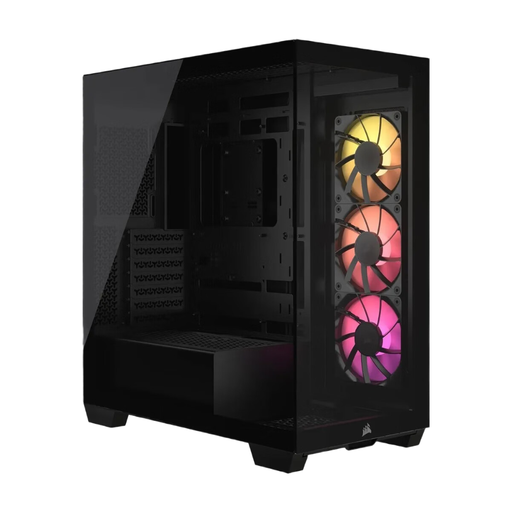
Why It's a Match: This case is designed for users who want a flawless aesthetic without compromise. The explicit support for reverse-connect motherboards allows for an extremely tidy interior, perfectly showcased by the panoramic glass front.
It combines the panoramic look with enormous cooling capacity for up to ten fans, thus avoiding the risk of heat buildup. Compatibility with new motherboard standards is not an empty promise here, but a central design feature.
Full compatibility with ASUS BTF and MSI Project Zero. Tool-free removable glass panels for easy access. Includes three pre-installed CORSAIR RS120 ARGB fans.
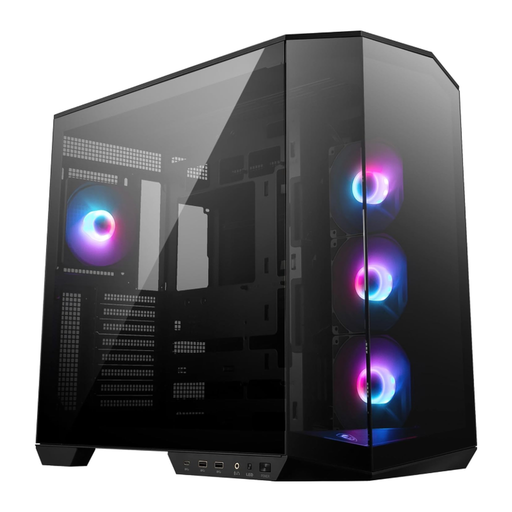
Why It's a Match: For users looking for a well-rounded package. This case also offers back-connect support and a panoramic view but focuses on a comprehensive out-of-the-box feature set that simplifies the build process.
It addresses the pitfall of inadequate included fans by coming equipped with four 120mm ARGB fans from the factory. The dual-chamber design separates the power supply and cables from the heat-generating main components, optimising airflow.
Four pre-installed ARGB fans. A vertical GPU holder is included to prevent graphics card sag. Also supports back-connect motherboards.
We have compiled a complete, up-to-date list of products that meet these strict selection criteria.
Not necessarily. While a fully enclosed glass front blocks direct air intake, modern designs like the black Corsair PC case compensate with alternative ventilation paths. Crucial factors are generous air inlets on the side, bottom, or top, as well as a high capacity for case fans. A case with space for 8-10 fans can maintain excellent airflow even with a glass front.
This technology relocates the motherboard's primary connectors (e.g., 24-pin ATX, 8-pin CPU, USB, SATA) to its rear side. This allows all main cables to be routed behind the motherboard tray. The result is an extremely clean and tidy look in the PC's main chamber, as almost no cables are visible. A compatible case must have special cutouts in the right places to allow access to these rear connectors.
For a typical gaming PC case, a configuration of at least three to four fans is recommended: two fans on the front or side as intake, and one to two fans on the rear or top as exhaust. For high-end systems with a powerful CPU and GPU in the 3500X, it is advisable to install additional fans. Equipping the side intakes with high-performance fans like the ARCTIC P12 Pro A-RGB can significantly improve GPU temperatures.