
Lieferung heute & morgen

Qualitätsgarantie

Willkommens-Angebote freischalten: KOSTENLOSE Lieferung | Bis zu 80 % RABATT | Kostenlose 30-Tage-JoyPlus-Testphase
App herunterladen
By Joybuy Product Recommendation Officer, July 28, 2026
Choosing a PC case has changed dramatically in recent years. What was once a purely functional decision is now a centerpiece of any setup's aesthetic. Panoramic glass PC cases, in particular, promise a stunning showcase for your hardware. However, this trend has pitfalls that often only become apparent after purchase, leading to disappointment.
Many users invest in a visually appealing case only to find their expensive components suffering from thermal throttling. Another, more recent pitfall is incompatibility with forward-thinking technologies like reverse-connection motherboards, which are key to achieving truly clean cable management. This guide will walk you through the crucial criteria to consider and introduce models that excel in both aesthetics and technical performance.
Before making a decision, it's essential to separate marketing promises from actual performance features. Three parameters are critical for a future-proof and functional setup.
A panoramic glass PC case looks impressive, but large glass panels can restrict airflow. The crucial factor isn't just the maximum number of fans, but the entire airflow design.
A pristine interior with no visible cables is the dream of many PC builders. The new generation of motherboards with rear-facing connectors makes this possible.
The longevity of your case and the ease of assembly depend directly on the materials and design.
Here are some recommendations tailored to different needs and priorities that avoid the pitfalls mentioned above.
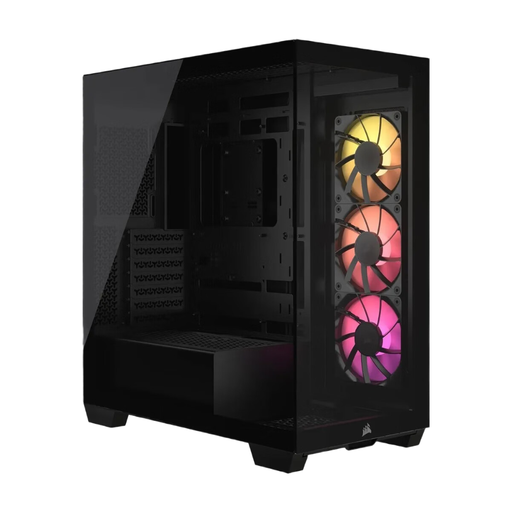
Why This Fits Their Persona: Ideal for users who want to combine a flawless aesthetic with the latest technology. This case is perfect for a clean build that will remain relevant for years to come.
It solves both key problems: Compatibility with reverse-connection motherboards (ASUS BTF, MSI Project Zero) enables exceptionally clean cable management. At the same time, support for up to 10 fans ensures that cooling doesn't suffer despite the panoramic glass.
Advantage: Full support for the new reverse-connection motherboard standard. Pros: Includes 3x RS120 ARGB fans, tool-free removable glass panels.
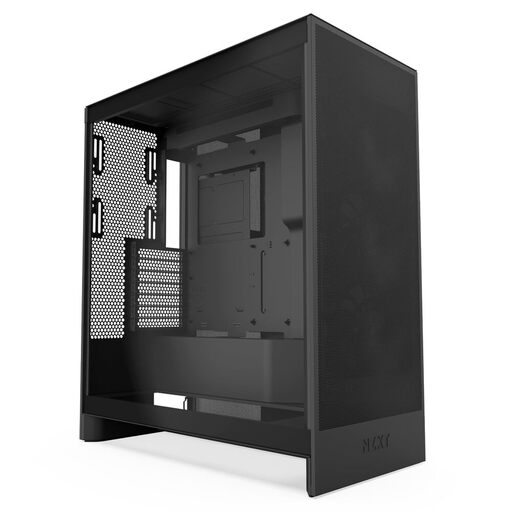
Why This Fits Their Persona: For users whose top priority is maximum cooling performance. This case is designed for high-end components that require constant, powerful airflow.
It bypasses the 'heat buildup' pitfall of sealed glass cases by using perforated front and top panels. The focus is clearly on airflow without making major compromises on aesthetics (tempered glass side panel).
Advantage: Dedicated bottom fan mounts for direct GPU cooling. Pros: High compatibility with large radiators (up to 420mm), three pre-installed fans.
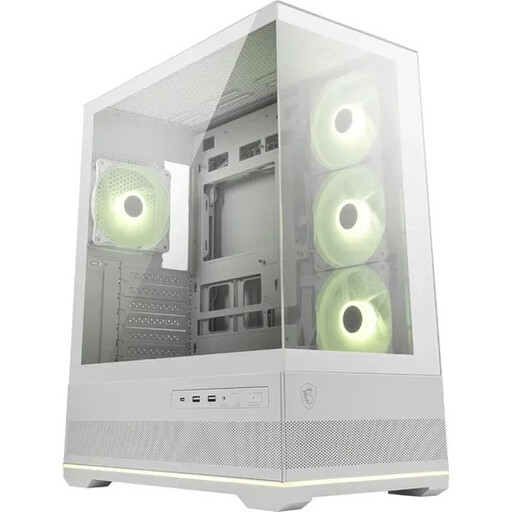
Why This Fits Their Persona: Perfect for anyone looking for an instant 'wow factor'. This case offers a 270° panoramic view and comes with a full set of ARGB fans for a stunning setup right out of the box.
It combines the 270° glass view with a smart cooling design. The three pre-installed reverse-blade side fans draw in fresh air without the fan frame obstructing the view—a clever solution to prevent heat buildup in showcase cases.
Advantage: Seamless 270° panoramic view for maximum component showcasing. Pros: Four ARGB fans (including reverse-blade) and an ARGB hub are already included.
We've compiled a complete, up-to-date list of products that fully meet these strict selection criteria and rigorous safety standards.
No, not necessarily. While completely sealed glass boxes can be problematic, modern designs like the Corsair 3500X feature alternative ventilation paths (e.g., on the side, bottom, top) and offer space for a high number of fans or large radiators. Cooling performance depends on the case's overall airflow design, not just the presence of glass.
This means the case has special cutouts on the back of the motherboard tray. These are necessary to install motherboards like ASUS BTF or MSI Project Zero, where the connectors (power, data, fans) are located on the rear. The result is an extremely clutter-free interior, as almost all cables are hidden behind the motherboard, leading to superior and clean cable management.
According to the manufacturer, the Corsair 3500X ARGB includes three 120mm CORSAIR RS120 ARGB PWM fans. These provide a solid foundation for airflow and customizable lighting that can be controlled via a standard 5V ARGB header on the motherboard.